
Getting Started
Product Updates
Email scheduling is now available in Vaizle AI
Read MoreVaizle AI now supports multiple marketing platf...
Read MoreGoogle Ads is now live inside Vaizle AI
Read MoreVaizle’s new Meta Ads experience is now live
Read MoreIntroducing Live Agent for Real-time Meta Ads A...
Read MoreYou can now choose which AI model powers your V...
Read MoreIntroducing Live Web Search in Vaizle AI
Read MoreVaizle AI Update: Responses are now easier to r...
Read MoreGoogle Ads is now live inside Vaizle AI
A very happy update from the Vaizle team: Vaizle AI now supports Google Ads.
This means you can connect your Google Ads account inside Vaizle, start a new chat, and ask Vaizle AI to analyze your campaign performance in simple language.
Until now, Vaizle AI was focused on Meta Ads. With this update, you can now bring Google Ads into the same AI workspace and get faster answers about your overall paid marketing performance.
You can also add Google Ads competitors to your chat, so Vaizle AI can help you understand what other brands are running and how you can improve your own ad ideas.
Connect Google Ads and Meta Ads in one chat
You can now add both Google Ads and Meta Ads in Vaizle AI.
This helps when you want a full view of your paid marketing performance instead of looking at each platform separately.
For example, you can ask:
- How are my Google Ads and Meta Ads performing together this week?
- Which platform is bringing conversions at a lower cost?
- Where is my paid budget being used better?
- Is Meta Ads driving cheaper traffic while Google Ads is driving better intent?
This is useful when you are managing paid ads across platforms and want one place to understand what is working, what is wasting money, and what needs attention.
Add Google Ads competitors for creative inspiration
You can also add Google Ads competitors inside your chat.
This is useful when you want inspiration for ad copy, messaging, offers, and campaign angles.
You can use competitor context to ask questions like:
- What kind of messaging are my competitors using in Google Ads?
- What offers or angles are competitors focusing on?
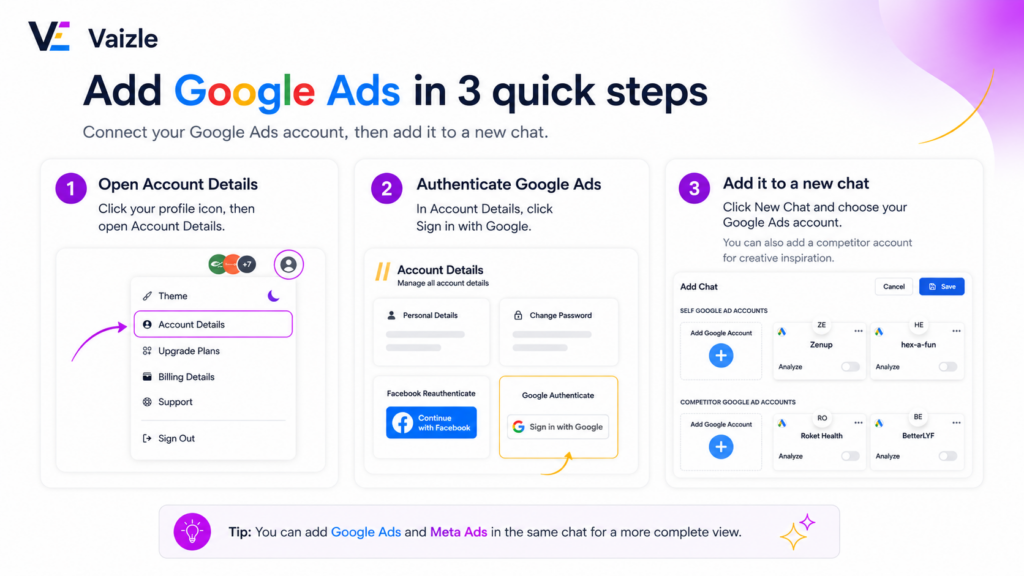
How to connect Google Ads in Vaizle?
To connect your Google Ads account, go to Account Settings inside Vaizle.
From there, authenticate your Google Ads connection.
You will need to sign in with the Google account that has access to the Google Ads account you want to connect.
Once you approve the connection, you can create a new chat and simply add the required Google Ads account.
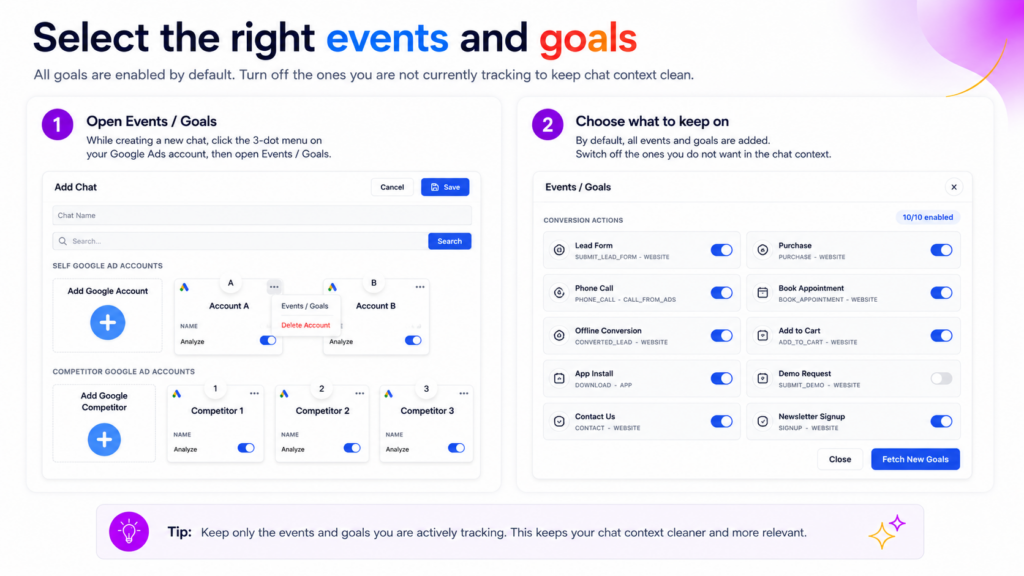
Choose the Google Ads goals you want Vaizle AI to use
While creating a new Google Ads chat, you can choose which events and goals should be included in the chat context.
All goals are enabled by default. If there are old, test, or inactive conversion actions you do not want to track, click the three-dot menu on your Google Ads account, open Events / Goals, and switch them off.
Keep only the events you are actively tracking, such as purchases, lead forms, phone calls, or booked appointments. This keeps the chat context cleaner and helps Vaizle AI give more relevant answers.
So, go ahead & connect your Google Ads account.
For any questions, reach out to us at [email protected]
Still have questions?
Connect with our team
If you have specific questions about our trial plan or Meta Ads Agent, our team is here to help.
Contact Support