Google Ads now lets you measure new customers without changing your bidding
Google Ads now lets advertisers measure new customers without changing bidding. See what changed, how it works, and what to analyze next.
Google Ads is rolling out a new customer acquisition setting that fixes a surprisingly awkward problem.
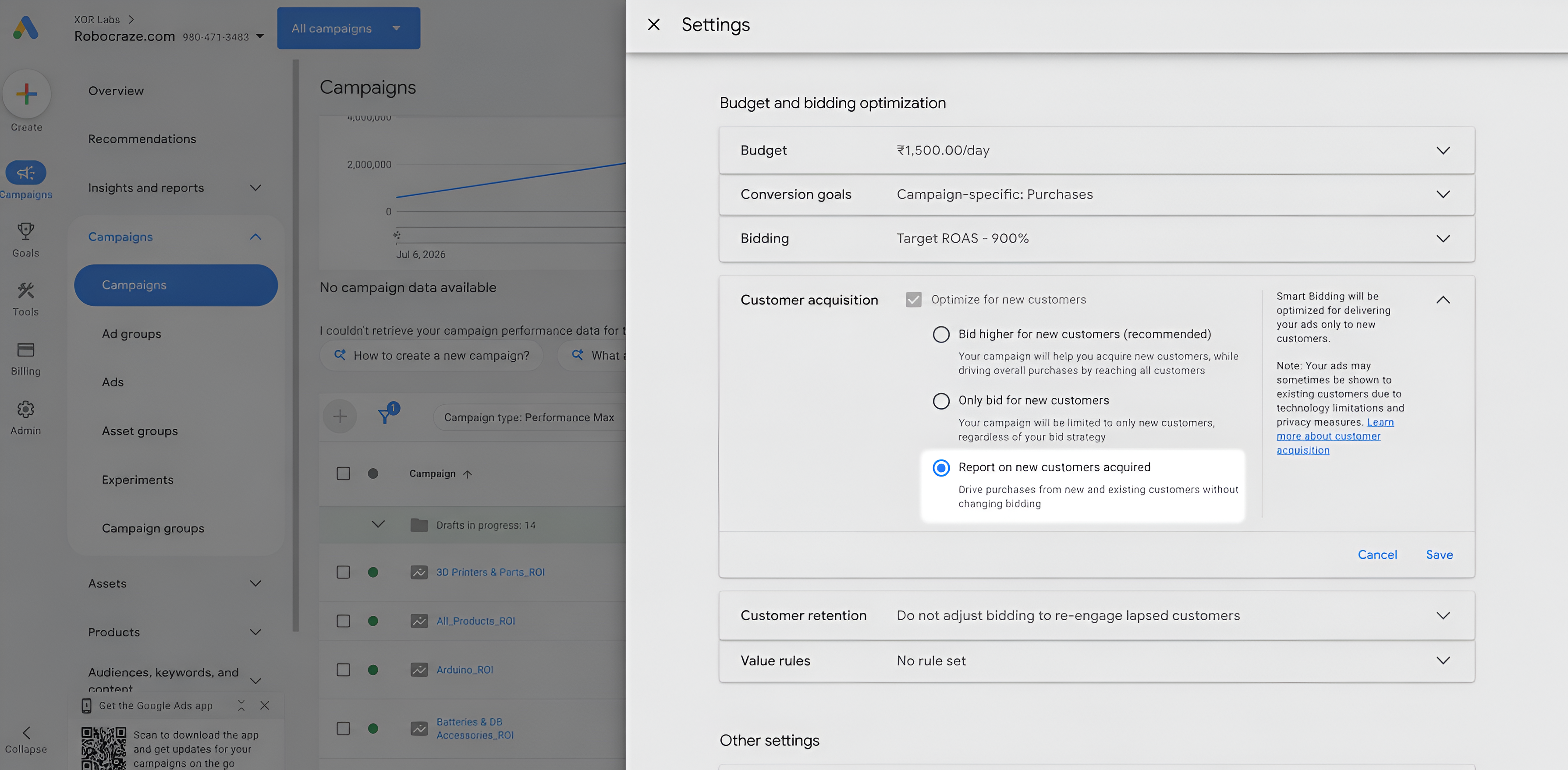
Advertisers can now choose “Report on new customers acquired” without asking Google to bid differently for those customers.
Until now, Google’s new customer reporting was closely tied to its New Customer Acquisition goal. If you wanted to see how many purchases were coming from new customers, you often had to activate a setting designed to make Smart Bidding value those customers differently.
Now you can simply measure them.
Your campaigns can continue bidding normally across new and existing customers while Google reports how much of the performance came from people it considers new to the business.
In simple terms, Google has finally separated new customer measurement from new customer optimization.
And for ecommerce advertisers, that can make campaign reporting much more useful.
What exactly changed?
Google Ads has started showing a third option inside its Customer Acquisition settings:
Report on new customers acquired
The existing options are built around changing how campaigns optimize.
- Bid higher for new customers: Google assigns additional value to acquiring a new customer and uses that signal during bidding.
- Only bid for new customers: Google focuses the campaign on acquiring people it identifies as new.
- Report on new customers acquired: Google measures new customer performance without changing how the campaign bids.
That last option is the new part.
An advertiser can now effectively tell Google:
I want to know which customers are new. I am not asking you to optimize toward them yet.
That sounds like a small change, but it fixes a real measurement problem.
The strange $0.01 workaround advertisers were using
Before this option existed, advertisers who wanted new customer reporting without materially changing bidding had to get creative.
One workaround was to enable “Bid higher for new customers” and assign an extremely small additional new customer value, sometimes just $0.01.
Technically, the campaign was now using the New Customer Acquisition setup. Practically, the advertiser was trying to make the bidding adjustment so small that it would have almost no effect.
The purpose was not really to tell Google: A new customer is worth $0.01 more.
The purpose was: Please give me access to the new customer reporting.
That is obviously not a clean measurement workflow.
The new reporting-only option removes the need for that workaround.
Advertisers can now measure first and decide later whether they actually want Smart Bidding to prioritize customer acquisition.
Google actually promised this setting before..
This update also has some history behind it. In October 2025, advertisers raised concerns about how tightly new customer reporting and New Customer Value settings were connected.
Google Ads Liaison Ginny Marvin acknowledged the problem and said dedicated new customer reporting for purchase campaigns was planned.
Now, roughly ten months later, the reporting-only option has started appearing in Google Ads accounts.
So this isn’t an entirely new measurement system. It is Google making an existing one much easier to use.
But what does Google actually mean by a “new customer”?
This is probably more important than the new checkbox itself.
Seeing 100 new customers in Google Ads does not automatically mean your CRM has confirmed that 100 people placed their first-ever order with your business.
Google can determine customer status using several signals.
1. Google’s automatic detection
Google can use its own observed purchase history to estimate whether someone is a new or returning customer.
Its documentation uses a 540-day lookback period for automatic detection.
That creates an important distinction.
Someone Google has not identified as purchasing from you during that window may be treated as new, even if your business has a longer customer history elsewhere.
So:
“New according to Google Ads” and “first-ever customer in your CRM” are not necessarily the same thing.
For some businesses, they will be close.
For others, particularly brands with long repurchase cycles, offline sales or incomplete tracking, the gap may be meaningful.
2. Your existing customer lists
Advertisers can also give Google first-party customer data through Customer Match and related customer lists.
That helps Google understand who already has a relationship with the business.
The more complete those lists are, the better chance Google has of separating genuinely new customers from known ones.
3. Customer status passed with the purchase
This is usually the strongest setup.
Advertisers can explicitly tell Google whether a purchase came from a new or returning customer through their conversion implementation.
Instead of asking Google to infer customer status, the business passes what it already knows from its own systems.
If your ecommerce backend knows that this is someone’s first order, that information can be sent with the conversion.
For reliable reporting, this matters a lot.
The reporting-only setting makes new customer measurement easier to enable. It does not make weak customer identification magically accurate.
Shopify advertisers may have an easier path
This update is especially relevant for Shopify stores. Google’s Shopify integrations can use order information to determine whether someone is placing their first order and pass customer status into Google’s measurement setup.
That gives Shopify advertisers something valuable: a direct connection between actual purchase history and Google Ads customer classification.
Instead of relying entirely on Google’s inferred purchase history, the reporting can be informed by what the store itself knows about the customer.
For any advertiser using this feature, that should be the goal.
The number becomes much more useful when Google’s definition of a new customer matches your business’s definition of a new customer.
What should advertisers actually do with this new customer data?
Turning on the report is the easy part. The real value comes from using new customer status as another way to evaluate campaign performance.
Here are a few analyses worth running once you have enough data.
1. Check how much of your performance is actually coming from new customers
Start with the simplest question: what share of your Google Ads performance comes from people who have not bought from you before?
Look at new customer share alongside your usual metrics such as conversions, CPA and ROAS.
A campaign could have:
- strong conversion volume
- excellent ROAS
- low CPA
and still generate relatively few new buyers.
Another campaign may look less efficient on standard metrics while introducing considerably more customers to the business.
Neither is automatically better. They may simply be doing different jobs.
The important part is knowing whether a campaign is primarily acquiring customers or monetizing existing demand.
2. Compare your highest-ROAS campaigns with your strongest acquisition campaigns
Rank your campaigns once by ROAS.
Then rank them again using customer acquisition metrics such as:
- new customers acquired
- new customer share
- spend per new customer
- conversion value from new customers
Now compare the two rankings.
If they look similar, your most efficient campaigns are also doing a good job of bringing in new buyers.
If they look completely different, that is worth investigating.
You may find that some of your highest-ROAS campaigns generate a large proportion of their revenue from returning customers, while campaigns with slightly weaker ROAS are responsible for much more customer acquisition.
That does not mean you should immediately move budget from one to the other.
It means ROAS is only telling you one part of the story.
3. See whether branded Search is mostly capturing existing demand
Brand campaigns are an obvious place to use this report.
Someone searching directly for your brand already knows you. That is one reason branded Search can produce excellent conversion rates and ROAS.
But how much of that performance comes from new customers?
Compare branded and non-branded campaigns using metrics such as:
- new customer share
- cost per new customer
- new customer conversion value
- total new customers acquired
You may find that non-brand Search looks weaker on ROAS but introduces significantly more new buyers.
Or you may discover that branded Search is bringing in more first-time customers than expected.
The report lets you check instead of assuming.
The question is no longer just:
Which Search campaign generates the best return?
You can also ask:
Which Search campaign is actually expanding our customer base?
4. Compare Performance Max and Search on actual customer acquisition
The same analysis becomes useful when comparing campaign types.
Performance Max may report a strong overall ROAS, but that number alone does not tell you how much of the revenue is coming from new customers.
Compare PMax with Search or Shopping and ask:
- Which campaign generates the most new customers per $1,000 spent?
- Which has the highest share of new buyers?
- Where is the cost per new customer lower?
- Did an increase in revenue come from more acquisition or more purchases from existing customers?
This can reveal a very different campaign ranking from the one you get by looking only at ROAS.
For example, PMax might produce the highest total revenue while Search brings in new customers more efficiently.
That distinction matters when deciding what each campaign should be responsible for.
5. Track whether your new customer share is growing or shrinking
Do not look at new customer reporting only as a campaign comparison.
Track it over time as well.
Imagine Google Ads revenue keeps increasing:
January: 52% of purchasing customers are new
February: 46%
March: 39%
April: 31%
Revenue growth still looks positive.
But something underneath it has changed.
An increasing proportion of that revenue is now coming from existing customers rather than new ones.
That is not necessarily bad. A growing repeat-customer base can be extremely valuable.
But if acquiring new customers is an important growth objective, the trend deserves attention.
It might point to weaker prospecting, changing campaign mix, greater dependence on branded demand or simply a larger returning-customer base.
The important thing is that you can now see the shift instead of having it disappear inside total conversion value.
6. Establish a baseline before asking Google to bid differently
This may be the most useful way to approach the new setting.
Do not immediately turn on Bid higher for new customers just because Google gives you the option.
Start with reporting.
Give the campaign enough time and conversion volume to establish a useful baseline. Then look at:
- which campaigns acquire the most new customers
- how much a new customer currently costs
- how new customer share differs across campaigns
- how much revenue new customers contribute
- whether those numbers are changing over time
Once you understand the existing acquisition pattern, you have a much better basis for deciding whether Smart Bidding should place additional value on new customers.
That creates a cleaner workflow:
Measure → understand → optimize.
And that is arguably the most useful part of this Google Ads update. Advertisers no longer have to change how Google bids just to understand who their campaigns are bringing in.
There are still important limitations!
The new option makes reporting easier. It does not make the underlying metric perfect.
Customer identification is only as good as the available signal
If Google cannot confidently identify a customer, reporting can contain unknown or incorrectly classified users.
Privacy restrictions, cookie limitations and incomplete first-party data all affect this.
Your CRM remains the stronger source of truth
If your own system knows someone purchased three years ago, but Google does not have that history available, the two systems can disagree.
For businesses with reliable first-party purchase records, those records should remain the benchmark.
This is primarily useful for purchase-based advertisers
Google’s lifecycle reporting is heavily oriented around purchase conversions.
That makes the update immediately useful for ecommerce and retail businesses.
A B2B SaaS company optimizing primarily for demo requests will not get the same value from it.
Historical reporting needs care
Google’s existing documentation says lifecycle reporting becomes available after the relevant setup is enabled and is not retroactive.
However, Google’s public documentation has not fully caught up with the new reporting-only option yet.
Advertisers should therefore avoid assuming that enabling it today will suddenly produce a complete historical new-vs-returning breakdown.
Google’s documentation is still catching up
At the time of writing, there is an unusual gap between what advertisers are seeing inside Google Ads and what Google’s main Help Center pages explain.
The existing documentation still focuses mainly on New Customer Acquisition modes that change optimization.
It does not yet fully explain the reporting-only option now appearing in accounts.
That leaves some rollout questions open, including:
- whether every eligible advertiser has access yet
- the exact campaign-type availability during rollout
- whether reporting begins strictly from the point of activation
- how the reporting-only state is represented through the Google Ads API
So for now, this is best treated as a feature rolling out, rather than something guaranteed to appear in every Google Ads account immediately.
The bigger change is how we can evaluate campaigns
The real value of this update is not another reporting column. It is being able to add new customer status to the metrics you already use to judge campaigns.
Instead of only asking which campaign has the best ROAS, you can now look at which campaigns are actually bringing in new buyers, what they cost to acquire, and where performance is leaning heavily on returning customers.
And if you prefer analyzing this conversationally, you can bring the same Google Ads data into Vaizle AI and ask these questions directly alongside your existing campaign metrics.
Get the latest marketing news and trends
Delivered straight to your inbox.
Thank you for subscribing!
Stay tuned for the latest updates.
Google is testing a new program that could change how publishers are...
Shopify has added Meta as an AI commerce channel in Agentic Storefronts,...
Meta is giving AI a more direct role in deciding which actions...
Meta is expanding Meta AI with a new set of features designed...