







Grow Your Agency
Grow Your Agency
Social Media Calendars
Best Text Generators
Best Posting Times
Best Posting Times
AI in Marketing
AI in Marketing
Explore Vaizle AI
Explore Vaizle AI
Run Facebook Ads
Run Facebook Ads
Content Creator's Life
Grow your Instagram
Grow your Instagram
Marketing with Vaizle

How to Connect Facebook Ads to Claude Using Meta Ads MCP?

Facebook Analytics
Purva August 14, 2026 16 min read

You can connect Facebook Ads to Claude using Meta’s official Ads MCP server. Once connected, Claude can retrieve information from the Meta ad accounts your Facebook profile has permission to access, compare campaign performance, inspect different levels of the account, search public competitor ads, and, if you allow write tools, help create or edit campaigns.

This removes the need to export a fresh CSV whenever you want Claude to investigate a campaign.

The connection itself is simple. The harder part is making sure Claude uses the correct account, date range, conversion event, attribution setting, and campaign breakdown before you rely on its answer.

This guide covers the complete Meta Ads MCP setup, practical prompts you can use after connecting it, and four checks that can prevent misleading analysis. We also asked Claude and Vaizle the same four Meta Ads questions to see how a general AI with account access compares with a marketing analytics agent built specifically for this work.

TL;DR: How to connect Facebook Ads to Claude?

Official Meta Ads MCP URL:
https://mcp.facebook.com/ads

Where to add it in Claude:
Open Customize → Connectors → Add custom connector.

Setup:
Add the official URL, authenticate with the Facebook profile that has access to your ad account, enable the connector inside your Claude conversation, and ask Claude to list the accounts it can access.

First verification prompt:
“List all Meta ad accounts you can currently access. For each account, return the account name, account ID, currency, and timezone. Do not make any account changes.”

What Claude can do:
Claude can retrieve Meta Ads information, analyze campaign performance, search public Meta Ad Library results, and potentially make campaign changes when write tools are enabled.

Important limitation:
Giving Claude access to an account does not automatically give it your target CPA, margins, preferred conversion event, or the analysis process you want it to follow.

What we found in our test:
Claude produced useful tactical findings. Vaizle more consistently defined the measurement frame, investigated additional account layers, connected performance with visible creative evidence, and completed exact decision tasks without another prompt.

Facebook Ads MCP and Meta Ads MCP generally refer to the same connection. Meta Ads is the official product name, while many marketers still search for Facebook Ads when looking for setup instructions.

What does connecting Meta Ads to Claude actually do?

MCP stands for Model Context Protocol. It gives an AI application a standard way to use tools and retrieve information from another service.

In this setup, the flow looks like this:

Your Meta ad account → Meta’s official MCP server → Claude → Your question

Claude does not receive a permanent copy of your entire account. Instead, Meta exposes specific tools that Claude can call when your question requires account information or an available action.

For example, Claude may use reporting tools when you ask which campaigns had the highest purchase CPA last week. It may use public Meta Ad Library search when you ask it to find active ads from a competitor.

The connection solves the account-access problem. It does not automatically decide what your business considers good performance or how a complete marketing investigation should be structured.

How to connect Facebook Ads to Claude using Meta Ads MCP?

You need a Claude account (even the free plan works!), a Facebook profile with access to the required ad account, and Meta’s official MCP server URL.

The setup takes four steps.

Step 1: Open Connectors in Claude

Sign in to Claude and open:

Customize → Connectors

Select Add custom connector.

Depending on the Claude interface you are using, you may also be able to reach this area from the + menu beside the chat input.
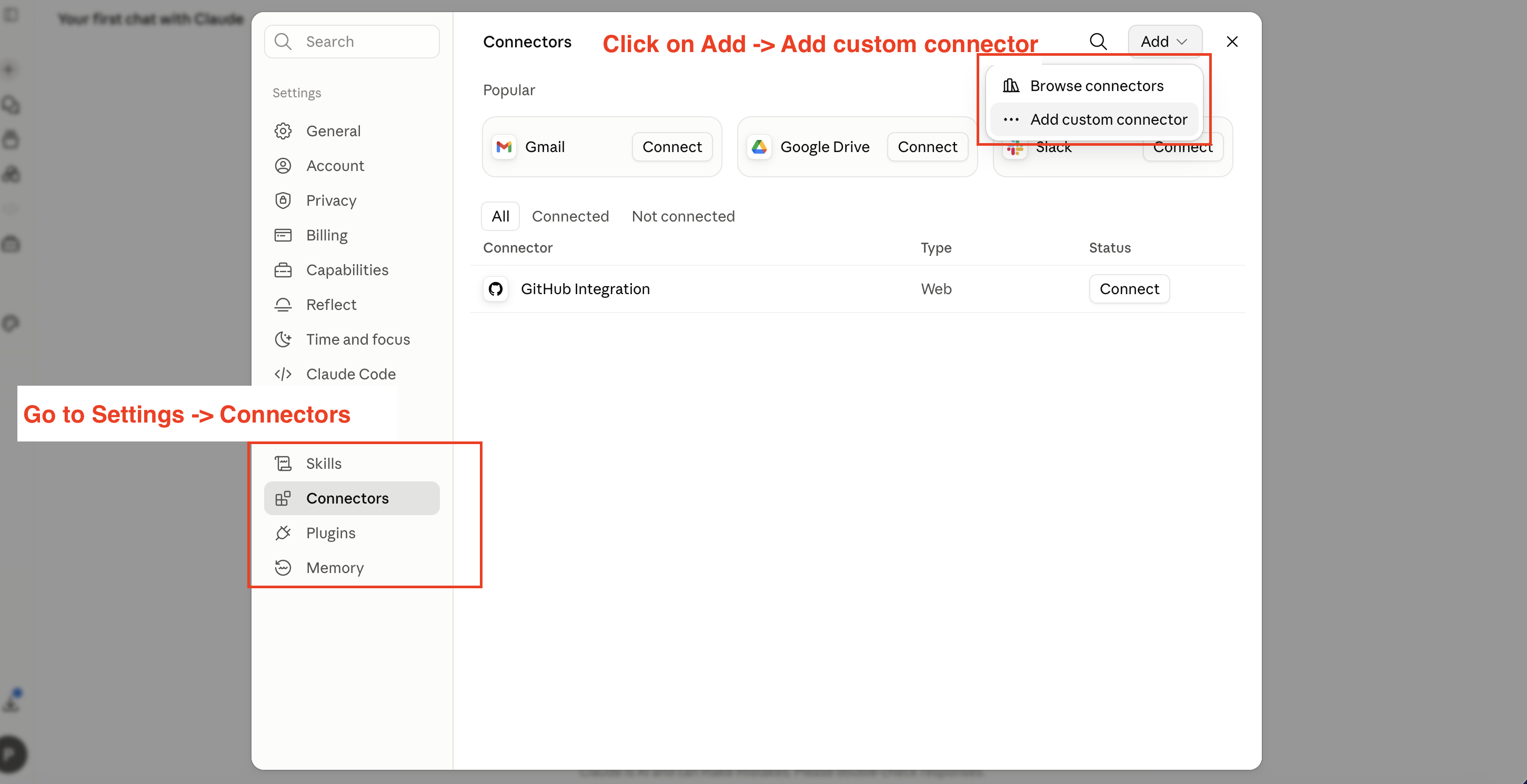
Open Claude custom connectors to connect Facebook Ads data

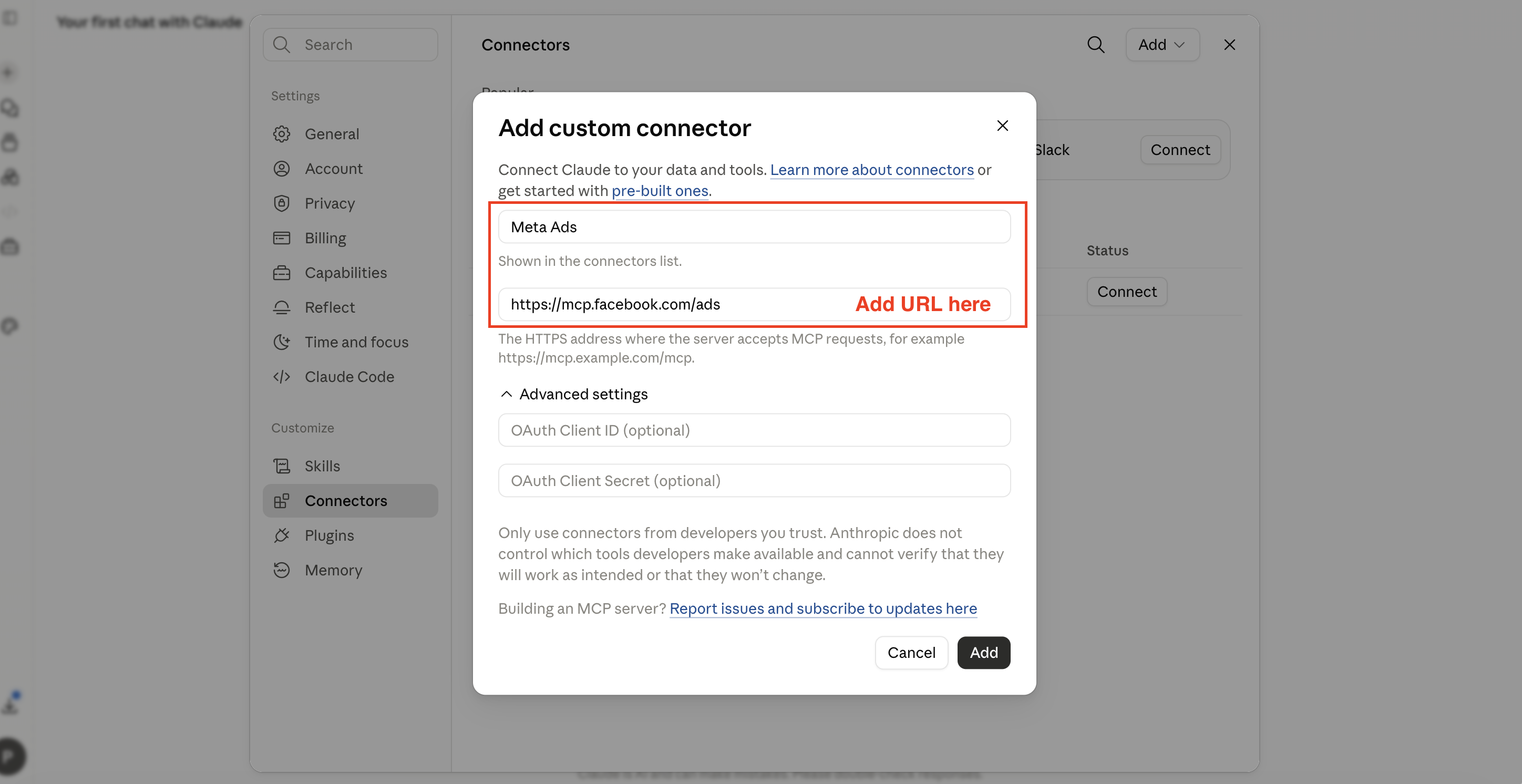
Step 2: Add Meta’s official MCP server

Enter the following details:

Connector name: Meta Ads
Remote MCP server URL: https://mcp.facebook.com/ads

Click Add.

Use Meta’s official URL for this guide. Third-party Meta Ads connectors may provide other reporting or cross-platform features, but they have their own authentication, permissions, and data-handling terms.

Add the official Meta Ads MCP URL to Claude

Step 3: Authenticate your Meta account

After adding the connector, click Connect and complete Meta’s authorization flow.

Sign in using the Facebook profile that already has access to the ad account you want Claude to analyze. Review the selected profile, business portfolio, ad accounts, and requested permissions before approving the connection.

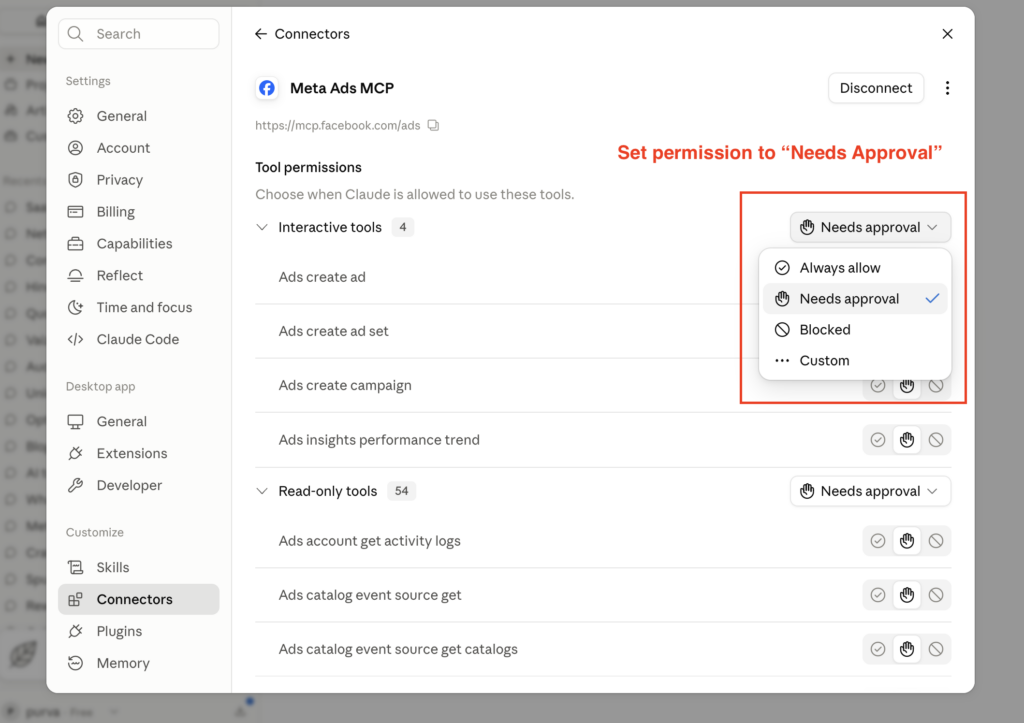
Set tool permissions to “Needs Approval” for beginning. Once you feel more confident, you can change to “Always allow.”

Authenticate a Meta Ads account with the Claude MCP connector

Step 4: Enable Meta Ads inside your Claude conversation

Open a new Claude conversation, select Connectors, and enable Meta Ads for that chat.
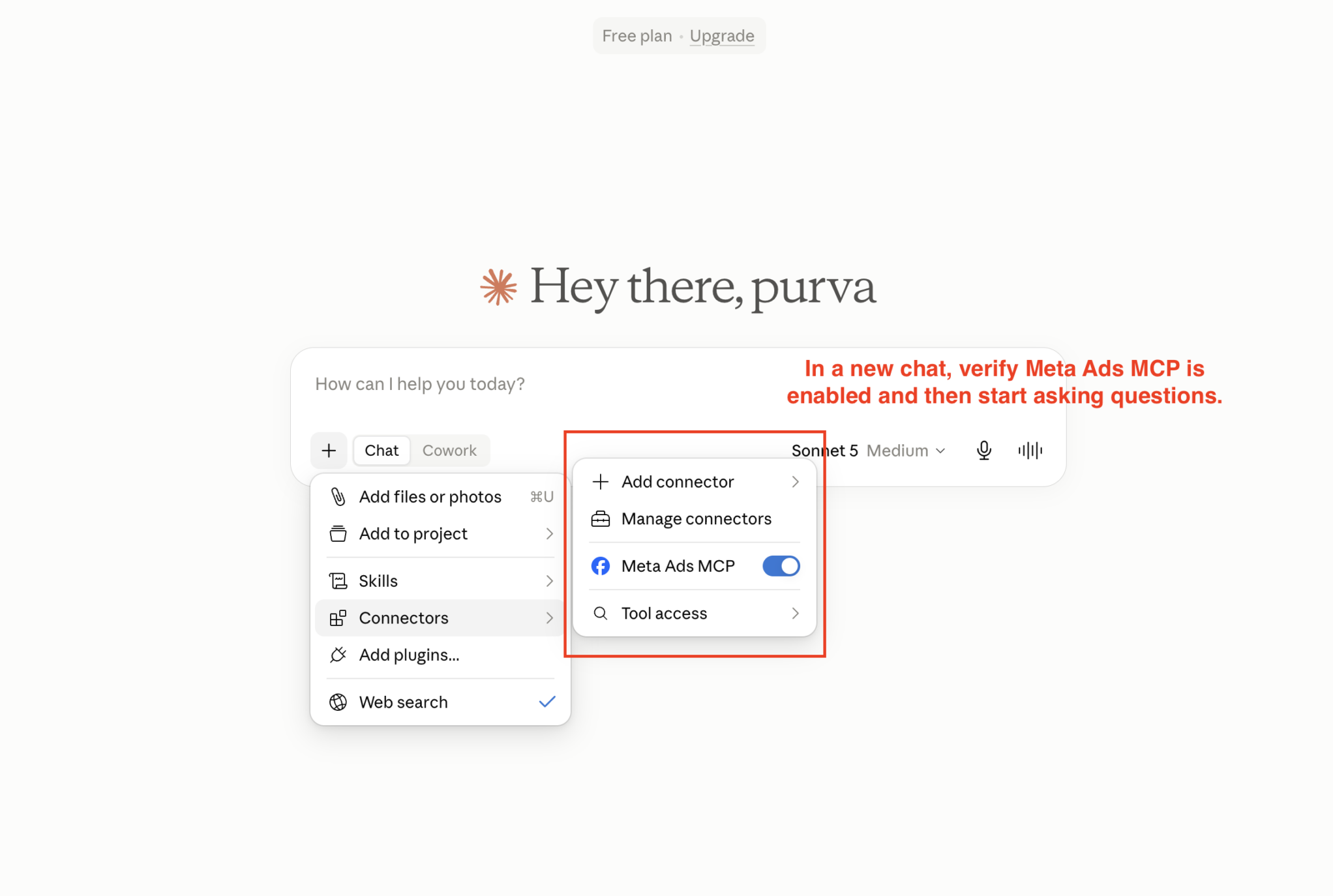
Enable Meta Ads MCP inside a Claude conversation

Now verify that Claude can see the correct account:

List all Meta ad accounts you can currently access. For each account, return the account name, account ID, currency, and account timezone. Do not create, edit, pause, or delete anything.

This verifies that the connector is active and gives you the account ID, currency, and timezone to use in future questions.
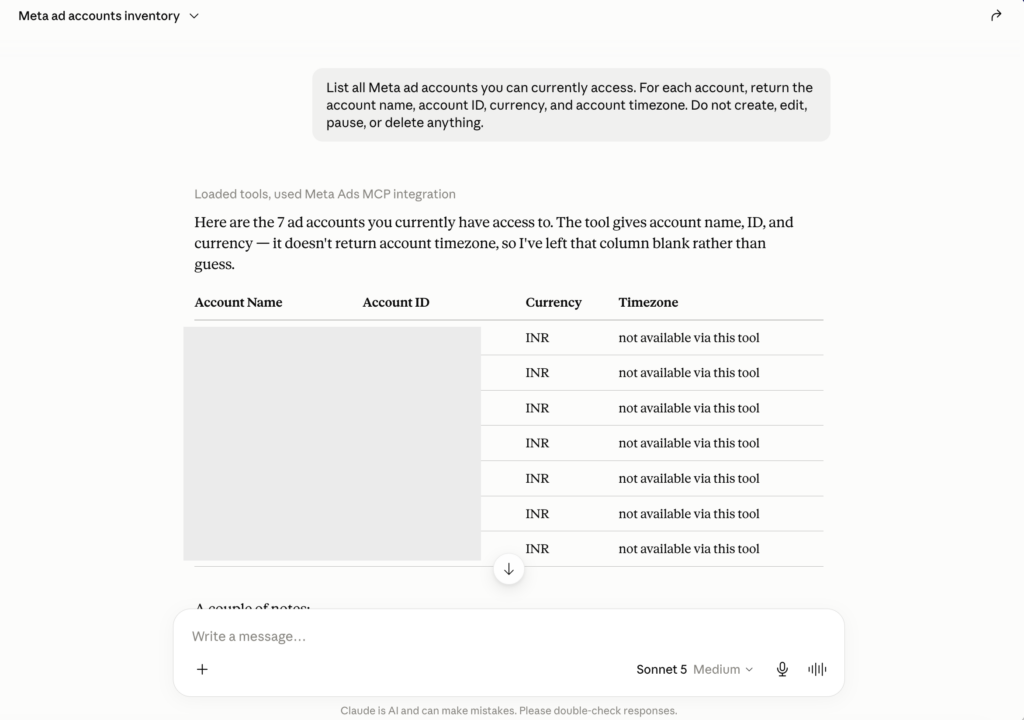
Verify that Claude can access the correct Facebook Ads account

Here, we can see that timezone data is not available!

Meta Ads MCP not working in Claude?

In case something goes wrong and your Meta Ads MCP connection is not established inside the Claude interface, check these four issues before rebuilding the connection.

The custom connector option is missing

Confirm that you are opening Claude’s Customize → Connectors area and that your workspace allows custom connectors. In a managed team account, an administrator may need to enable or add the connector.

Authentication keeps failing

Disconnect the connector, make sure you are signed in with the correct Facebook profile, confirm that the profile can access the ad account in Ads Manager, and then reconnect it.

The required ad account is missing

The most common cause is that the wrong Facebook profile was authenticated or that the profile has Page access without the required ad-account permissions. Ask Claude to list every account it can access and use the account ID rather than relying only on the account name.

Claude’s numbers do not match Ads Manager

Check that both views use the same account, date range, account timezone, attribution setting, conversion event, reporting level, and treatment of the current partial day.

Ask Claude to rerun the report using exact dates and to state every filter before presenting the answer.

What can Claude do once Meta Ads is connected?

Meta Ads MCP can support more than a basic performance summary.

What you want to doWhat Claude can help withWhat you should specify
Review account performanceSpend, results, CPA, ROAS, CTR, CPM, CPC, frequency, and other available metricsAccount, dates, conversion event, and attribution
Compare periodsAccount, campaign, ad set, or ad-level movementExact current and comparison periods
Diagnose a declineCampaigns, ad sets, ads, placements, or platforms linked with the changePrimary metric and required investigation depth
Find wasted spendAreas consuming budget without sufficient conversion valueTarget CPA or ROAS, minimum spend, and minimum volume
Reduce budgetAreas to cut, preserve, or monitorExact reduction required and acceptable conversion risk
Review creativesCopy, metadata, previews, and available visual assetsWhat creative information is accessible
Research competitorsPublic Meta Ad Library resultsCompetitors, market, format, and research objective
Create or edit campaignsCampaign actions when write tools are enabledClear permissions, limits, and approval rules

This access is powerful, but Claude still needs to decide what “performance” means, which period to compare, which metrics to inspect, and how far through the campaign hierarchy it should investigate.

You can leave those decisions to Claude or define more of them in your prompt.

Connecting the account does not give Claude your business context

Meta Ads can tell Claude what happened inside the advertising account. It cannot automatically tell Claude what matters to your business.

Claude will not know your:

  • Target CPA
  • Break-even ROAS
  • Product margins
  • Trusted conversion event
  • Average order value
  • Priority products
  • Stock constraints
  • New-customer targets
  • Minimum conversion volume
  • Appetite for risk

Without this information, Claude may recommend cutting a campaign that has a high CPA but produces more valuable customers. It may recommend scaling a campaign with strong ROAS even though the result is based on only two purchases.

Before asking for a significant decision, provide a short context block:

Business context

Primary objective: [PURCHASES / LEADS / REVENUE]
Primary conversion event: [EVENT]
Target CPA: [AMOUNT]
Break-even ROAS: [NUMBER]
Average order value: [AMOUNT]
Priority products or campaigns: [LIST]
Current constraints: [BUDGET / STOCK / CREATIVE / SALES CAPACITY]
Minimum conversion volume before making a decision: [NUMBER]
Permission boundary: Recommendations only. Do not change the account.

A better structure for Claude Meta Ads prompts

A useful Meta Ads prompt should define seven things:

Account → period → comparison → conversion event → breakdowns → decision → safety

A reusable prompt structure is:

For [ACCOUNT], compare [CURRENT PERIOD] with [PREVIOUS PERIOD] using [PRIMARY CONVERSION EVENT]. Check [METRICS AND BREAKDOWNS]. Help me decide [DECISION]. Do not [RESTRICTED ACTION]. Separate measured findings from hypotheses.

Here are four prompts that cover the most useful Meta Ads workflows.

1. Diagnose a performance change

For Meta ad account [ID], compare the last 30 complete account-local days with the previous 30 complete days. Use [PURCHASE EVENT] as the primary conversion event. Explain the biggest changes in spend, purchases, cost per purchase, purchase ROAS, CPM, CTR, CPC, conversion rate, and frequency. Trace the main drivers through campaign, ad set, ad, platform, and placement levels. Rank the three actions I should take first. Do not make any account changes. Separate measured findings from possible explanations.

Use this when performance has changed but you do not yet know where the change came from.

2. Find weak creatives

Analyze all currently active ads with meaningful delivery over the last 30 complete days. Identify the creatives that combine weak efficiency with meaningful spend. Do not rank ads by CPA alone. Consider spend, purchase volume, CPA, ROAS, CTR, CPC, frequency, and recent trend. For every flagged ad, separate the performance findings from creative hypotheses that still need testing. Do not pause or edit anything.

Use this to avoid overreacting to a high CPA based on very little spend or conversion volume.

3. Reduce spend by an exact amount

I need to reduce current Meta Ads spend by exactly 20% without hurting purchases more than necessary. Calculate the latest complete 7-day daily spend pace, the exact daily reduction required, and the recommended cuts by campaign or ad set. Use purchase CPA, purchase volume, recent trend, current spend, and sample size. Estimate how much purchase volume the plan may expose. Do not make the changes. Add a 5-day monitoring and rollback rule.

Use this when you need an executable plan rather than a list of campaigns that look weak.

4. Research competitor creatives

Search the public Meta Ad Library for active ads from [COMPETITOR 1], [COMPETITOR 2], and [COMPETITOR 3] in [COUNTRY]. Group the ads by format, hook, offer, product angle, first visible frame, product demonstration, and CTA. Identify patterns that appear across several competitors, then list gaps our brand could test without copying them. Do not describe an ad as a top performer unless performance evidence is available.

Use this for creative research, not for estimating a competitor’s ROAS or conversion volume.

Can Claude visually analyze Meta Ads creatives through MCP?

Claude can visually analyze an ad when the actual image, carousel card, video frame, or usable creative preview is available to the model.

However, connecting Meta Ads through MCP does not guarantee that every creative asset will reach Claude in a visually inspectable form. What Claude receives can depend on the available tool, ad format, preview, and client workflow.

In our own-account test, Claude’s answer focused mainly on primary text and ad metadata. It did not provide the same type of visual observations that appeared in Vaizle’s answer.

In the competitor test, Claude found relevant Meta Ad Library results but could not render their opening visuals inside the workflow we tested. It returned links for manual inspection instead.

This is a workflow limitation, not a claim that Claude lacks visual intelligence. When the creative is not available inside the conversation, you can upload the image, carousel cards, or representative video frames manually.

For video, be precise about what was inspected. A preview thumbnail or first visible frame does not prove what happens in the complete video.

Four checks before acting on a Claude Meta Ads answer

1. Confirm the measurement frame

The answer should state the account, current period, comparison period, timezone, currency, conversion event, and attribution basis, or it’s hard to audit later even when it isn’t wrong. See Test 1 below for exactly what this looked like in practice.

2. Look beyond percentage change

A large improvement percentage doesn’t automatically make an ad efficient. Check current CPA or ROAS, spend, conversion volume, and sample size before protecting or scaling anything. See the Badass Bold example in Test 2 below for a real case where a 99% “improvement” was still 111.5% above benchmark.

3. Separate evidence from hypotheses

Meta Ads data can show that CTR fell or CPA increased. It does not always prove why.

Claude identified missing primary text as the likely reason for a creative performance gap and ruled out the audience or bidding as the problem. That was a useful hypothesis, but the answer did not contain enough evidence to fully eliminate placement, delivery, learning, landing-page, or sample-size effects.

Vaizle explicitly described its observations about message confusion, missing benefits, and weak openings as hypotheses to validate through future creative tests.

4. Check whether the answer completes the task

If you ask where to reduce spend by exactly 20%, the recommended cuts should add up to 20%, not stop at “directionally useful.” See Test 3 below.

We asked Claude MCP and Vaizle the same four Meta Ads questions!

By this point, it should be clear that Claude can produce a much stronger analysis when the marketer provides a detailed prompt.

We wanted to test a different question: What happens when a marketer asks a normal business question without manually defining the full analysis process?

For the first three tests, we used the same Meta Ads account and asked both tools the same natural-language question. We did not list the metrics, date comparisons, or account levels they should inspect.

For the competitor test, both tools received the same initial request. Claude asked for a category and country, so we provided bamboo socks and India.

We compared the first complete answer from each system. Both tools suggested possible next steps, but we did not use those follow-up questions to improve the initial answers.

QuestionClaude + Meta Ads MCPVaizle
Why did performance change?Found a useful tactical issue, but did not clearly define its baselineDefined the period and purchase metric, then investigated campaign, ad set, platform, placement, and creative signals
Which creatives are hurting?Focused mainly on missing primary text and sibling-ad comparisonCombined spend, efficiency, trend, and visible creative observations
Where should we cut 20%?Identified areas to cut, but required another query to size the reductionCalculated an exact plan and estimated conversion exposure
Which competitor ads use product demonstrations?Found relevant active ads and returned Ad Library linksInspected visible previews and turned the findings into a brand-specific creative plan

Test 1: Why did performance change?

We asked:

Why did our Meta Ads performance change over the last 30 days? Find the biggest drivers behind the change, show me where they are coming from, and tell me what I should fix first.

How Vaizle answered?

Vaizle first defined the measurement frame.

It compared 13 July to 11 August 2026 with the previous complete 30-day period. It found that spend increased by 24.48%, purchases increased by only 9.98%, and cost per purchase increased by 13.18%.

At the same time, CPM fell by 15.86% while CTR declined. The conclusion was not simply that Meta traffic had become more expensive. The account was buying cheaper reach, but the additional exposure produced proportionally fewer clicks and purchases.

The analysis then moved through the account hierarchy. It identified the campaign responsible for most of the increased spend, separated ad sets that had become less efficient from one that had scaled with relatively stable CPA, and checked platform and placement movement before ranking the actions to take first.

How Claude answered?

Claude produced a shorter diagnosis. It identified the Stand-up comedy and Socks ad sets as major problems and found a specific Fashion Fusion Socks creative that appeared to be dragging down an otherwise healthier ad set.

That was a practical tactical finding.

However, Claude did not clearly state the exact comparison period or the result event behind its cost-per-result changes.

The impact of that missing baseline became visible when the two systems gave different recommendations for a certain ad set.

Vaizle found strong 30-day volume with relatively stable CPA. Claude described a severe deterioration. A later Vaizle analysis showed that the ad set had strong 30-day volume but a weaker recent 7-day CPA, which suggests that the systems may have been emphasizing different windows.

What this tells us?

Claude surfaced a useful issue quickly. Vaizle made the complete diagnosis easier to audit because it showed what performance meant, which periods were being compared, and how the problem moved through the account.

Test 2: Which creatives are hurting performance?

We asked:

Which ads are hurting performance right now? Identify the weakest creatives, analyze the creatives currently running, explain what seems to be going wrong, and tell me what I should change.

How Vaizle answered?

Vaizle analyzed 10 active ads and calculated a combined active-ad CPA before ranking the creative problems.

It did not select ads using CPA alone. It prioritized the combination of weak efficiency, meaningful spend, recent trend, and conversion volume.

The analysis then used visible creative information to identify issues such as competing offers, unclear pack quantity, weak product demonstration, missing CTAs, mixed typography, and opening frames that did not make the product use obvious.

It also separated what the performance evidence established from what still needed to be tested creatively.

How Claude answered?

Claude focused on two ads that appeared to have no primary text.

Its strongest observation was that the Fashion Fusion Socks ad was running without a proper body copy, while a sibling ad in the same ad set had a complete offer, product benefits, urgency, and CTA.

This produced a simple and useful recommendation: add stronger primary text and let the ad collect enough new data before judging it again.

What this tells us?

Claude found a focused copy problem. Vaizle investigated more active creatives, combined performance with visible creative evidence, and was more careful about separating measured findings from creative hypotheses.

The fair conclusion is not that Claude cannot analyze visuals. In the Meta MCP workflow we tested, its answer relied mainly on copy and metadata, while Vaizle also inspected visible creative previews or first frames.

Test 3: Where should we cut spend by exactly 20%?

We asked:

If I had to reduce Meta Ads spend by 20% today without hurting conversions too much, where would you cut the budget and why?

How Vaizle answered?

Vaizle calculated the current active delivery pace at ₹14,300.93 per day.

It then calculated that a 20% reduction required cutting ₹2,860.19 per day, or approximately ₹20,021.30 per week.
The plan distributed the reduction across four ad sets using recent CPA, 30-day CPA, current spend, purchase volume, recent trend, and sample size.

It estimated that the plan exposed approximately 15.43% of recent purchase volume against a 20% spend reduction and added a monitoring and rollback rule.

How Claude answered?

Claude identified several logical places to reduce spend, including Stand-up comedy, the weak Fashion Fusion Socks creative, and a retargeting catalog ad. It also listed areas that it believed should be protected.

The direction was useful, but Claude did not calculate the current spend, exact reduction, amount to remove from each area, or whether the proposed cuts reached the requested 20%.

It offered to pull the spend shares in a follow-up query so that the reduction could be sized correctly.

What this tells us?

Claude told us where it would cut.

Vaizle returned a plan that added up to the requested 20%.

Test 4: Find competitor ads using product demonstrations

We asked:

Find active competitor ads using product demonstrations in their opening frame.

How Vaizle answered?

Vaizle checked publicly discoverable active India-targeted ads in adjacent categories.

It identified several Supersox examples where the product was visible in use, including socks shown on feet or legs alongside an offer. It also distinguished those examples from an open-box creative that was a product reveal rather than a true use demonstration.

The answer was careful about its limitations. It stated that the visible preview could confirm the first available image, but not necessarily the exact first motion of a video.

It then translated the observations into specific recommendations for Hexafun:

  • Show a shoe entering the Shoe Bag before lifestyle context
  • Show socks being worn before moving to pattern and offer
  • Show a bandana or hankie being folded, tied, or worn
  • Give the first frame one job: product action, one benefit, and one CTA

How Claude answered?

Claude first asked for the category and country. After receiving bamboo socks and India, it found 185 active ads.

It attempted to inspect the most promising creatives, but the preview tool in the tested workflow could not render ads belonging to other advertisers.

Claude then returned useful advertiser names and direct Meta Ad Library links for manual inspection.

That made the answer helpful for discovery, but the user still had to open each ad and inspect the creative before answering the original opening-frame question.

Claude also described the presence of many similar variants from one advertiser as a strong signal of a best-performing creative. That may be worth investigating, but public Ad Library activity does not prove CPA, ROAS, or conversion performance.

What this tells us?

Both workflows could search Meta Ad Library.

Claude helped us find the ads. Vaizle could use visible competitor previews inside the analysis and continue into a brand-specific creative plan.

Move from competitor ads to your next creative plan

Vaizle lets you add competitor Meta Ad Library sources as reusable context and view available ad previews inside the conversation.

You can combine those competitor creatives with the ads already running in your own account and ask:

Compare our weakest creatives with the active ads of these competitors. Identify differences in hooks, offers, product demonstrations, first-frame messaging, and CTAs. Then build a four-week creative testing plan based on the gaps.

Instead of stopping at a list of competitor links, the analysis can continue into the next creative brief.

Why the harness around the model matters?

The most important conclusion from these tests is not that one foundation model is intelligent and another is not.

Claude is clearly capable of useful Meta Ads analysis.

The difference was the system surrounding the model.

Once a foundation model is capable enough, another small increase in general intelligence may matter less than whether the product supplies the right tools, context, data, measurement rules, and definition of a complete answer.

This surrounding system is often described as the model’s harness.

Claude with Meta Ads MCP

Claude is a general-purpose AI with access to Meta’s reporting, Ad Library, and campaign-management tools.

The user can decide:

  • Which business context to provide
  • Which metrics to request
  • Which account levels to investigate
  • Which tools Claude can use
  • How to structure the output
  • Which follow-up questions to run
  • Whether Claude may make account changes

This is flexible and powerful, especially for experienced marketers who want to build their own workflow.

Vaizle

Vaizle is an AI marketing analytics agent. The model is only one component of the product.

The surrounding marketing-analysis layer can bring together:

  • Connected marketing accounts
  • Selected conversion events
  • Account hierarchy
  • Business guidance
  • Website and landing-page context
  • Creative previews
  • Competitor sources
  • Comparison logic
  • Reporting structure
  • Suggested next analyses

You can connect one Meta Ads account or combine Meta Ads with Google Ads, LinkedIn Ads, GA4, Search Console, Shopify, social pages, websites, and competitor sources in the same chat.

That allows questions such as:

Meta Ads spend increased by 20%, but Shopify revenue barely moved. Where did the performance break down?

or:

Compare our paid campaign performance with GA4 landing-page behavior and tell me whether the problem is traffic quality or website conversion.

or:

Compare our weakest creatives with five active competitors and build the next month’s creative testing plan.

This is why Vaizle’s answers appeared more structured in our test. The marketer did not have to manually define every step of the analysis before asking the business question.

Claude Meta Ads MCP vs Vaizle

CapabilityClaude + official Meta Ads MCPVaizle
Ask questions about live Meta Ads dataYesYes
Use a general marketing workspaceYesYes
Create or edit campaignsPossible when write tools are enabledNo
Account accessCan include read and write toolsRead-only
Define your own analysis workflowFlexibleSupported, with more structure built in
Marketing-specific investigation by defaultDepends on the prompt and tool callsCore product feature
Add business guidanceAdd it through prompts, projects, or instructionsAdd it as chat context
Analyze visible creative elementsDepends on the asset or preview availableSupported through available creative previews
Search competitor adsYesYes
Use competitor previews inside the analysisNot available in the workflow we testedSupported
Combine Meta Ads with Shopify and analyticsRequires the relevant connectors and setupSupported in the same chat
Complete exact budget calculationsPossible with sufficient instructions and tool callsCompleted in the initial answer in our test
Best fitA flexible AI workspace with possible account actionsStructured, read-only marketing analysis and planning

Run the same test on your own Meta Ads account

You do not have to rely on our experiment.

Connect your Meta Ads account to Vaizle and ask the same question you currently ask Claude:

Why did performance change over the last 30 complete days? Find the biggest drivers, show me where they are coming from, and tell me what I should fix first.

Vaizle will connect to the account using read-only access. It can analyze performance, review available creatives, compare competitor ads, and recommend actions, but it cannot change your live campaigns.

You can then add Shopify, GA4, Google Ads, Search Console, your website, or competitor sources to the same chat and continue the investigation without rebuilding everything from scratch.

What happens after you sign up

  1. Connect your Meta Ads account with read-only access.
  2. Add any other marketing or business sources relevant to the question.
  3. Ask the same natural-language question you would ask Claude.
  4. Review the metrics, breakdowns, creative evidence, and proposed next action.
  5. Compare which workflow gives you a decision you can defend.

Frequently Asked Questions

1. Can Claude connect directly to Facebook Ads?

Yes. You can add Meta’s official Ads MCP server as a custom connector in Claude and authenticate it using the Facebook profile that has access to your ad account.

2. What is the official Meta Ads MCP URL?

The official remote server URL is: https://mcp.facebook.com/ads

3. Can Claude visually analyze Meta Ads creatives?

Claude can visually analyze an ad when the actual image, carousel card, representative video frame, or usable creative preview is available to the model.

The Meta MCP connection does not guarantee that every creative asset will appear inside Claude in a visually inspectable form. When it does not, upload the creative separately.

4. Can Claude change Meta Ads campaigns?

It may be able to create or edit campaigns when the relevant tools and permissions are enabled.

When you only want analysis, block write tools or require approval and clearly state that Claude should not make account changes.

5. Can Vaizle analyze Meta Ads and Shopify together?

Yes. You can connect Meta Ads and Shopify to the same chat, along with supported advertising, analytics, social, website, and competitor sources.

This allows Vaizle to investigate questions that cannot be answered from the ad account alone, such as why ad spend increased while store revenue remained flat.

About the Author

Purva

Purva

Purva is part of the content team at Vaizle, where she focuses on delivering insightful and engaging content. When not chronically online, you will find her taking long walks, adding another book to her TBR list, or watching rom-coms.

Enjoy this Article? Share it please.

Turn your marketing data into clear answers

Connect your marketing channels, ask questions, compare performance, and get reports without jumping between dashboards.

Wondering if Vaizle AI is the right choice for you?