Canva Magic Layers Now Works in ChatGPT and Gemini
Canva’s Magic Layers now turns ChatGPT and Gemini AI images into editable Canva designs, making AI visuals easier to fix and reuse.
Canva is bringing Magic Layers into ChatGPT and Gemini, letting users turn AI-generated images into editable Canva designs instead of keeping them as flat image files.
The update is not just about creating better AI images. It is about fixing what usually happens after an AI image is generated: the image looks close, but changing one headline, object, layout, or size still takes too much work.
According to Canva’s announcement, Magic Layers is now available inside ChatGPT and Gemini. The feature can take an AI-generated image and convert it into a layered Canva design that users can open, edit, and adapt.
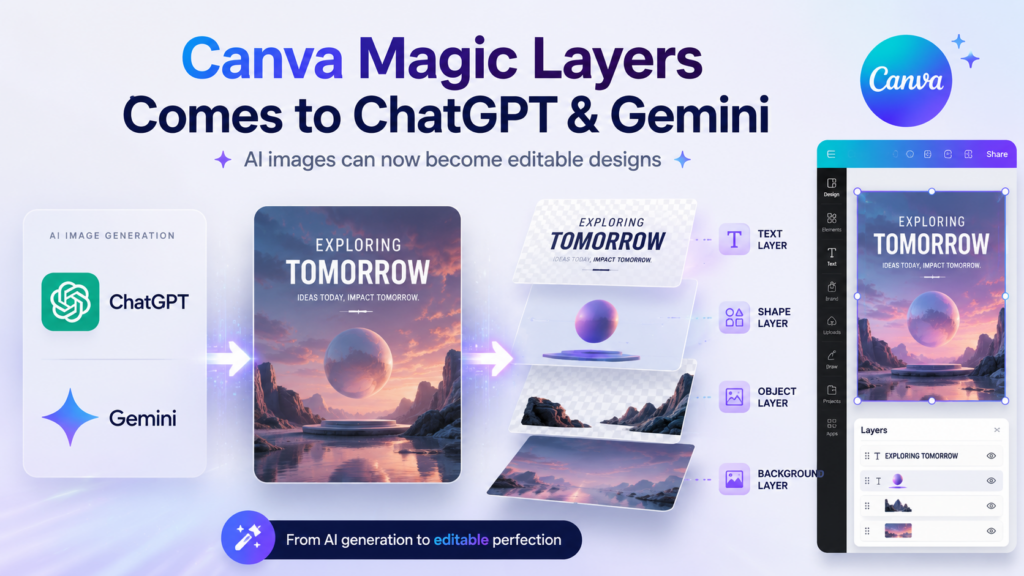
AI images often stop being useful when one thing needs fixing
AI image tools can create a poster, campaign visual, product mockup, or social media graphic in seconds. But the output is usually a flat file, which means users cannot easily change separate parts of the design.
That becomes a problem when the image is “mostly right” but still not deployment-worthy.
A marketer may like the layout but need to rewrite the headline. A creator may like the concept but want to move one object. A small business may want to resize the same design for Instagram, LinkedIn, ads, and a presentation slide.
Earlier, users often had to regenerate the image and hope the next version fixed the issue without ruining the rest of the design. Canva’s Magic Layers is meant to reduce that loop by turning the existing image into something editable.
Magic Layers itself is not brand new
Canva first introduced Magic Layers in March as a beta feature for converting flat images and static AI outputs into editable, multi-layered designs inside Canva. In its original Magic Layers launch post, Canva said the tool could transform flat images into editable designs so users could refine and adapt AI-generated visuals.
The new part is where the workflow now lives.
Instead of starting only inside Canva, users can begin with an AI-generated image in ChatGPT or Gemini, then use Canva to convert that image into an editable design. That makes Magic Layers more useful because it appears closer to where people are already creating AI visuals.
ChatGPT and Gemini create the first version. Canva wants to handle the edit.
The bigger shift is the role Canva is trying to play inside AI workflows.
ChatGPT and Gemini are becoming places where users brainstorm, write prompts, generate visuals, and test creative directions. Canva is positioning itself as the next step, where those AI-generated images become editable, branded, resized, and ready to publish.
That makes the update more interesting than a simple feature expansion.
Canva does not need to replace ChatGPT or Gemini. It needs to become the tool users call when a good AI-generated image still needs practical design work.
How to turn AI images into editable Canva designs?
The workflow is simple enough for non-designers to understand.
A user first creates or opens an AI-generated image in ChatGPT or Gemini. Then, using Canva’s app or connected-app workflow, they can ask Canva to turn the image into an editable design with Magic Layers.
Once the design opens in Canva, users can work with separate elements instead of treating the image as one locked file. That can include editing text, moving objects, changing layout elements, resizing the creative, adding brand assets, or preparing versions for different channels.
The important detail is that ChatGPT and Gemini are not becoming full design editors with native Canva-style layers. Canva is the tool converting the image and providing the editing environment.
OpenAI’s Canva app page for ChatGPT says users can create, preview, and edit Canva designs inside ChatGPT conversations. Canva’s Gemini integration announcement also says users can connect Canva in Gemini to create, edit, resize, translate, and repurpose designs through prompts.
The most useful case is an image that is 80% right
Magic Layers becomes most useful when an AI image is too good to discard but not good enough to publish.
That is a common problem with AI-generated creative. The first result may have the right mood, layout, and visual direction, but the text may be wrong, a detail may be misplaced, or the image may need a brand-safe version.
Instead of asking the AI model to generate the entire image again, users can take the version they already like and edit it inside Canva. For marketing teams, this could make AI visuals more practical for campaign drafts, ad mockups, launch graphics, event posters, social media posts, and presentation visuals.
This does not remove the need to review the final design
Magic Layers can make AI-generated images easier to edit, but users should not treat the output as automatically perfect.
Layer separation can misread text, objects, spacing, or layout. Complex images may not convert as cleanly as simple graphics. Photo-realistic scenes, small text, unusual typography, or crowded visuals may still need manual cleanup.
There is also a trust reason to review the result. In April, The Verge reported that Canva apologized after Magic Layers changed the word “Palestine” to “Ukraine” in some designs. Canva said it had fixed the issue and was adding additional checks.
That incident matters because Magic Layers is supposed to preserve a design while separating it into editable parts. Any unwanted change to text or meaning can become a serious problem for brand, legal, political, news, or public-facing content.
Designers may still matter, but the starting point changes
For non-designers, Magic Layers can make AI-generated visuals easier to turn into usable content. A creator or marketer may be able to take an AI-generated concept and adapt it without rebuilding the entire design from scratch.
For designers, the feature may be useful as a faster way to turn rough AI concepts into editable starting points. It can save time on early drafts, but it does not replace design judgment, brand review, typography cleanup, or final approval.
The realistic value is not that AI can now finish every design. It is that users may spend less time fighting flat AI images and more time improving the parts that actually need work.
Canva is following users into AI assistants
The strategic move is clear: Canva wants to stay inside the creative flow even when users start somewhere else.
If people begin campaign ideas inside ChatGPT or Gemini, Canva cannot wait for them to manually return to the Canva editor. By putting Magic Layers inside those assistants, Canva is making itself available at the moment users need to turn an AI image into a usable design.
That could become an important layer in AI creative work.
The first wave of AI image tools focused on generation. The next wave is likely to focus on control: editing, resizing, branding, collaborating, and publishing.
Canva’s Magic Layers update sits in that second wave.
What users should know before trying it?
Users can edit ChatGPT-generated images in Canva through Canva’s ChatGPT app workflow. They can also use Canva with Gemini through Canva’s connected app.
Magic Layers is not limited only to AI-generated images. Canva describes it as a tool for converting flat images and static AI outputs into editable designs.
The feature can help separate design elements, including text and objects, but users should still check the converted file before publishing.
Canva describes Magic Layers as a premium AI tool, so access may depend on the user’s Canva plan and AI usage limits.
The bigger takeaway
AI tools have made it easier to create images, but creation is not where most real design work ends.
Marketers and creators still need to edit the copy, move objects, apply brand guidelines, resize for different platforms, and prepare assets for publishing. Canva’s Magic Layers update is aimed at that exact handoff.
ChatGPT and Gemini can help generate the first visual. Canva wants to make that visual editable enough to become real work.
Get the latest marketing news and trends
Delivered straight to your inbox.
Thank you for subscribing!
Stay tuned for the latest updates.
Google is testing a new program that could change how publishers are...
Shopify has added Meta as an AI commerce channel in Agentic Storefronts,...
Meta is giving AI a more direct role in deciding which actions...
Meta is expanding Meta AI with a new set of features designed...