

Facebook retargeting ads help you reach people who have already interacted with your business, such as website visitors, video viewers, cart abandoners, Instagram engagers, or past customers. Instead of introducing your brand from scratch, retargeting campaigns focus on bringing warm audiences back with more relevant offers, proof, reminders, and next steps.
But here’s the thing: most Facebook Ads advice we come across generally focuses on cold audiences.
To some extent, that makes sense. Prospecting is where you find new people, test new creatives, and build the top of your funnel. But retargeting is where a lot of businesses quietly recover lost conversions.
In this guide, we will cover how Facebook retargeting works, which audiences you should build first, how to structure your campaigns, what kind of creative works at each funnel stage, how to manage frequency, and how to read retargeting performance without getting fooled by inflated ROAS.
Before you build any retargeting campaign, one thing needs to be clear: your audiences are only as good as your tracking. Facebook retargeting depends on signals from your Meta Pixel, Conversions API, customer lists, and on-platform engagement. If those signals are incomplete, your audiences will be incomplete too.
If you have not checked your tracking setup yet, start with the Meta Pixel and Conversions API guide first.
What is Facebook Ads retargeting?
Retargeting on Facebook and Instagram means showing ads specifically to people who have already had some form of contact with your business. That contact could be a visit to your website, a video view, a click on a previous ad, an interaction with your Instagram profile, a message to your Facebook page, or an action recorded by your Pixel like adding a product to a cart without completing a purchase.
The reason retargeting consistently outperforms cold prospecting on cost-per-conversion metrics comes down to intent. Someone who spent three minutes on your pricing page and then left is a fundamentally different prospect from someone who has never heard of you. Meta’s algorithm can find new users who look like your customers, but it cannot replicate the familiarity and partial intent that a warm audience already has.
In practice, retargeting campaigns typically produce a cost per acquisition that is 50 to 70 percent lower than cold prospecting campaigns, with conversion rates three to five times higher. This does not mean retargeting should consume most of your budget — the audience size is naturally smaller than cold traffic — but it does mean that every business running Meta Ads should have retargeting running as a permanent, always-on campaign layer. It is not a tactic you run once. It is a structural part of your account.
How Facebook Ads retargeting works?
Facebook retargeting works by turning user actions into Custom Audiences.
Let’s assume someone takes an action connected to your business. They visit your website, view a product, watch a video, engage with your Instagram profile, open a form, message your page, or appear in your customer list.
Meta records that signal through one of its audience sources. For website behavior, that usually comes from the Meta Pixel and Conversions API. For on-platform behavior, Meta uses engagement data from Facebook and Instagram. For customer lists, Meta matches uploaded contact details to user profiles where possible.
You then create a Custom Audience from that behavior.
For example, you can create audiences like:
- People who visited your website in the last 30 days
- People who viewed a specific product page
- People who added to cart but did not purchase
- People who started checkout but did not complete it
- People who watched 75% of a video
- People who engaged with your Instagram account
- Existing customers you want to exclude or upsell
Once the audience is created, you can show ads only to that group.
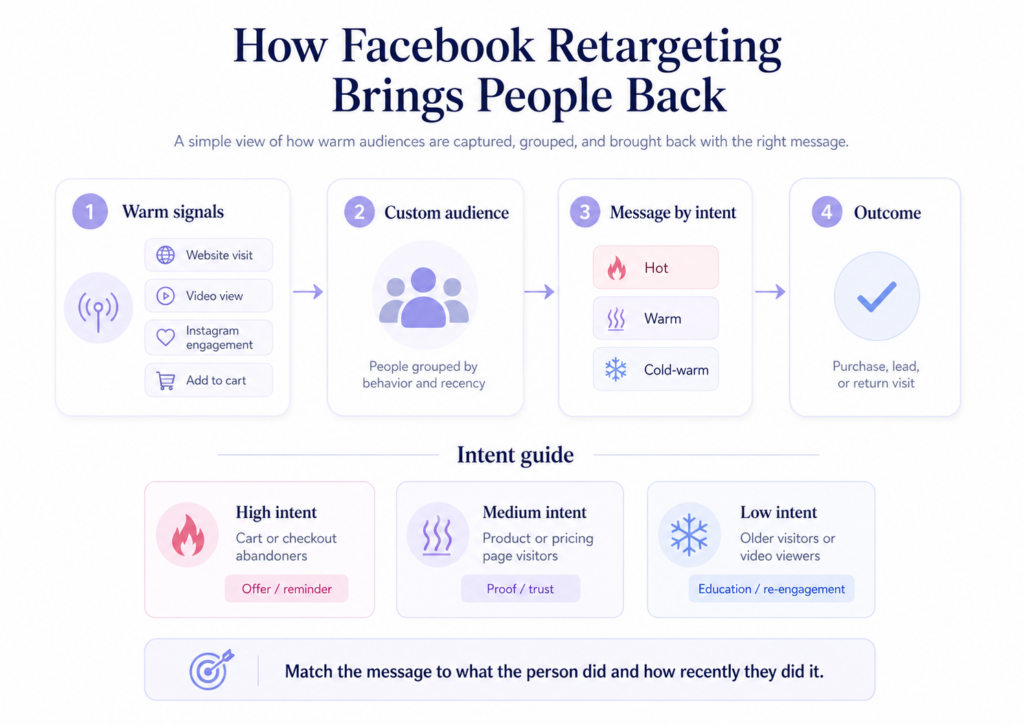
This is where the retargeting for Meta ads strategy begins. You do not want every warm user to see the same ad. A person who abandoned checkout yesterday needs a different message from someone who watched half of a video three weeks ago. One is close to buying. The other may still need education, trust, or a stronger reason to care.
That is why strong retargeting campaigns are usually built around behavior and recency.
- Behavior tells you what the person did.
- Recency tells you how fresh their intent is.
A checkout visitor from the last 7 days is usually a hot audience. A product page visitor from the last 30 days is warm. A website visitor from 90 days ago may still be useful, but they probably need softer re-engagement content before you ask for a purchase or demo.
The three Facebook custom audience types for retargeting
Before setting up any campaign, you need to understand what you are working with. Facebook custom audience retargeting draws from three distinct sources, each with different characteristics and implications for how you approach them.
Website visitors (Pixel-based audiences)
These are people who visited specific pages on your website within a defined time window. You build them in Meta Audiences using your Pixel data. A website visitor audience for people who visited your pricing page in the last 30 days is one of the highest-intent segments available to any advertiser outside of people who already converted.
The time window matters a great deal. Someone who visited your site yesterday is in a very different state of mind from someone who visited six months ago. Shorter windows are higher intent and warrant more direct conversion-focused messaging. Longer windows capture people further from their initial consideration and need more nurturing before they will convert.
Engagement audiences (on-platform behaviour)
These are people who have interacted with your content or profiles directly on Meta’s platforms — people who watched a certain percentage of a video you ran as an ad, engaged with your Facebook page or Instagram profile, opened or clicked a Facebook Instant Form, or sent a message to your accounts.
Engagement audiences are useful in two situations: when your website traffic volume is too low to build meaningful Pixel-based retargeting audiences, and as an earlier funnel layer for businesses running top-of-funnel video or content campaigns. Someone who watched 75% of a brand video has shown real interest even though they may never have visited your site.
Customer list audiences
These are audiences built by uploading your existing customer data, email subscribers, or CRM contacts directly to Meta. Meta hashes the data and attempts to match it to user profiles on the platform. Match rates typically fall between 50 and 80 percent depending on data quality.
Customer list audiences serve a different purpose from the first two types — less about retargeting people who recently showed interest, and more about reaching specific known contacts with specific messaging: a re-engagement offer for lapsed customers, an upsell campaign for active customers, or a suppression list to exclude existing customers from prospecting. Their role is important but distinct from this guide focuses on from here.
👉 The Facebook Ad Targeting guide covers how to build each of these audience types technically in Ads Manager, including the Custom Audience setup process and all available sources.
How to build your retargeting audiences in Ads Manager?
Go to Meta Ads Manager, open the Audiences section, click “Create Audience,” then “Custom Audience.” For website-based retargeting, select “Website.” For engagement-based retargeting, select the relevant source (Video, Instagram Account, Facebook Page, and so on).
For a website custom audience, you will select which events or pages to include and the time window (1 to 180 days). You can include all website visitors, visitors to specific URLs, or visitors who triggered specific Pixel events like ViewContent, AddToCart, or InitiateCheckout.
Build these core audiences before you set up any campaigns — Meta needs time to populate them, and an audience requires at least 1,000 matched users before it is eligible for ad delivery. If your site is new, run traffic campaigns for a few weeks first to build the pool.
Here are the core audiences to create for a standard retargeting setup:
- All website visitors, last 30 days. Your broadest retargeting pool can be used for Tier 3 re-engagement creative, not conversion pressure.
- All website visitors, last 90 days, excluding last 30 days. People whose signal has cooled. They need brand familiarity content before conversion messaging will land.
- Viewed specific pages, last 30 days. Build separate audiences for each high-intent page — pricing, product, and contact — because messaging should differ by which page they visited.
- AddToCart in last 14 days, excluding purchases. The highest-intent segment for ecommerce. These people went through the deliberate action of adding something to their cart and did not complete the purchase.
- InitiateCheckout in last 7 days, excluding purchases. Even higher intent than AddToCart. They started the checkout process and something stopped them — a very specific situation that deserves very specific messaging.
- Video viewers, 75% completion, last 30 days. For advertisers running video content at the top of the funnel. A strong engagement signal worth following up with conversion-focused messaging.
- Existing customers, last 180 days. Used primarily as an exclusion to prevent acquisition-focused ads from reaching people who already converted.
Save each audience before building any campaigns. Give them clear names that include the source, window, and any inclusions or exclusions — as your account grows, naming confusion becomes a real operational problem.
How to structure your retargeting campaigns?
This is where most advertisers get retargeting wrong. The most common mistake is running a single retargeting campaign that lumps all warm audiences into one or two ad sets. This approach wastes budget, delivers the wrong message to the wrong people, and makes it impossible to read performance accurately.
The correct approach is to segment by funnel stage and intent level, with each segment receiving messaging appropriate to where they are in their decision-making process.
The three-tier retargeting structure
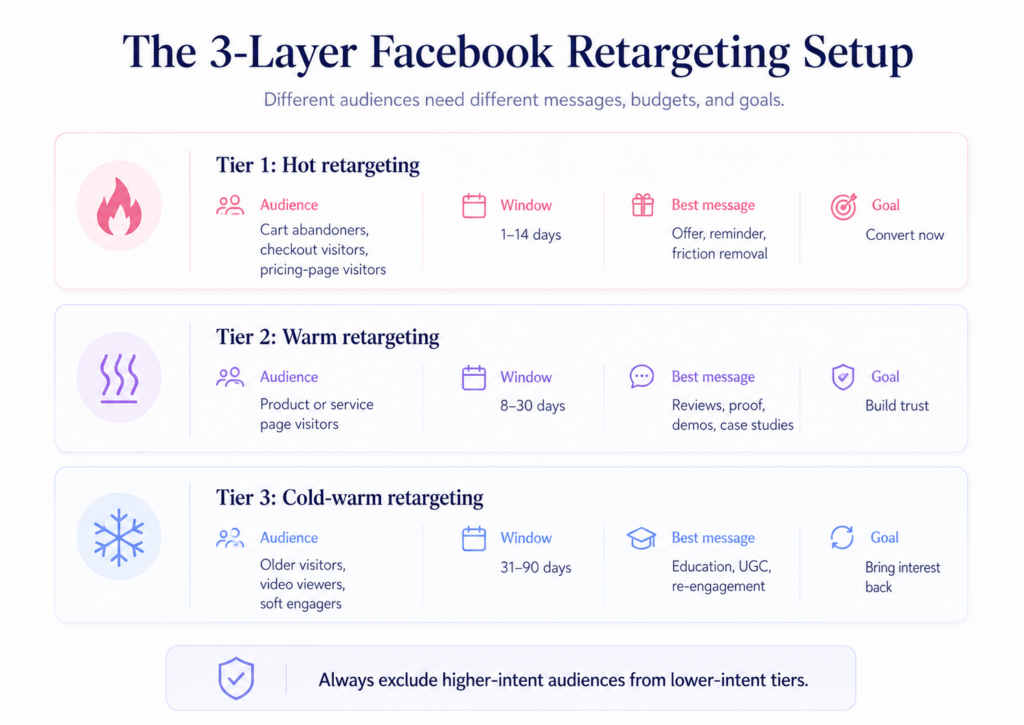
Tier 1: Hot retargeting (bottom of funnel)
Audience: AddToCart or InitiateCheckout in the last 7 to 14 days, excluding purchasers.
These people were on the verge of converting and something interrupted them. Your job is to remove whatever stopped them. Use your most direct, conversion-focused creative. Acknowledge where they got to if you can — dynamic product ads showing exactly what someone added to their cart work extremely well here. Use your strongest offer: a time-limited discount, free shipping, a bonus, a guarantee. In lead generation rather than ecommerce, this tier covers people who started filling in a form and did not complete it, or who visited your contact or pricing page multiple times without enquiring.
Budget allocation: start with 20 to 25 percent of your total retargeting budget here. The audience size is small, so there is a natural ceiling on how much it can absorb productively.
Tier 2: Warm retargeting (middle of funnel)
Audience: website visitors in the last 30 days who viewed product or service pages, minus anyone who added to cart or converted.
These people showed genuine interest but did not go deep enough into the funnel to trigger a strong intent signal. Your messaging here should build trust and reduce risk perception rather than push for an immediate conversion. Testimonials, case studies, reviews, and detailed product demonstrations all work well. Offers at this tier should be softer than Tier 1 — a free trial or free consultation rather than a discount coupon.
Budget allocation: around 50 percent of your retargeting budget. This is usually your largest retargeting audience and benefits from more creative variety because the consideration window is longer.
Tier 3: Cold-warm retargeting (upper funnel)
Audience: all website visitors in the last 31 to 90 days, or video viewers at 50 to 75 percent completion, excluding anyone in Tier 1 or Tier 2.
These people have a weaker, older signal. Heavy conversion pressure rarely works here. Instead, focus on content that re-establishes your relevance: educational content, new product announcements, brand stories, user-generated content. The goal is to bring them back into active consideration so they move up into Tier 2.
Budget allocation: around 25 to 30 percent of your retargeting budget.
Campaign setup in Meta Ads Manager
Run each tier as a separate campaign with its own objective, budget, and bid strategy. Do not mix tiers within the same campaign. This separation gives you clean performance data, prevents audience overlap from causing internal auction competition, and lets you control budget at the tier level.
For Tier 1, use the Sales objective with Purchase or Lead as your conversion event. For Tier 2, Sales with the same conversion event, or Leads if your product has a longer consideration cycle. For Tier 3, you can use Sales or Traffic depending on whether the primary goal is re-engagement or conversion.
Always set explicit exclusions at each tier. Tier 1 excludes purchasers. Tier 2 excludes Tier 1 audiences and purchasers. Tier 3 excludes everyone in Tier 1 and Tier 2. Without these exclusions, the same person receives ads from multiple campaigns simultaneously — CPMs inflate from internal competition, performance signals are mixed across intent levels, and you cannot manage funnel stages deliberately.
For a more detailed breakdown of budget allocation across your full account including both prospecting and retargeting, the Facebook Ads Budget Optimization guide covers CBO versus ABO decisions and scaling frameworks in full.
Creative strategy for retargeting
Retargeting creative has different requirements from prospecting creative. In prospecting, you are introducing your brand and making a first impression. In retargeting, the person already knows who you are. You do not need to introduce yourself. You need to close the gap between where they are and where you need them to be.
Tier 1 creative: remove the friction
Quick spec:
- Format: Dynamic product ads (ecommerce) or direct-offer static (all business types)
- Message: One specific offer or one specific objection removed
- Tone: Direct, action-oriented
- Avoid: Brand storytelling, broad awareness messaging, generic CTAs the person already ignored
Dynamic product ads pull the exact product someone looked at or added to their cart from your product catalogue and show it back to them with your ad creative around it. The specificity of seeing the exact item they were considering is far more compelling than a generic brand ad. If your ecommerce store has a product catalogue set up in Meta Commerce Manager, DPA should be your default Tier 1 format.
Direct-offer static ads work well for both ecommerce and lead generation. Keep the message focused on a single offer. “Still thinking about it? Here is 10% off to make your decision easier.” “Free shipping on your first order.” One clear message. One clear action.
Urgency and scarcity work genuinely well at Tier 1 because the audience is already close to converting — a small push matters more at this stage than at any other. Use these mechanisms honestly. Fake countdown timers and fabricated scarcity are visible to most buyers and actively erode the trust you need from a warm audience.
Tier 2 creative: build trust
Quick spec:
- Format: Video testimonials, review carousels, case study summaries, comparison ads
- Message: Social proof, risk reduction, product confidence
- Tone: Reassuring, specific, evidence-based
- Avoid: Heavy discount pressure, urgency tactics, generic brand ads
Testimonials and reviews reduce risk perception and address the “is this actually good?” question that sits in the middle of most buying decisions. Comparison ads that show why your product or service is the right choice over alternatives also work well here, as long as they are factual.
Behind-the-scenes content, product demonstration videos, and founder or team content that builds brand familiarity are useful for higher-consideration purchases where the person needs to trust the business, not just the product. Video generally outperforms static at this tier because it gives you more time to build the case.
Avoid heavy promotional messaging at Tier 2. Someone who saw your site 10 days ago and has not converted is not necessarily waiting for a coupon code. They may be waiting for enough confidence that your product is the right choice. Promotional pressure can increase purchase anxiety at this stage rather than reducing it.
Tier 3 creative: re-establish relevance
Quick spec:
- Format: Short-form video, user-generated content, organic-looking content
- Message: Educational, entertaining, low-barrier re-engagement
- Tone: Informal, value-first, no conversion pressure
- Avoid: Discount offers, direct conversion CTAs, anything that reads immediately as an ad
For people whose signal is older and weaker, education and entertainment outperform conversion messaging. Short-form video content that is genuinely useful — a quick tip, a product insight, a behind-the-scenes process — reminds people who you are and why they were interested without asking them for anything.
User-generated content and social proof at scale work well here too: real customers using your product, organic-looking creative that does not immediately feel like paid advertising. If the creative successfully brings people back into active consideration, they will move into Tier 2 naturally.
Frequency management and ad fatigue in retargeting
Frequency is the most important metric to monitor in retargeting campaigns, and it requires different management from prospecting.
In prospecting, frequency above 3 or 4 within a short window usually signals a too-narrow audience. In retargeting, higher frequency is expected and acceptable — up to a point. The thresholds that generally apply by tier:
- Tier 1 (hot retargeting): frequency up to 5 or 6 within a 14-day window is acceptable. Monitor CPA trend rather than frequency alone. If frequency is at 5 but CPA is stable, let it run.
- Tier 2 (warm retargeting): frequency above 4 within a 30-day window is a signal to refresh creative. The longer consideration window here means more time for fatigue to build.
- Tier 3 (cold-warm retargeting): keep frequency below 3 within a 30-day window. These people have a weak signal and repeated exposure without strong intent does not accelerate conversion.
When frequency climbs above these thresholds, the first fix is creative refresh rather than audience restructuring. New creative resets the fatigue clock without disrupting the audience’s learning history. Setting a frequency cap in Ads Manager via automated rules can help alert you before performance drops, though monitoring manually by tier gives you more precise control.
Meta is rolling out a Creative Fatigue score in Ads Manager in 2026 that flags specific ads burning out before performance drops noticeably. Fatigue in small warm audiences compounds faster than in large prospecting audiences — this score is worth checking weekly for retargeting campaigns. The Facebook Ads Updates 2026 guide covers this and other new Ads Manager features in detail.
If after creative refresh frequency continues to spike and CPA climbs, the underlying problem is audience size. A Tier 1 audience of 500 people cannot absorb meaningful daily budget without burning out quickly. Lower the budget on that ad set rather than forcing spend into an audience that cannot support it, and focus on growing your Pixel data through prospecting campaigns to expand the pool.
Facebook retargeting window strategy
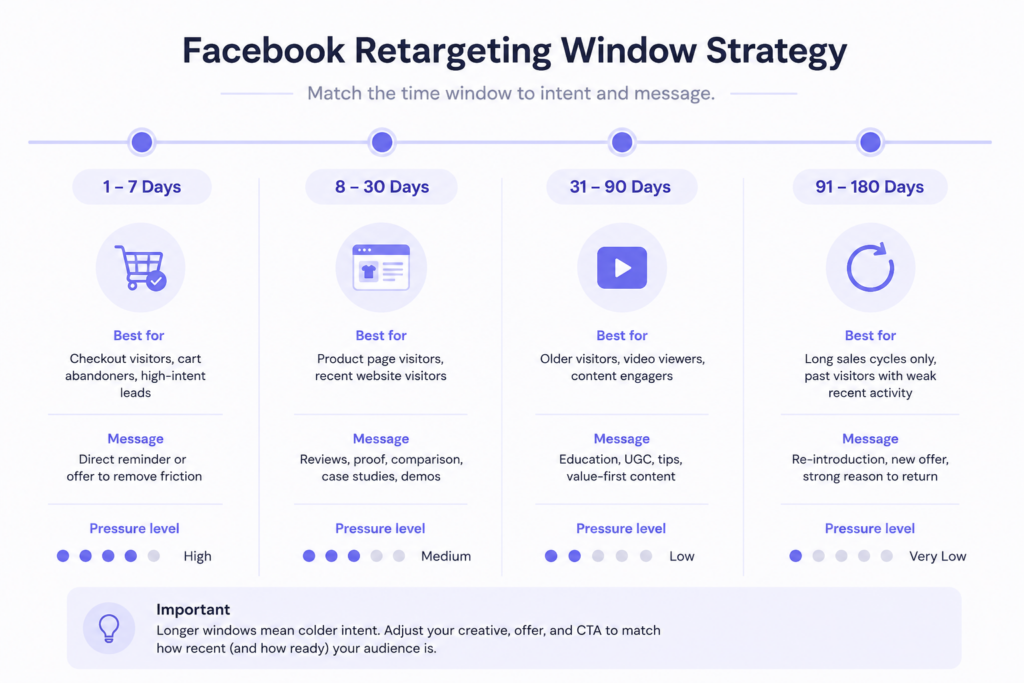
Choosing the right Facebook retargeting window is not arbitrary. It directly affects your audience size, cost per result, and the relevance of your creative to each group.
Shorter windows mean smaller audiences, higher intent, and lower cost per conversion. Longer windows mean larger audiences, lower average intent, and more variation in where people are in their decision process.
- 1 to 7 days is for immediate follow-up after a high-intent action. Use this window for InitiateCheckout audiences and for any audience you want to retarget with time-sensitive offers. Small audience, highly responsive.
- 8 to 30 days is your primary conversion window. Most people who are going to convert from retargeting will do so within 30 days of their original visit. This is where most of your retargeting budget should sit.
- 31 to 90 days captures people who considered you a while ago. They need re-engagement rather than conversion pressure. Creative here should look different from your 30-day window creative.
- 91 to 180 days is only worth using if you have a genuinely long sales cycle — high-ticket B2B, real estate, premium services. For most ecommerce and short-cycle lead generation, this window adds more cost than value.
One principle that applies to all windows: always exclude shorter windows from longer window audiences. Your 31 to 90-day audience should exclude people in your 30-day audience so each ad set reaches genuinely distinct groups. Without these exclusions, the same person sits in multiple ad sets simultaneously, causing internal auction competition, inflating CPMs, and making performance data unreadable.
Why retargeting metrics lie (and how to read them accurately?)
Retargeting metrics need to be interpreted differently from prospecting metrics, and comparing the two directly leads to bad decisions.
Your retargeting ROAS will almost always be higher than your prospecting ROAS, and your retargeting CPA will almost always be lower. This does not mean retargeting is more efficient in the way that matters — it means you are reaching people who were already partially sold. Some portion of those conversions would have happened anyway through organic search or direct visits. Retargeting accelerated them and claimed credit for them.
This is why cutting prospecting budget to fund more retargeting spend is usually a mistake. Without a continuous flow of new prospecting traffic, your retargeting audiences shrink within two to four weeks and the performance advantage disappears entirely.
The metrics that tell you whether your retargeting campaigns are actually healthy:
- Cost per result by tier. Tier 1 should produce your lowest CPA. Tier 2 will be higher. Tier 3 higher still. If Tier 2 is producing a lower CPA than Tier 1, your Tier 1 creative is likely underperforming or your exclusions are not set up correctly.
- Frequency by tier. Monitor weekly and refresh creative when the thresholds above are exceeded.
- Audience overlap. Verify your tier exclusions are working as intended. Use the Audience Overlap tool in Ads Manager to confirm that Tier 1 and Tier 2 audiences are not heavily overlapping. If they are, your exclusion audiences may not have been applied to the ad set correctly.
- New versus returning converters. If a large percentage of retargeting conversions are coming from people who purchased before, your customer exclusion is missing or not working. That is acquisition budget being spent on people you already converted.
For tracking all of these metrics accurately, your Pixel and CAPI need to be passing clean, complete data. An EMQ score below 6 means a meaningful share of your retargeting events are not being attributed correctly, which distorts your reported CPA and ROAS. The Facebook Ads Metrics guide explains how to read each metric and what normal ranges look like across different account types.
To benchmark your retargeting CPA and ROAS against other advertisers in your industry, the Facebook Ads Benchmarks guide breaks down performance data across industries and regions.
Dynamic retargeting for ecommerce
If you run an ecommerce business with a product catalogue in Meta Commerce Manager, dynamic retargeting deserves specific attention because dynamic product ads (DPA) are the single most effective retargeting format available for product-based businesses.
Dynamic ads automatically show each user the specific products they viewed or added to their cart, pulled in real time from your product catalogue. You create the ad template once — defining the layout, copy structure, and offer — and Meta populates it per user. The result is a highly personalised ad experience that requires no manual creative work per product.
The setup requires a product catalogue in Meta Commerce Manager with your full inventory, connected to your Pixel with ViewContent, AddToCart, and Purchase events passing the correct product IDs as parameters.
Dynamic ads work well across all three retargeting tiers. For Tier 1, show the exact products someone added to their cart or started to purchase. For Tier 2, show viewed products alongside related or complementary items. For Tier 3, show broad catalogue ads featuring your best-selling or most-reviewed products as a general re-engagement approach.
The Facebook Ads Strategies guide covers dynamic creative optimisation more broadly, including how to test and scale winning creative assets across both prospecting and retargeting campaigns.
Retargeting for lead generation
Lead generation retargeting follows the same structural principles, but the intent signals and creative approach differ.
Your highest-intent Tier 1 audience is not AddToCart but rather people who visited your contact, pricing, or booking page without submitting, or people who started filling in a form and abandoned it. If your Pixel is tracking form abandonment (which requires a custom event or a page-visit trigger mid-form), this is one of your most valuable retargeting segments.
Most advertisers retarget form abandoners with the same ad the person already ignored. That is a reliable way to waste budget. The better approach is to change the conversation entirely. If someone visited your pricing page and left, they likely have one of three objections: the price feels high, they are not sure it works for their situation, or they are not ready to talk to sales. Your Tier 1 ad should address one of those three things directly. “See how companies your size use [product]” addresses the second. “No sales call until you are ready — just a 15-minute demo on your schedule” addresses the third. The original CTA already failed once with this person. A different message gives you a second chance.
For longer consideration cycle products and services, Tier 2 lead generation retargeting should lean on case studies with specific, tangible results. Not generic testimonials, but specific outcomes with real numbers where possible. “How Company X reduced their cost per lead by 40% in 90 days” is more persuasive to a warm lead than “Company X loves working with us.”
If your Facebook retargeting is not working: six common causes
- Running retargeting without prospecting. Retargeting audiences are fed by prospecting traffic. Pause prospecting and your warm audiences shrink within two to four weeks. Always run both.
- Using the same creative across all tiers. Tier 1 needs direct conversion messaging. Tier 3 needs re-engagement content. Showing the same ad to both wastes the intent signal from your hot audience and over-pressures your cold-warm audience.
- No exclusion audiences between tiers. Without exclusions, the same person receives ads from multiple campaigns simultaneously. CPMs inflate from internal competition and performance signals are mixed across intent levels.
- Window lengths too long without adjusting creative. A 180-day audience includes people who visited months ago for reasons that may have nothing to do with buying intent today. If you use this window, your creative needs to reflect the distance.
- Ignoring frequency until performance has already dropped. By the time CPA climbs noticeably due to ad fatigue, you have already spent days of budget on a burned-out audience. Monitor frequency weekly and refresh creative before performance drops, not after.
- Retargeting existing customers with acquisition messaging. If your customer exclusion list is missing or out of date, you are spending acquisition budget on people who already bought from you. Update this audience regularly.
For a full structured review of your retargeting setup alongside the rest of your account, the Facebook Ads Audit guide provides a step-by-step checklist you can work through for any account.
Your retargeting setup checklist
Audiences
- [ ] Website custom audiences created for 7, 30, and 90-day windows
- [ ] High-intent page audiences created for pricing, product, and contact pages separately
- [ ] AddToCart and InitiateCheckout audiences created (ecommerce)
- [ ] Customer and purchaser exclusion audience is current and applied to all campaigns
- [ ] Engagement audiences created if website traffic volume is too low for Pixel-based audiences
Campaign structure
- [ ] Three-tier campaign structure in place — hot, warm, and cold-warm run as separate campaigns
- [ ] Each tier has its own budget, objective, and bid strategy
- [ ] Tier exclusions applied at ad set level — each tier excludes all higher-intent tiers
- [ ] Prospecting campaigns exclude all website visitors from the last 30 days
Creative
- [ ] Tier 1 creative is conversion-focused with a specific offer or friction-removal message
- [ ] Tier 2 creative includes social proof, testimonials, or trust-building content
- [ ] Tier 3 creative is re-engagement focused with low conversion pressure
- [ ] Dynamic product ads set up for ecommerce (if product catalogue is available)
- [ ] Lead gen Tier 1 creative addresses objections, not just repeats the original CTA
Performance monitoring
- [ ] Frequency monitored weekly by tier with defined refresh thresholds
- [ ] CPA tracked by tier, not averaged across retargeting as a whole
- [ ] Audience Overlap tool checked to confirm tier exclusions are working
- [ ] Customer exclusion list updated regularly
Conclusion
Facebook retargeting works best when it is treated as a follow-up system, not a shortcut.
The goal is not to show the same ad to everyone who visited your website. A cart abandoner, a pricing page visitor, a video viewer, and an old website visitor are all warm audiences, but they are not in the same state of mind. Each one needs a different message, a different level of pressure, and a different reason to come back.
That is why the structure matters so much.
Build your audiences around behavior and recency. Keep hot, warm, and cold-warm users separate. Exclude higher-intent audiences from lower-intent campaigns. Refresh creative before frequency damages performance. And most importantly, do not judge retargeting by ROAS alone, because warm audiences can make performance look cleaner than it really is.
This is also where Vaizle AI can help. Instead of jumping between Ads Manager reports, audience breakdowns, frequency columns, and campaign-level ROAS, you can ask Vaizle what is actually happening in your retargeting campaigns. It can help you spot whether CPA is rising because of fatigue, whether your warm audience is too small, whether one tier is carrying the whole campaign, or whether your retargeting numbers look good only because prospecting is doing the hard work.
Retargeting is not just about bringing people back.
It is about understanding why they left, what they need next, and whether your campaigns are giving them the right reason to return.
