WhatsApp Adds Member Tags to Make Group Chats Easier to Navigate
WhatsApp is rolling out member tags, event reminders, and text stickers as group chats grow larger and harder to manage.
TL;DR
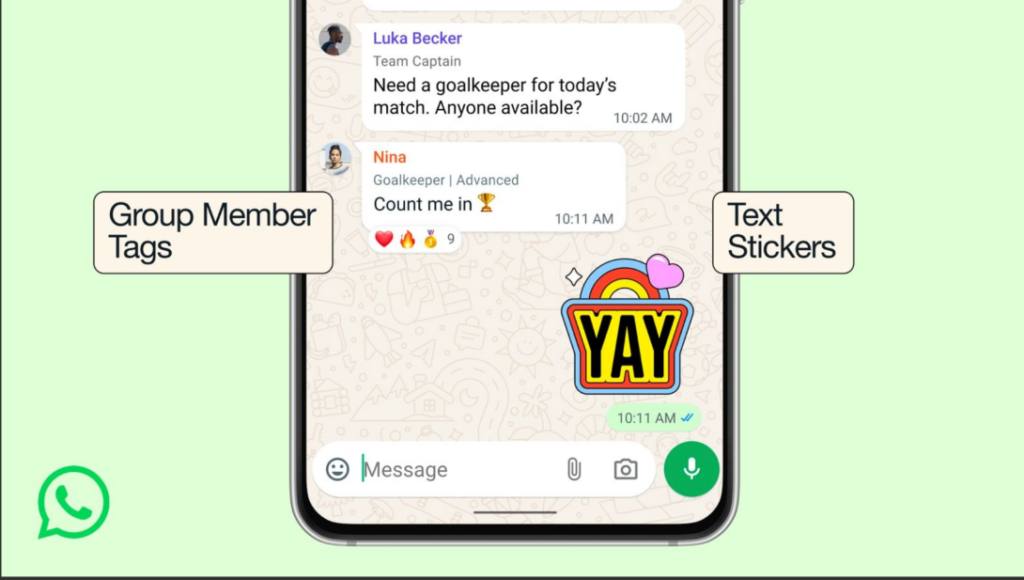
- Member tags: Add a short label for yourself inside a specific group (example: “Treasurer” or “Parent of 2B”) so people instantly know who you are.
- Event reminders: Group events now support stronger reminders, making it harder for plans to get lost in the chat scroll.
- Text stickers: Turn typed words into stickers, so replies feel faster and more expressive without extra typing.
Group chats were never meant to scale this much.
What started as small circles of friends and family has turned into large, mixed groups that include parents, neighbors, coworkers, vendors, and people who barely know each other. Messages move fast, names repeat, and context is often missing. With its latest update, WhatsApp is addressing that shift head-on.
Rather than redesigning the app, WhatsApp is introducing small changes that reduce friction in everyday group conversations.
Member Tags: Giving Context Without Changing Your Identity
The most notable addition is member tags, a feature that allows users to label themselves differently in each group chat.
Instead of relying only on a display name, members can now add a short tag that explains who they are or what role they play in that specific group. This could be something practical like “Treasurer,” “Admin,” or “Parent of Class 2B,” helping others immediately understand context in large or unfamiliar groups.
These tags are group-specific. They do not change a user’s name across WhatsApp, which keeps personal identity intact while adding clarity where it is needed most.
How to Add a Member Tag in a WhatsApp Group?
Adding a member tag is designed to be simple and optional.
To add or edit your member tag:
- Open the WhatsApp group where you want to add the tag.
- Tap the group name at the top to open group info.
- Scroll to the participant list and tap your name.
- Select the option to add or edit your member tag.
- Enter a short label and save it.
The tag will appear next to your name only in that group. You can choose a different tag for every group you are part of, or skip the feature entirely if you prefer.
If you don’t see this in your device yet, be patient. WhatsApp is gradually rolling this update to all devices and regions.
Event Reminders: Planning Inside Chats, Without Losing Details
WhatsApp is also improving how groups handle events.
Group chats are often used to plan meetups, calls, or activities, but important details tend to get buried as conversations continue. With enhanced event reminders, WhatsApp is making it easier for members to remember dates and times without scrolling back through long message histories.
This update reflects how chats already function in practice: not just as conversations, but as informal coordination spaces.
Text Stickers: Faster Expression, Less Typing
Another update focuses on expression rather than organization. Users can now turn typed text into stickers directly within WhatsApp.
While light in nature, this change aligns with how people communicate today. Short, visual responses often replace full sentences, helping convey tone quickly without adding more messages to the chat.
What This Signals About WhatsApp’s Direction?
Individually, these updates are subtle. Together, they point to a broader shift.
WhatsApp is increasingly designing for large, multi-purpose groups where clarity matters more than novelty. By addressing identity, planning, and expression, the platform is adapting to how group chats are actually used today.
The rollout is gradual, and availability may vary by device and region. But the intent is clear: reduce confusion, not add noise.
Get the latest marketing news and trends
Delivered straight to your inbox.
Thank you for subscribing!
Stay tuned for the latest updates.
Google is testing a new program that could change how publishers are...
Shopify has added Meta as an AI commerce channel in Agentic Storefronts,...
Meta is giving AI a more direct role in deciding which actions...
Meta is expanding Meta AI with a new set of features designed...