How to do Facebook Ads Budget Optimization? | Complete Guide
Complete guide on how to do Facebook ads budget optimization. Set the right budget, scale strategically, allocate across objectives, and fix campaigns that won't spend your budget.
Purva
January 13, 2026
Related Topics
No related topics found.
Facebook advertisers don’t have a spending problem. They have a budget optimization problem instead. You could throw as much as $500 per day at Meta’s algorithm and still see terrible results, or spend $50 strategically and outperform competitors with 10x your budget.
The difference comes down to how you set, allocate, and scale your Facebook ad budget. Whether you’re using Advantage Campaign Budget, splitting spend across ad sets manually, or figuring out why your Facebook ad budget isn’t spending at all – every decision affects how Meta’s auction system prioritizes your ads.
Here’s what makes Facebook ads budget optimization tricky in 2026: CPMs are higher, the learning phase is less forgiving, and Meta offers multiple budget types (daily vs lifetime, cost cap vs bid cap, CBO vs manual) without clear guidance on when to use each. Pick the wrong Facebook ad budget strategy, and you’ll either underfund campaigns that never gain traction or scale too aggressively and watch your cost per result explode.
If you’re stuck in the same loop, this guide is exactly what you need. We will walk through exactly how to optimize your Facebook ad budget (from choosing the right budget structure and bid strategy to scaling without killing performance).
Whether you’re figuring out how to set Facebook ads budget for the first time or looking for advanced budget scaling tactics, you’ll find frameworks that actually work. Let’s dive right in!
How Meta uses your ad budget behind the scenes?
Meta uses your ad budget to help you meet campaign objectives. The reason is straightforward: Meta makes money when you make money. But this isn’t a cooperative game. It’s winner-takes-all, and the algorithm rewards advertisers who understand how budget signals work.
Let’s understand how Meta is using your ad budget behind the scenes?
Budget drives auction behaviour
Meta runs millions of auctions every second. Your Facebook ad budget tells the algorithm how much risk it can take. Set a higher budget, and Meta bids aggressively for premium placements. Set it too low, and the algorithm goes conservative and starts skipping auctions where your ideal customer might be, simply because the cost feels risky relative to your budget.
Three variables control the outcome
Budget pairs with bid strategy (cost cap, bid cap, lowest cost), optimization window (1-day click vs 7-day view), and learning phase status. If any of the variable gets misaligned, the algorithm won’t be able to work in an optimal manner. You could have winning creative and a perfect audience, but without enough budget to generate conversion data, Meta is essentially guessing.
Daily vs lifetime budgets behave differently
A daily budget spreads spend evenly across 24 hours. Delivery stays consistent, but you sacrifice flexibility. This means Meta can’t push harder during peak hours. Lifetime budgets let the algorithm shift spend to high-performance windows. The tradeoff? You need longer campaign durations for this to work.
Budget throttling kills campaigns quietly
If your budget is too low relative to your average cost per result, Meta can’t spend efficiently. Delivery slows. You’ll see “learning limited” warnings when the algorithm doesn’t hit roughly 50 conversions per week per ad set. That’s the minimum it needs to optimize. Adjust your budget mid-learning-phase, and you reset the clock. Performance tanks, and most advertisers have no idea why.
Campaign Budget vs Ad Set Budget: Which Should You Use?
Meta gives you two ways to control spending: set budgets at the campaign level (Advantage Campaign Budget, formerly CBO) or at the ad set level manually. The choice affects how much control you have and how the algorithm distributes your money.
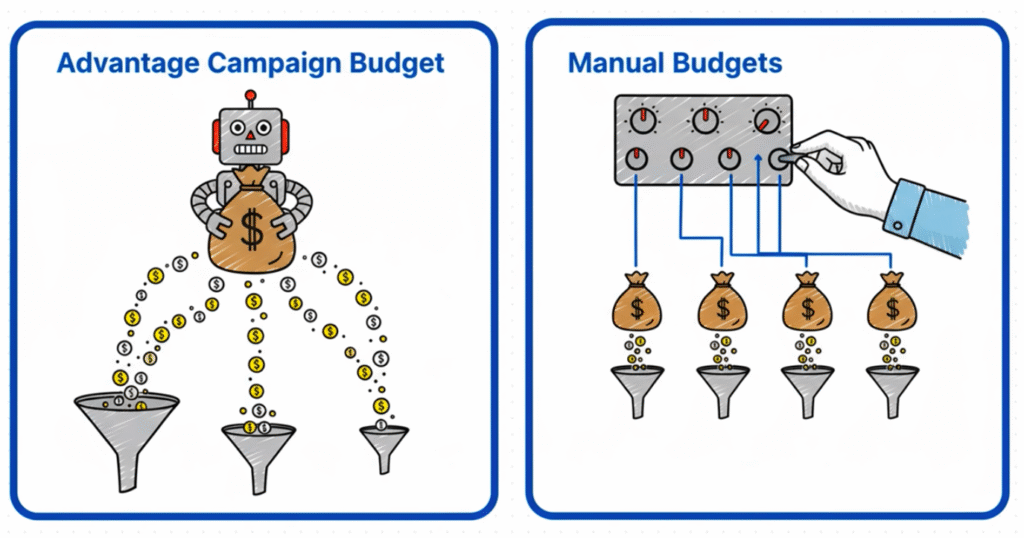
Advantage Campaign Budget (CBO) lets Meta decide
With CBO, you set one budget for the entire campaign, and the algorithm allocates spend across ad sets based on performance. Meta shifts money toward ad sets that deliver better results and pulls back from underperformers. This works well when you trust the algorithm and want Meta to find efficiencies you might miss manually.
Advantage campaigns make sense for you if you’re testing multiple audiences or creatives and don’t know which will perform best. This is when you want the algorithm to optimize distribution automatically. Your ad sets have similar audience sizes and conversion potential.
Manual ad set budgets give you control
With manual ad set budgets, each ad set gets its own budget. You decide exactly how much to spend on cold traffic vs retargeting, or how to split budget between different audience segments. The algorithm can’t reallocate between ad sets, which means you control the test but also own the risk of poor distribution.
This means manual budgeting would make sense when you need guaranteed spend on specific audiences (like a retargeting campaign that must run). You’re running campaigns with very different objectives or audience sizes within the same campaign structure. You want full visibility and control over where every dollar goes.
Here’s what most Meta advertisers are getting wrong. Setting budgets at both levels. If you enable CBO and also set ad set budgets, you confuse the algorithm. Meta doesn’t know which instruction to prioritize. Pick one approach per campaign.
All Facebook Ads Budget Types Explained
Facebook offers multiple budget structures and bid strategies. Understanding the difference helps you match your budget setup to your campaign goals.
Daily Budget vs Lifetime Budget for Facebook Ads
Daily Budget
You set a maximum spend per day. Meta paces delivery evenly across 24 hours, though it can spend up to 25% more on high-performing days and balance it out over the week.
When to use it: You need predictable daily spend. Your budget is tight and you can’t risk overspending. You’re running evergreen campaigns where consistent delivery matters more than timing optimization.
When NOT to use it: You want Meta to capitalize on peak conversion windows. Your campaign duration is short (less than a week), making daily pacing inefficient.
Lifetime Budget
You set a total budget for the entire campaign duration. Meta decides when to spend more or less based on performance patterns and audience availability.
When to use it: You’re running campaigns longer than 7 days. You want the algorithm to optimize spend timing. You’re comfortable with uneven daily spend as long as total budget stays within limits.
When NOT to use it: You need guaranteed daily delivery. You’re running very short campaigns (1-3 days) where Meta doesn’t have time to learn patterns. You have strict daily spend caps for accounting reasons.
Meta bids for the lowest cost per result without restrictions. The algorithm chases conversions at whatever price the auction demands.
When to use it: You’re testing and don’t have a target CPA yet. Your primary goal is volume, not efficiency. You have enough budget that cost fluctuations won’t break your ROI.
When NOT to use it: You have strict profitability targets. Your margins are thin and you can’t afford CPA spikes. You’ve already identified an acceptable cost per result from past campaigns.
Cost Cap
You set a maximum average cost per result. Meta tries to stay at or below this number over time, but individual conversions might cost more or less.
When to use it: You know your target CPA or CPL from historical data. You want cost control but still need volume. Your conversion window and creative are proven.
When NOT to use it: You set the cap too low relative to market rates—Meta won’t spend your budget. You’re still testing and don’t have reliable cost benchmarks.
Bid Cap
You set a maximum bid for each auction. Meta never exceeds this amount, which gives you the tightest cost control but often limits delivery.
When to use it: You have very strict cost requirements. You’re willing to sacrifice volume for control. You know the exact bid amount that keeps you profitable.
When NOT to use it: You need to spend your full budget. You’re testing new audiences or creatives where the ideal bid isn’t clear yet. Your cap is set too conservatively and throttles delivery.
ROAS Target
You tell Meta the minimum return on ad spend you need. The algorithm bids to hit or exceed that target, prioritizing high-value conversions over volume.
When to use it: You’re running ecommerce or catalog campaigns with clear revenue tracking. You’ve passed the learning phase and have consistent conversion data. Profitability matters more than reach.
When NOT to use it: Your pixel doesn’t track revenue accurately. You’re in the learning phase with limited conversion data. Your products have widely varying margins (ROAS targeting works best with consistent AOV).
How to Set Facebook Ads Budget? What are Starting Amounts by Goal?
The best budget for Facebook ads depends on your campaign objective, conversion window, and how quickly you need the algorithm to learn. Starting too low guarantees poor performance. Starting too high without data wastes money. Here’s how you’ll find the middle ground:
Budget Requirements by Campaign Objective
Different objectives need different minimum budgets to work properly.
Traffic and Engagement campaigns: $10-20/day can work because these optimize for cheap actions (clicks, post engagement). The algorithm gets enough signal quickly.
Lead Generation: $20-50/day minimum. Lead forms convert less frequently than clicks. Meta needs volume to identify quality leads vs tire-kickers.
Conversions (Sales, Purchases): $50-100/day per ad set minimum. Conversion events are rare compared to clicks. The algorithm needs roughly 50 conversions per week to exit learning phase. If your conversion rate is 2% and your average CPC is $1, you need enough budget to generate those conversions.
Catalog Sales (Dynamic Ads): $30-75/day works for retargeting. Cold traffic catalog campaigns need $75-150/day because Meta is optimizing for purchases across hundreds or thousands of products.
The Conversion Window Factor
Your attribution window affects how much budget you need. A 1-day click window requires higher daily budget because Meta has less time to attribute conversions. A 7-day click window gives the algorithm more flexibility, so you can start with less.
If you’re optimizing for 1-day click conversions, increase your minimum budget by 30-50% compared to 7-day windows.
Sample Starting Budgets by Business Type
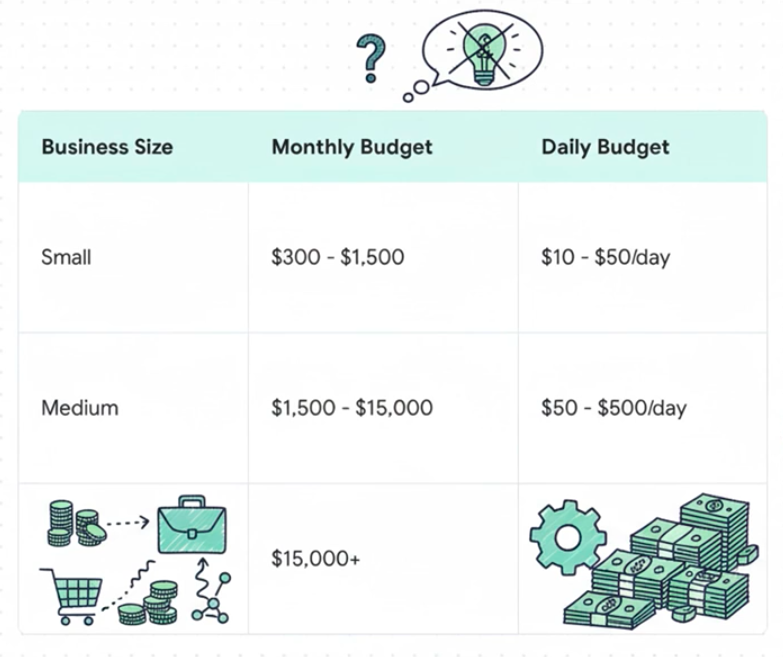
Small Budget ($300-1,500/month): You’re testing Facebook ads for the first time or have limited cashflow. Allocate $10-50/day depending on your objective. Focus on one campaign with 1-2 ad sets maximum. Expect slower learning and limited scale potential.
Medium Budget ($1,500-15,000/month): You have proven offers and want to scale testing. Run $50-500/day across 2-4 campaigns. This is the sweet spot for most small-to-mid-size businesses—enough budget to exit learning phase and test multiple audiences or creatives simultaneously.
Large Budget ($15,000+/month): You’re scaling proven campaigns. Daily budgets of $500-5,000+ per campaign. At this level, focus shifts from testing to optimization and expansion into new markets or products.
Why $10/Day Rarely Works for Conversions?
A $10/day budget might seem reasonable for testing, but it’s insufficient for most conversion campaigns. Here’s the math: if your target CPA is $30, that’s roughly 1 conversion every 3 days, or 2-3 per week. Meta needs 50 conversions per week per ad set to optimize properly. You’d be stuck in learning phase indefinitely, with inconsistent results and high costs.
Low budgets force the algorithm into survival mode. It can’t test different placements, audience segments, or times of day. You get limited delivery, which means limited data, which means the algorithm never improves.
If your budget is genuinely limited, run shorter campaigns with higher daily spend rather than long campaigns with tiny budgets. A $210 budget spent over 21 days ($10/day) will perform worse than the same budget spent over 7 days ($30/day).
Facebook Ad Budget Scaling: When and How to Increase Spend?
Scaling requires three conditions to be met before you increase budget. Miss any of them, and you’re likely wasting money.
Don’t Scale Until You See These Three Signals
Signal 1: Consistent performance over 3-5 days Your CPA or ROAS needs to stay within 15-20% of your target for at least three consecutive days. One profitable day means nothing. If you’re hitting $25 CPA one day and $60 the next, you don’t have stability yet.
Signal 2: You’re maxing out your budget If Meta is only spending 60% of your daily budget, increasing it accomplishes nothing. You need 90%+ budget utilization before more money helps.
Signal 3: Frequency stays under 3.0 Frequency tells you how often the same people see your ads. Under 1.5 means you haven’t saturated your audience yet—room to grow. Between 1.5-3.0 is healthy. Above 3.0 means you’re hammering the same people repeatedly. More budget will just make this worse.
Two Ways to Scale Your Facebook Ads (And When to Use Each)
Vertical scaling = more money into what’s working. You increase budget on your existing winning campaign or ad set. This is simpler and should be your default approach. You’re not splitting budget across multiple ad sets or complicating your account structure.
Horizontal scaling = duplicate what’s working. You create new campaigns or ad sets with the same creative and offer, but target different audiences. Or you duplicate the winning campaign entirely. This works when you’ve maxed out an audience (high frequency) or when you want to expand reach without touching a profitable campaign.
Start with vertical. Move to horizontal only when frequency climbs above 3.0 or when you’re genuinely constrained by audience size.
The 20% Rule (And When It’s Wrong)
Standard advice says: increase budget by no more than 20% at a time. Bigger jumps reset learning phase and destabilize performance.
This is true for conversion campaigns where every dollar of efficiency matters. If you’re running at $40 CPA and happy with it, don’t risk a 20%+ increase that might spike you to $60.
But break the rule when:
You’re running Traffic or Engagement campaigns (learning phase matters less)
You’ve found a clear winner during a time-sensitive window (Black Friday, product launch)
You’re willing to accept 48 hours of chaos for faster scale
When you do increase by more than 20%, watch the first two days closely. Be ready to roll back if costs explode.
Give It Time Between Changes
Most scaling failures happen because advertisers change budget again too soon.
Day 1-2 after an increase: Performance goes haywire. CPA might spike or drop randomly. The algorithm is recalibrating its bidding strategy. This is normal.
Day 3-5: Things stabilize. You’ll see whether your target metrics hold at the new budget level.
Day 7+: If performance is steady, you can consider another increase.
Wait at least 5-7 days between budget changes. Adjusting every 2-3 days creates constant instability. You never know what’s working because you keep changing variables.
When Facebook Ad Scaling Backfires
You increased budget. Now your CPA is 40% higher and climbing. What happened?
Check frequency first. If it jumped from 2.0 to 4.5, you’ve saturated your audience. No amount of budget will fix this—you need new audiences (horizontal scaling).
Check for auction overlap. If you’re running multiple ad sets targeting similar people, your campaigns might be bidding against each other. Consolidate or tighten targeting.
If frequency is fine and there’s no overlap, give it 3-5 days. The algorithm might just need time to adjust. Don’t roll back after 24 hours unless performance is catastrophic (like 100%+ CPA increase).
If costs don’t improve after a week, reduce back to your previous budget and try a smaller increment next time—10% instead of 20%.
What are Some Facebook Ad Budget Reallocation Tactics?
How you split your budget matters as much as how much you spend. Different objectives, funnel stages, and business types require different allocation approaches.
Allocating Budget by Campaign Objective
Awareness campaigns should get 15-25% of your total budget if you’re building a new brand or entering a new market. These campaigns focus on reach and impressions, not conversions. They set up your retargeting audiences and make your brand recognizable.
Consideration campaigns (lead gen, engagement, traffic) work best with 25-35% of budget. These campaigns bridge the gap between cold audiences and purchase-ready prospects. You’re building trust and collecting intent signals.
Conversion campaigns should get 40-60% of your budget once you have proven offers. This is where revenue happens. Cold traffic conversions need more budget than retargeting because they’re optimizing for people who’ve never heard of you.
Allocating by Funnel Stage
Top of funnel (TOFU) typically gets 30-40% of budget when you’re prospecting heavily. You’re reaching cold audiences with awareness content, building custom audiences for retargeting, and testing new audience segments.
Middle of funnel (MOFU) should receive 20-30%. These are people who’ve engaged with your content, visited your site, or interacted with your brand but haven’t converted. You’re nurturing them with value-driven content and soft offers.
Bottom of funnel (BOFU) gets 30-50% and focuses on retargeting and high-intent audiences. These campaigns target people who’ve added to cart, visited pricing pages, or shown clear buying signals. ROAS is typically highest here, so budget efficiency is strong.
The exact split depends on your business maturity. New businesses need heavier TOFU investment. Established businesses with large retargeting pools can shift more budget to BOFU.
Testing vs Scaling Budget Split
The 70/30 rule works for most advertisers: 70% of budget goes to proven winners (scaling), 30% goes to testing new audiences, creatives, or offers.
Early-stage businesses flip this ratio. You might run 50/50 or even 40/60 (testing/scaling) when you’re still figuring out what works. Once you’ve identified winning campaigns, shift progressively toward the 70/30 split.
Never allocate zero budget to testing. Markets change, creative fatigues, and audiences saturate. Even successful campaigns need fresh creative and new audience angles to maintain performance.
Industry-Specific Allocation for Meta Ads Budget
Ecommerce: Heavy retargeting focus. Allocate 40-50% to catalog retargeting campaigns and dynamic product ads. These audiences already know your products and convert at 3-5x the rate of cold traffic. The remaining budget splits between cold prospecting (30-40%) and abandoned cart campaigns (10-20%).
SaaS and B2B: Lead quality matters more than volume. Allocate 50-60% to conversion campaigns targeting high-intent audiences (competitor searches, job titles, company sizes). Use 20-30% for nurturing campaigns (content downloads, webinar registrations) and 10-20% for retargeting trial users or demo requests.
Local businesses: Geographic constraints limit scale potential. Focus 60-70% on conversion campaigns within tight radius targeting (5-15 miles). Use 20-30% for local awareness campaigns to build brand recognition. Retargeting budgets can be minimal (10%) because local audience pools are small.
Creators and course sellers: Burst budget strategies work best. Allocate 70-80% to short, aggressive launch windows (7-14 days) when you’re opening enrollment or releasing new content. Use the remaining 20-30% for evergreen lead generation between launches.
Why is My Facebook Ad Budget Not Spending?
Your budget sits there, barely touched, while Meta shows “delivery limited” warnings. Here are the seven most common causes and how to fix them.
Cause 1: Bid cap set too low
If you’re using bid cap and it’s below average market rates, Meta can’t win auctions. Check your industry’s average CPM benchmarks. If your bid cap is 30-40% below these numbers, raise it incrementally or switch to cost cap for more flexibility.
Cause 2: Audience too narrow
An audience under 50,000 people often can’t support meaningful budget spend. Meta runs out of available users quickly. Broaden your targeting—add related interests, expand age ranges, or include lookalike audiences. For retargeting, this might mean extending your pixel window from 30 days to 60 or 90 days.
Cause 3: Stuck in learning phase
If your ad set shows “learning limited,” it’s not generating enough conversions (50 per week) for Meta to optimize. Either increase budget to drive more conversions, or consolidate multiple small ad sets into one larger ad set that can hit the threshold.
Cause 4: Poor ad relevance or quality
Meta won’t push ads with low engagement or high negative feedback. Check your relevance diagnostics in Ads Manager. If you’re seeing “below average” ratings, your creative or offer isn’t resonating. Refresh your ad creative or test new messaging before increasing budget.
Cause 5: Conversion window misalignment
If you’re optimizing for 1-day click conversions but your typical customer journey takes 5-7 days, Meta can’t find enough quick converters. Switch to a 7-day click window or optimize for a higher-funnel event that happens more frequently (like “initiate checkout” instead of “purchase”).
Cause 6: Campaign overlap and audience saturation
Running multiple campaigns targeting similar audiences creates auction overlap. Your campaigns bid against each other, driving up costs and limiting delivery. Use Meta’s audience overlap tool to check. If overlap exceeds 20-30%, consolidate campaigns or use exclusions to separate audiences.
Cause 7: Account spending limits
Check your account settings for spending limits. New ad accounts often have low limits ($50-250/day) until Meta establishes trust. If you’re hitting this ceiling, you’ll see throttled delivery even with higher campaign budgets. Request a limit increase through your account settings.
How to Find Out Why Ad Budget is Not Spending from Ads Manager?
Open your campaign and look at the “Delivery” column. Meta usually flags the specific issue:
“Learning limited” = not enough conversions
“Audience size limited” = targeting too narrow
“Bid too low” = bid cap issue
“Low ad quality” = creative problem
Click the delivery status for specific recommendations. Meta’s suggestions aren’t always perfect, but they point you toward the right area to investigate.
Or you can find out what’s going wrong with your Meta Ads the easy way!
Starting with insufficient budget for the learning phase: You need enough budget to generate 50 conversions per week per ad set. Anything less keeps you stuck in learning phase with inconsistent performance. Calculate backward from your target CPA to find your minimum viable budget before launching.
Changing budgets too frequently: Every budget change creates instability. The algorithm needs 5-7 days to adjust. Advertisers who tweak budgets every 2-3 days never get stable data. Set a schedule—check performance weekly, make changes only when you see sustained trends, not daily fluctuations.
Ignoring audience size requirements: Small audiences (under 50K) can’t support large budgets. You’ll hit frequency caps quickly, costs will spike, and delivery will slow. Match your budget to your audience size, or expand targeting to support your spending goals.
Poor CBO setup with unequal ad set potential: When using Advantage Campaign Budget, all ad sets should have similar audience sizes and conversion potential. If one ad set targets 5 million people and another targets 50,000, CBO will heavily favor the larger audience. This isn’t a bug—it’s Meta following your instructions. Either use manual budgets or equalize ad set potential.
Not accounting for seasonality and competition: CPMs spike during Q4, major shopping events, and around elections. Your $50/day budget that worked in February might be insufficient in November. Monitor CPM trends and adjust budgets seasonally. Don’t assume year-round consistency.
How to Monitor and Adjust Your Facebook Ad Budget?
Budget optimization doesn’t end when you hit publish in your Meta Ads Manager. Regular monitoring tells you when to increase, decrease, or pause spending.
Key Meta Ads Metrics to Track
Cost per result (CPA, CPL, CPC): Your primary efficiency metric. Track daily, but make decisions based on 3-7 day trends. Day-to-day fluctuations are normal.
ROAS (Return on Ad Spend): For ecommerce and revenue-tracking campaigns. Calculate as revenue divided by ad spend. A 3.0 ROAS means you’re earning $3 for every $1 spent.
Frequency: How many times the average person sees your ad. Under 2.0 is fresh territory. 2.0-3.5 is healthy. Above 4.0 signals audience fatigue and rising costs.
Budget utilization: The percentage of your budget Meta actually spends. Below 80% suggests delivery issues (audience too narrow, bid too low). Above 95% consistently means you might have room to scale.
Learning phase status: “Active” means the algorithm is optimizing normally. “Learning” means it’s still collecting data. “Learning limited” means insufficient conversions—increase budget or consolidate ad sets.
CPA or ROAS meeting targets for 5+ consecutive days
Budget utilization above 90%
Frequency below 3.0
Don’t increase based on one good day. Wait for sustained performance.
When to Decrease Budget on Your Facebook Ads?
Decrease when:
CPA rises 30%+ above target for 5+ days despite optimization attempts
Frequency climbs above 4.0 and shows no signs of stabilizing
ROAS drops below your profitability threshold consistently
Try reducing by 20-30% and monitoring for 3-5 days before making another change.
When to Pause Your Facebook Ads?
Pause immediately when:
You’re losing money on every conversion with no path to profitability
Frequency exceeds 6.0 and costs are spiking
You’ve exhausted testing options (audiences, creative, offers) and nothing works
Don’t let underperforming campaigns bleed budget for weeks hoping they’ll improve. Kill them, learn from them, and reallocate budget to what’s working.
Optimize Your Facebook Ad Budget with Vaizle AI
Budget optimization for Facebook ads gets much easier when you can see exactly where money goes and what it returns.
Vaizle AI analyzes your Meta Ads account to identify top spenders versus top performers, spots wasted spend on underperforming campaigns, and shows you which ad sets deserve more budget.
You get specific recommendations on where to cut, where to scale, and how to reallocate for better ROAS.
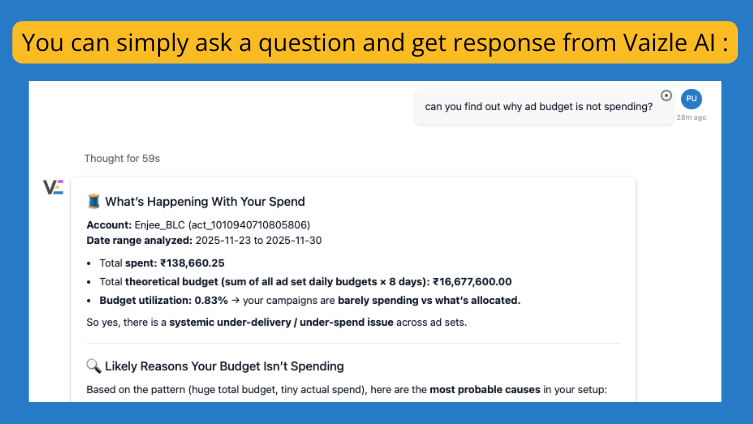
Best part? You don’t have to deep dive in any dashboards or reports. You just have to ask your question in plain language and Vaizle AI will have your answer ready within seconds.
1. What's a good starting budget for Facebook ads?
It depends on your campaign objective. Traffic campaigns can start at $10-20/day. Lead generation needs $20-50/day minimum. Conversion campaigns require $50-100/day per ad set to exit learning phase and optimize properly.
2. Should I use daily budget or lifetime budget?
Use daily budgets for predictable, consistent delivery and tight spend control. Use lifetime budgets when running campaigns longer than 7 days and you want Meta to optimize spend timing. Lifetime budgets perform better for campaigns where conversion patterns vary by time of day or day of week.
3. What's the difference between CBO and manual ad set budgeting?
Advantage Campaign Budget (CBO) sets one budget at campaign level and lets Meta distribute it across ad sets based on performance. Manual budgeting gives each ad set its own budget, giving you full control over distribution. Use CBO when testing multiple audiences. Use manual budgets when you need guaranteed spend on specific segments.
4. How long should I wait before adjusting my budget?
Wait at least 5-7 days after any budget change before making another adjustment. The algorithm needs time to recalibrate and stabilize performance. Daily fluctuations are normal—make decisions based on multi-day trends, not single-day results.
5. Why is my Facebook ad campaign not spending my full budget?
Common causes include bid cap set too low, audience too narrow (under 50K people), stuck in learning phase, poor ad quality or relevance, conversion window misalignment, campaign overlap causing auction competition, or account spending limits. Check your delivery status in Ads Manager for specific guidance.
6. What's the 20% rule for scaling Facebook ads?
Don’t increase budget by more than 20% at a time to avoid resetting learning phase and destabilizing performance. This rule applies mainly to conversion campaigns. You can break it for Traffic or Engagement campaigns, or during time-sensitive opportunities where speed matters more than stability.
7. How much budget do I need to test new creatives?
Allocate 20-30% of your total budget to creative testing. For individual creative tests, run each variation with at least $50-100 in spend before making decisions. You need enough impressions and clicks to determine if poor performance is due to the creative or just insufficient data.
8. What's the best way to reduce cost per result?
First, ensure you’re past learning phase with stable delivery. Then test new audiences, refresh creative to combat fatigue, adjust your optimization event (optimize for a higher-funnel action if conversions are too rare), use cost cap bidding to control efficiency, or reallocate budget away from high-frequency, high-cost ad sets toward fresh audiences.
9. Can I change my budget during the learning phase?
You can, but it restarts learning phase and creates performance instability. If you must adjust during learning, keep changes small (10% or less) and wait at least 3-4 days to see how it affects delivery. Ideally, set your budget correctly from the start and let learning phase complete without changes.
10. What happens if my budget runs out mid-day?
Your ads stop delivering until the next day (for daily budgets) or until the campaign end date (for lifetime budgets). This creates inconsistent delivery patterns. If this happens regularly, increase your daily budget or switch to lifetime budget so Meta can pace spending more effectively across your campaign duration.
11. How do I know if I'm spending too much or too little on Facebook Ads?
You’re spending too little if your budget utilization is below 80%, you’re stuck in “learning limited” status, or your frequency is below 1.5 (not reaching your audience enough). You’re spending too much if frequency exceeds 4.0, CPA is rising despite optimizations, or you’re hitting diminishing returns where additional budget doesn’t improve results.
12. What's the minimum budget for ROAS bidding?
ROAS bidding requires higher budgets than other strategies because Meta needs consistent conversion data to optimize. Start with at least $100-150/day for ROAS campaigns. Lower budgets struggle to generate enough purchases for the algorithm to hit your ROAS target reliably.
Purva is part of the content team at Vaizle, where she focuses on delivering insightful and engaging content. When not chronically online, you will find her taking long walks, adding another book to her TBR list, or watching rom-coms.