









Choosing an AI tool for Meta Ads gets confusing fast. Almost every product describes itself as an optimizer, copilot, assistant, or AI agent. But these tools often solve completely different problems.
Some analyze your actual ad account and explain why performance changed. Some generate creatives. Others can launch campaigns, adjust budgets, pause ads, or automate repetitive media-buying tasks.
That distinction matters. A creative generation tool cannot diagnose wasted spend across your campaigns. An analytics workspace should not be mistaken for an autonomous media buyer.
We compared 15 of the best AI tools for Meta Ads based on:
The tools are grouped by what they do best. Vaizle is our best overall choice because it gives marketing teams one place to understand Meta Ads alongside the rest of their marketing and turn recurring analysis into repeatable workflows. The other products make sense when you need a specialist to execute a narrower job.
Features and prices were checked on September 1, 2026.
For most marketing teams, Vaizle is the best overall AI tool for Meta Ads. It connects advertising, social, web analytics, ecommerce, creative, and competitor sources, then turns that context into analysis, reports, scheduled checks, and agents you can run again.
In the table below, “campaign control” means the tool can create, publish, pause, or modify campaigns, budgets, or bids. A “No” does not make a tool less useful. It means the product is designed for analysis, reporting, or creative work instead of media-buying execution.
| Tool | Best for | Uses account data? | Campaign control | Starting price |
| Vaizle | Connected marketing analysis and reporting | Yes | No | $9/month |
| Meta Advantage+ | Native Meta delivery and campaign automation | Yes | Native automation | Included with ad spend |
| Madgicx | Meta optimization, creative analysis, and assisted execution | Yes | Assisted or automated workflows | From $99/month, spend-based |
| AdAmigo.ai | Autonomous Meta and Google campaign management | Yes | Approval or autopilot | From $99/month |
| Ryze AI | Autonomous paid-ad management across channels | Yes | Yes, with approval controls | $89/month |
| Bïrch | Custom rules for bids, budgets, and campaign status | Yes | Rule-based | From $49/month |
| Koast | Bulk launching and multi-account Meta ad operations | Yes | Publishing and automation | From $79/month on its public pricing page |
| Atria | Creative research, intelligence, production, and launching | Yes | Batch launching | From $129/month, annual billing |
| Segwise | Creative tagging, fatigue detection, and strategy | Yes | No budget or bid changes | From $499/month |
| Superads | Creative analytics and cross-channel reporting | Yes | No | From $125/month, annual billing |
| ADEN’S LAB | Static Meta ads generated from a product page | No | No | From $59/month after introductory pricing |
| AdCreative.ai | High-volume image, copy, and video generation | Optional integrations | No | From $39/month |
| Marpipe | Catalog creative, product feeds, and SKU optimization | Feed and catalog data | Catalog workflows only | Free feed plan; creative from $199/month |
| AdScale | Ecommerce advertising across Meta and Google | Yes | Yes | From $169/month, spend-based |
| Smartly.io | Enterprise creative and media automation | Yes | Yes | Custom pricing |
AI tools for Meta Ads fall into five broad categories. Knowing the category is more useful than comparing feature counts across unrelated products.
These tools connect to your ad account and help you investigate performance, create reports, spot wasted spend, and share findings. They may combine Meta data with Google Ads, social channels, web analytics, ecommerce, or competitor data.
They usually have read access. They do not change campaigns. This makes them useful when you want faster analysis without handing over budget control.
Meta Advantage+ uses Meta’s own models to automate targeting, placements, budget distribution, delivery, and parts of creative adaptation. It works inside Ads Manager and has access to signals that third-party tools do not receive in the same form.
The trade-off is scope. Native automation optimizes within Meta. It does not compare whether your next dollar should move to Google, TikTok, or another channel.
These products can create campaigns, change budgets, pause underperforming ads, launch new creatives, or run scheduled checks. Some use fixed if-then rules. Others use an agent that recommends or executes a change.
The important question is not whether a vendor calls the product an agent. Ask what actions it can take, what needs approval, how frequently it checks the account, and whether every change is logged.
Creative intelligence tools connect performance data to ad content. They can tag ads by hook, format, product, angle, scene, or message and show which patterns correlate with results.
Creative generation tools solve a different problem. They produce images, videos, copy, or variations. Some combine both functions, but a predicted creative score is not the same as performance data from a live campaign.
Catalog tools use a product feed to create or improve ads across hundreds or thousands of SKUs. They can add prices, discounts, product attributes, branded frames, localized offers, or product-level videos.
These tools are valuable for ecommerce teams running Advantage+ catalog ads. They are less relevant to lead-generation, SaaS, or service businesses that do not advertise from a product catalog.
We did not rank products based on the largest ROAS claim on a vendor homepage. Those results come from different accounts, attribution models, budgets, and test conditions, so they are not directly comparable.
Instead, we used seven practical questions.
An AI ad generator may produce attractive assets without knowing what has worked in your account. An analysis or optimization tool should connect to campaign, ad set, ad, conversion, and cost data rather than relying only on a screenshot or exported summary.
Read-only analysis, approval-based execution, rule-based automation, and unrestricted autopilot carry different levels of risk. The right option depends on the team’s experience, account size, and tolerance for automated changes.
A useful tool should show why it recommends pausing an ad, raising a budget, or replacing a creative. Change logs, approval queues, guardrails, and visible thresholds matter more than a vague promise of continuous optimization.
Meta-only depth may be ideal for a specialist. An agency or marketing lead may need Meta, Google, TikTok, LinkedIn, GA4, Shopify, social pages, and competitor data in the same workflow.
Check whether the tool analyzes static images, video frames, transcripts, metadata, copy, landing pages, or only performance metrics. “Creative analysis” can mean very different things across products.
Agencies need consolidated views, account-level permissions, repeatable naming conventions, shared workflows, and clear change histories. A tool that works well for one store may become awkward across 30 client accounts.
A $500 creative intelligence platform can be reasonable for a team spending $250,000 a month and testing hundreds of assets. It makes little sense for a local business spending $1,500. Starting price needs to be considered alongside spend limits, account limits, credits, and required seats.
Best for: Marketing teams and agencies that need to understand Meta Ads in the context of the rest of their marketing.
Vaizle is an all-in-one marketing workspace. Meta Ads analysis is one part of a wider environment that can connect paid advertising, social pages, web analytics, ecommerce, and competitor sources.
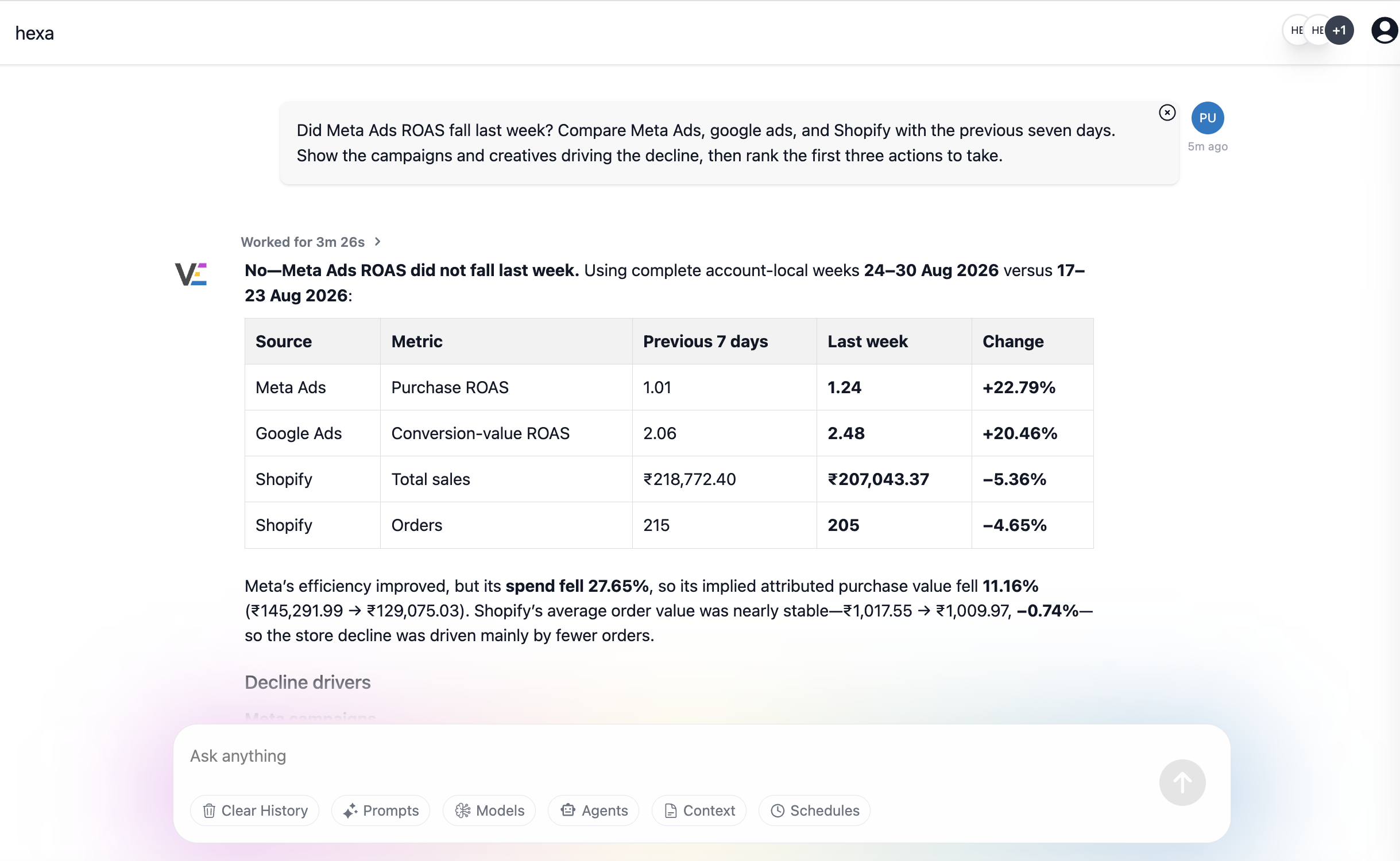
This matters when the answer is not sitting inside a single campaign table. A drop in Meta conversions may need to be checked against landing-page traffic in GA4, branded demand in Search Console, Shopify sales, a creative change, or a shift in another paid channel. Vaizle lets you investigate those sources together and turn the output into charts, tables, reports, scheduled email checks, or connected Google Sheets.
The useful part is the context around the analysis, not simply the ability to type a question. You can keep account-specific instructions, use follow-up questions, compare multiple ad accounts or platforms, and reuse the resulting workflow instead of rebuilding the same report every week.
Vaizle can also examine static ad creatives and competitor ads to break down offers, messaging, formats, and visible creative patterns. For video, it currently uses available metadata rather than frame-by-frame visual analysis.
Explore Vaizle’s dedicated workflows for Meta Ads analysis, Meta Ads reporting, and Meta Ads auditing.
2. Meta Advantage+: Best starting point for native Meta automation
Best for: Advertisers who want Meta to automate campaign setup and delivery without adding another subscription.
Meta Advantage+ is a suite of automation features inside Meta Ads Manager, not a separate software product. It can automate or expand audience selection, distribute campaign budget, choose placements, optimize delivery, and adapt parts of the creative.
Advantage+ campaign options now cover major objectives such as sales, leads, and app promotion. Advantage+ creative can also generate or apply variations, resize assets, and make placement-specific adjustments.
The strongest reason to use it is proximity to Meta’s delivery system. Meta controls the auction and has direct access to platform signals. A third-party tool cannot replace that delivery layer.
The limitation is that Meta’s automation works toward the objective and conversion data you provide inside Meta. It does not give you an independent cross-channel view, detailed client reporting, or a neutral recommendation about moving spend away from Meta.
Advantage+ is often the right base layer. Third-party tools become useful when you need clearer reporting, account-wide guardrails, creative intelligence, multi-account workflows, or automation across more than Meta.
Best for: Ecommerce advertisers and Meta specialists who want analysis, creative tools, tracking, and optimization in one platform.
Madgicx connects to an ad account, audits it continuously, and surfaces recommendations through its AI Marketer. It covers more than recommendations: the wider platform includes an ad launcher, creative analysis, fatigue detection, reporting, audience tools, tracking, and automation.
Its execution model deserves a precise description. AI Marketer prepares recommended changes, ads, or audiences so the user can review and click “Launch.” Other Madgicx agents and automation features can handle more repetitive work, but the platform is not simply a black-box replacement for account strategy.
Madgicx suits a team that wants to stay involved in decisions while reducing the time spent auditing and preparing changes.
Best for: Brands and agencies that want one agent to design, launch, monitor, and optimize ads across Meta and Google.
AdAmigo.ai works more like an AI media buyer than a reporting assistant. You define goals, targeting restrictions, budget limits, naming conventions, and other guardrails. The system then recommends daily actions, which can be approved manually or placed on autopilot.
The platform also supports creative generation, bulk launching, account audits, anomaly detection, and chat-based campaign operations. Its monitoring can flag setup errors, unusual spend, broken links, disabled ads, and other account problems.
AdAmigo is a strong fit when the goal is active execution. It is unnecessary if you only want reporting or occasional analysis.
Best for: Teams that want automated execution across several paid channels without a fee tied to ad spend.
Ryze AI positions its Paid Ads Autopilot as an execution layer rather than a recommendation feed. It audits connected accounts, adjusts bids and budgets, detects wasted spend, rotates creative, and supports approval controls.
Its paid-ads plan covers Meta, Google, TikTok, and LinkedIn, with other data integrations available. Ryze also sells separate SEO, GEO, CRO, and done-for-you ecommerce plans, but those should not be confused with the $89 paid-ads product.
Ryze is most compelling for a team that runs more than Meta and wants an execution tool without percentage-of-spend pricing.
Best for: Experienced media buyers who know the conditions and actions they want to automate.
Bïrch, formerly Revealbot, gives marketers a visual rule builder with custom conditions, timeframes, external data, and more than 20 possible actions. Rules can pause an ad, increase or decrease a budget, start a campaign, send a notification, or run another predefined response.
It also includes automation logs, Slack and email notifications, reusable strategies, bulk ad creation, post boosting, creative exploration, and reporting. Rules can run as frequently as every 15 minutes.
The main advantage over an opaque agent is control. You can see the exact condition that fired and the exact action taken.
Bïrch is a good choice when your team prefers explicit if-then logic over an agent deciding what should happen.
Best for: Agencies and performance teams that publish large creative batches and manage many Meta ad accounts.
Koast has expanded from a bulk launcher into an operating system for Meta ad operations. Teams can pull assets from Frame.io, Google Drive, or Dropbox, group placement sizes, apply saved naming conventions and UTMs, and launch a batch across several accounts.
Its agent tasks add scheduled or trigger-based work such as morning account triage, creative-fatigue audits, stop-loss checks, client recaps, and month-end forecasts. Routine actions can run automatically, while sensitive changes can wait in a sign-off queue. Attribution data can also come from Cometly or Hyros.
Koast is especially useful when campaign setup and account switching consume more time than strategic analysis.
Best for: Performance and creative teams that want competitor research, account insights, asset management, generation, and launching in one workflow.
Atria combines a large ad inspiration library with creative analytics, AI tagging, customer-review research, asset organization, ad generation, and batch launching to Meta. Its Raya strategist turns performance and competitor patterns into concepts, hooks, scripts, copy, and visual directions.
Atria also offers an MCP server and API, which lets teams access parts of the workflow from compatible AI tools or their own systems. Plans differ by connected accounts, analyzed ad spend, storage, brands, seats, and AI credits.
Choose Atria when the bottleneck sits between discovering a winning idea and getting a new batch of ads live.
Best for: Mobile apps, games, DTC brands, and performance teams with substantial creative volume across several networks.
Segwise connects creative assets to performance data and automatically tags elements such as hooks, formats, scenes, messages, and products. It can group similar assets, track fatigue, identify winning patterns, monitor competitors, and turn findings into new creative strategy or generated assets.
Its integrations include more than 15 ad networks and mobile measurement partners such as AppsFlyer, Adjust, Singular, and Kochava. This makes it especially relevant to app-growth teams that cannot evaluate creative through Meta data alone.
Segwise stands out when the question is not only which ad won, but which repeatable creative elements won across channels.
Best for: Brands and agencies that want customizable reporting, creative tagging, and competitor inspiration without campaign execution.
Superads analyzes connected ad accounts, builds boards and reports, and automatically tags ads by format, hook, product, angle, and other creative attributes. Its creative score uses the advertiser’s own historical data to compare hook, hold, click, and conversion performance.
It supports Meta, Google, TikTok, and LinkedIn reporting. Competitor tracking and shared inspiration collections are also live. Superads promotes recurring agents that send insights to Slack or email, but its current product page still marks that delivery workflow as coming soon.
Superads fits teams that want creative analysis to be visible to both media buyers and creative staff.
Best for: Ecommerce brands that need a high volume of static ads from an existing product or landing page.
ADEN’S LAB turns a public URL into finished static image ads. It reads the page’s product details, offer, brand cues, and visuals, then generates different hooks and layouts without requiring a written prompt or creative brief.
The narrow scope is the benefit. It is designed for static Meta ads, not general design, reporting, or campaign management. The output is downloaded and launched manually.
ADEN’S LAB is useful when a brand already knows what it sells but cannot produce enough static variations for testing.
Best for: Small businesses and agencies that need images, ad copy, product visuals, and several types of video from one generator.
AdCreative.ai covers more formats than a Meta-only static generator. It can produce banners, text, product photoshoots, fashion images, product videos, and UGC-style videos. It also includes custom templates, creative scoring, creative insights, competitor research, and compliance checks.
Ad-platform integrations can bring performance information into its insight features, but the product’s primary role remains creative production and prediction rather than campaign operation.
Choose AdCreative.ai when format coverage matters more than deep Meta account automation.
Best for: Ecommerce brands that rely on Advantage+ catalog ads and need better control over how every SKU appears.
Marpipe treats the product feed as a creative and performance system. Teams can add branded catalog designs, produce product-level videos, manage feeds, generate catalog variations, and filter weak products through SKU optimization.
This is different from making a batch of standalone image ads. Marpipe applies a design or rule across a live catalog, so product images, prices, discounts, and other fields stay connected to the feed. Output feeds can support Meta and other commerce-focused channels.
Marpipe is strongest when plain product-feed images are holding back otherwise sound catalog campaigns.
Best for: Shopify and ecommerce brands that want advertising, customer data, email, and SMS in one ecommerce-focused system.
AdScale uses store data, advertising history, and customer segments to build and optimize campaigns across Meta and Google. Its tools include campaign creation, budget allocation, audience segmentation, creative generation, performance monitoring, and product-level ecommerce workflows.
Unlike Marpipe, which focuses mainly on feeds and catalog creative, AdScale covers a larger acquisition and retention system. That broader scope can reduce tool switching for a small ecommerce team.
AdScale fits an ecommerce operator who wants one system to coordinate paid acquisition and customer data across Meta and Google.
Best for: Large brands and agencies that need creative production, media execution, and measurement across markets and channels.
Smartly.io connects creative and media workflows at enterprise scale. Teams can build and personalize large creative sets, launch and update campaigns, manage cross-channel media, and view performance through a central intelligence layer.
Its value appears when advertising operations involve many markets, product feeds, approval processes, teams, and channels. That is a different requirement from helping one media buyer optimize a few Meta campaigns.
Smartly.io belongs on an enterprise shortlist where governance and global scale matter as much as individual campaign features.
Searches for Meta catalog AI tools often mention Hunch, Confect, and BigAtom. They overlap with Marpipe, but each enters the problem from a different direction.
| Tool | Best fit | What it adds to catalog ads | Pricing |
| Hunch | Retailers and agencies running large, localized paid-social catalogs | Enriched dynamic ads, product video, creative localization, product insights, and bulk campaign automation across Meta, Snapchat, and TikTok | Contact sales |
| Confect | Ecommerce teams focused on catalog design control | Drag-and-drop layouts, dynamic product layers, product fields, design rules, placement-specific formats, and scheduled promotional treatments | See current vendor plans |
| BigAtom | Shopify brands focused on SKU performance and spend control | Dynamic overlays, discount and stock badges, product segmentation, SKU analytics, stop-loss logic, and feed management | Shopify plans start around $299/month |
Meta itself now supports templates and dynamic overlays for Advantage+ catalog ads. That may be enough for a small catalog with simple branding needs.
A specialist platform becomes useful when you need complex design rules, thousands of localized variations, custom feed transformations, product-level video, SKU-level reporting, or workflow support across several ad accounts and channels.
Start with Meta Advantage+ and accurate conversion tracking before paying for several external tools. Add a read-only workspace such as Vaizle when reporting and diagnosis take too long, or a narrow creative generator when ad production is the bottleneck.
At low spend, avoid tools whose monthly fee consumes a large share of the advertising budget. Limited campaign data also makes aggressive automation more likely to react to noise.
Match the tool to the constraint:
Account switching, repeatable reporting, permissions, and change history matter more as the client list grows.
Koast is well suited to high-volume Meta launches and shared operational workflows. Bïrch is strong for applying controlled automation across accounts. Vaizle can analyze multiple accounts and connect paid, social, web, and competitor sources without campaign write access. Atria and Segwise add deeper creative operations when clients produce large asset volumes.
If reporting across several Meta accounts is the immediate problem, see this workflow for analyzing multiple Facebook ad accounts at the same time.
Smartly.io is the clearest enterprise option in this list. Hunch and Segwise also fit larger creative and catalog operations. Enterprise buyers should assess security, regional data requirements, role-based access, service levels, onboarding, and support alongside product features.
Meta Advantage+ and third-party tools are not direct substitutes in every case.
Advantage+ controls delivery inside Meta. It can choose who sees an ad, where it appears, how budget moves, and which eligible creative variation is served. A third-party tool generally works above that layer by improving inputs, reading results, coordinating workflows, or sending permitted changes through Meta’s APIs.
Use Advantage+ alone when:
In many mature setups, Advantage+ remains the delivery engine while another tool handles analysis, creative operations, reporting, or governance.
An AI Ads Manager can replace a meaningful amount of repetitive execution. It can monitor pacing, flag anomalies, prepare reports, apply stop-loss rules, launch approved creatives, and make defined budget changes faster than a person checking accounts manually.
It does not remove the need for business judgment.
The system still needs someone to decide:
The strongest setup is usually human-controlled automation. Let software handle frequent checks and repeatable actions. Keep goals, guardrails, experiments, and unusual decisions with an experienced operator.
Giving an AI tool campaign access should be treated like giving a new media buyer access. Start with limits.
For a practical diagnostic starting point, use this guide to identify wasted spend in Meta Ads before deciding what should be automated.
Do not choose a Meta Ads AI tool because it has the longest feature list. Choose it based on the job that currently slows your team down.
Use native Advantage+ features for delivery. Add a campaign automation tool when frequent account actions are the bottleneck. Add a creative platform when your team cannot produce or learn from enough ads. Add a catalog specialist when product-feed creative needs more control.
If the real problem is understanding what is happening across Meta Ads and the rest of your marketing, use Vaizle as the connected workspace. It brings paid channels, social, web, ecommerce, and competitor data together so your team can investigate performance, build reports, and run repeatable workflows without handing over campaign control.
Bring Meta Ads Into One Marketing Workspace
Vaizle connects Meta Ads with your other paid channels, social pages, GA4, Search Console, Shopify, and competitor sources. Investigate performance, compare accounts, build reports, and schedule repeatable checks without giving Vaizle permission to change your campaigns.
There is no single best tool for every Meta advertiser. Vaizle is suited to connected analysis and reporting. Meta Advantage+ handles native delivery automation. AdAmigo and Ryze focus on autonomous execution. Bïrch offers rule-based control. Atria, Segwise, and Superads focus more heavily on creative intelligence.
Choose based on the task you want the tool to own.
For Meta-only creative reporting, Superads and Segwise are strong options. For analysis that needs to connect Meta Ads with other paid channels, social pages, GA4, Search Console, Shopify, or competitor data, Vaizle is the broader marketing workspace.
If you prefer to work inside Claude through a direct connector, you can also follow this guide to connect Facebook Ads to Claude using a Meta Ads MCP.
Vaizle, Madgicx, AdAmigo, Ryze, Bïrch, Koast, Atria, Segwise, Superads, AdScale, and Smartly.io can use connected advertising data.
ADEN’S LAB generates ads from a webpage rather than campaign history. AdCreative.ai can connect advertising platforms for creative insights, but its primary job is generating and scoring creative.
Meta Advantage+, AdAmigo, Ryze, Bïrch, Koast, AdScale, and Smartly.io can execute campaign actions within their supported workflows. Madgicx can prepare and launch changes through its optimization and automation tools. Atria supports creative batch launching.
Vaizle, Segwise, and Superads are primarily analysis or intelligence tools and do not act as autonomous budget managers.
Ryze supports paid-ad workflows across Meta, Google, TikTok, and LinkedIn. Bïrch supports automation across Meta, Google, TikTok, and Snapchat. Vaizle connects Meta, Google, LinkedIn, and TikTok Ads for analysis. Segwise connects more than 15 networks.
AdAmigo currently supports Meta and Google, with TikTok listed for later in 2026. Always verify a channel is live for the specific action you need, since reporting support and campaign write access are not the same.

Purva is part of the content team at Vaizle, where she focuses on delivering insightful and engaging content. When not chronically online, you will find her taking long walks, adding another book to her TBR list, or watching rom-coms.
Connect your marketing channels, ask questions, compare performance, and get reports without jumping between dashboards.
Copyright @VAIZLE 2026
