










If you run Meta Ads for a Shopify store, you’ve probably been here before.
You open Ads Manager and see one set of numbers. Then you check Shopify and the picture looks different. Purchases don’t line up. Revenue feels off. ROAS looks better in one place and worse in the other. And now you’re left wondering what’s actually true.
This is one of the most common frustrations in ecommerce. It also makes people panic faster than they should. Because when the numbers don’t match, the first reaction is usually: something is broken.
But that’s not always what’s happening.
A lot of the time, Meta Ads and Shopify are simply reporting differently. They track people in different ways, count conversions differently, and attribute sales based on different logic. So even when your setup is fine, the numbers can still look inconsistent.
That’s where most of the confusion begins.
In this article, we’ll break down why Meta Ads and Shopify numbers don’t match, what usually causes the gap, and how to compare both platforms without drawing the wrong conclusion.
Table of Content:
Think of it this way. Shopify is a store operator. Its job is to count every order and figure out which channel sent the customer. Meta is a media platform. Its job is to give you a platform to run ads, reach more people, and ultimately show you the value it delivered from your ad spend.
Those are genuinely different jobs. So, different numbers aren’t really a glitch. It is just the expected output of two systems doing their own thing correctly.
Here’s how each platform approaches a “purchase”:
| Platform -> | Meta Ads Manager | Shopify |
|---|---|---|
| Primary job | Measure ad impact | Count and attribute orders |
| Attribution method | Ad interactions (clicks + views) within a set window | Last trackable click or UTM tag |
| Counts view-through conversions? | Yes, by default | No |
| Cross-device matching? | Yes (logged-in identity) | Partially |
| Includes canceled orders? | No | Sometimes |
| Built for | Media buyers | Store operators |
If you’re new to Meta ads, our Facebook Ads guide for beginners covers the basics of how the platform works and operates results.
The gap between the two platforms usually comes down to one or more of these six causes. Some are structural, so they’ll always exist. Others are fixable with the right tracking setup.
Let’s discuss different reasons why your Meta ads and Shopify numbers don’t match, and figure out which issues can actually be corrected.
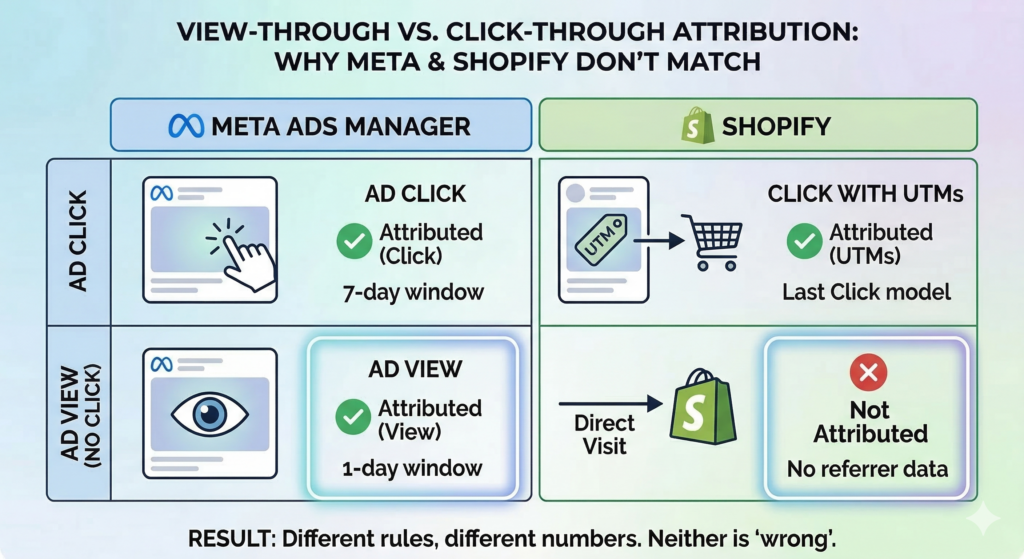
Meta’s default attribution setting is 7-day click, 1-day view. Any purchase that happens within 7 days of someone clicking your ad gets credited to that ad. This is applicable even if the customer visited three other sites in between and came back via Google.
Shopify looks at things more differently. It usually gives credit based on the last UTM-tagged session before the purchase. So if there is no UTM data attached to that final visit, Shopify may not give Meta credit at all.
That difference alone can create a huge gap for the exact same customer journey.
For example, let’s say a customer first sees your Meta ad on March 1 and clicks it on March 3. A few days later, on March 6, they click a link from one of your emails. Then on March 9, they come back directly to your store and make the purchase.
In Meta’s view, that sale can still be credited to the ad because the purchase happened within 7 days of the ad click. In Shopify’s view, the story may look completely different. Since the customer interacted with email later in the journey, or returned directly without a tagged session, Shopify may not attribute that sale to Meta at all.
So when you compare both dashboards, it looks like one of them is over-reporting. In reality, both are just following their own attribution rules. Let’s look at this table:
| Attribution Setting | Who Gets Credit | Why |
|---|---|---|
| Meta, 7-day click | Meta ad | Purchase falls within 7 days of the Meta click |
| Meta, 1-day click | No Meta credit | Purchase is outside the 1-day window |
| Shopify, Last click | Direct | Final session had no UTM |
| Shopify, Last non-direct click | Direct excluded; email was the last real touch | |
| Shopify, First click | Meta paid social | First touchpoint gets 100% |
| Shopify, Any click | Meta + Email (both) | Each clicked channel gets full credit |
Here we have one purchase and six reporting possibilties. None of them are technically wrong.
Attribution is the single biggest structural reason for both platforms reporting different numbers.
Meta does not always need a click to claim a conversion. It also uses view-through attribution, which means that if someone sees your ad, does not click it, and then makes a purchase within 1 day, Meta may still count that sale as influenced by the ad.
Shopify is never going to see that the same way.
From Shopify’s side, there was no ad click, no UTM parameter, and no referrer telling it that Meta played a role. So as far as Shopify is concerned, that customer simply arrived on the site and bought. In many cases, the order gets bucketed under “Direct” instead.
This is especially common with remarketing campaigns. Think about someone who already knows your brand and was probably close to buying anyway. They see your retargeting ad while scrolling, do not click, but later type your website directly into the browser and place the order. Meta may count that as a conversion because the ad was viewed shortly before the purchase. Shopify will almost certainly not.
One practical way to reduce this reporting gap is to switch Meta reporting to 7-day click only when you are trying to reconcile numbers with Shopify. That usually makes the comparison cleaner because you are removing view-through conversions from the equation.
View-through data can still be useful. It helps you understand whether your ads are contributing to awareness or nudging people who were already close to converting.
This is also one of the main reasons Meta Ads ROAS looks inconsistent across reporting periods when you’re comparing dashboards instead of isolating attribution settings. Here are some other reasons why your ROAS might be down ->
Sometimes the confusion is not about conversion count at all. Both Meta and Shopify may agree that a purchase happened, but the revenue attached to that purchase still looks different.
That is because both platforms are not using the same definition of purchase value.
Meta usually captures the full order value passed at checkout. In many cases, that includes the product subtotal, shipping, and tax. Shopify’s marketing-attributed sales reporting is usually more conservative. It focuses more on the product value itself, excludes shipping and tax, and can also reflect returns or refunds later on.
So the order is the same, but the revenue formula is not.
Let’s say a customer places a $120 order made up of:
Meta may show that order as $120 in revenue. Shopify may show it closer to $89.
So, nothing is broken here. The two platforms are simply adding up different parts of the same transaction.
That is why revenue gaps often feel bigger than purchase gaps. You might see one purchase in both dashboards and still assume something is wrong because the value attached to that purchase does not match.
A simple way to think about it is this:
| What’s Included | Meta Ads Manager | Shopify “Sales” Report |
|---|---|---|
| Product subtotal | Yes | Yes |
| Shipping | Yes | No |
| Tax | Yes | No |
| Discounts | Varies | Deducted |
| Returns / refunds | Not subtracted | Netted out |
So if your Shopify revenue keeps looking 20 to 25 percent lower than Meta, that does not automatically point to a tracking issue. Very often, it just means Shopify is reporting a cleaner net sales number, while Meta is showing a broader order value.
That difference is easy to mistake for bad attribution, but in many accounts, it is simply a reporting formula issue.
Not every reporting gap happens because Meta is claiming too much credit. In many cases, Meta actually ends up seeing less than what Shopify records. A big reason for that is browser-side tracking loss.
Over the last few years, platforms like iOS Safari have made it much harder for ad platforms to follow users across the web. If someone clicks your Meta ad, browses your store, and comes back later to buy, Meta may not always be able to connect that final purchase to the original click. The tracking window may have expired, the browser may have limited the cookie, or the user may have blocked tracking altogether.
Shopify still records the order because the order happened on your store.
Ad blockers make this even harder. If the Meta Pixel does not fire in the browser, Meta loses one of its main ways of detecting that the purchase happened. Shopify still captures the order because it is the ecommerce platform processing the transaction.
This is important because it creates the opposite problem from view-through attribution.
Earlier, we talked about situations where Meta can look like it is overcounting compared to Shopify. Here, Meta can just as easily end up undercounting because it never received the signal properly in the first place. In most real ad accounts, both of these effects are happening at the same time.
One way to reduce this loss is to use Conversions API through Shopify’s Facebook & Instagram integration. When purchase events are sent server-side instead of relying only on the browser, Meta gets a more reliable signal and can recover some of the conversions that would otherwise be lost to browser restrictions or blocked scripts.
It will not make Meta and Shopify match perfectly, but it does reduce the part of the gap caused by browser-side tracking issues.
If you’re running multiple analytics tools alongside Meta, GA4 fits into the picture really well when browser-side tracking is unreliable.
Using both the Meta Pixel and Conversions API is usually the right move. One sends data from the browser, the other sends it from the server, and together they help you recover more accurate conversion tracking.
The problem starts when both of them report the same purchase, but Meta fails to recognize that it is the same order.
In that case, the browser sends one Purchase event, the server sends another, and Meta may count both as separate conversions. Shopify still shows one order because only one order actually happened. So the mismatch is not coming from attribution here. It is coming from duplication.
This usually happens when deduplication is not configured properly. Meta combines browser-side and server-side events by matching the Pixel eventID with the Conversions API event_id. If those IDs do not match, or if old Pixel code is still firing from your theme or another app, Meta can treat both events as unique purchases.
A quick way to check this is inside Meta Events Manager. Look at the Purchase event and review the deduplication rate. If it is under 80%, that is a strong sign something is off. In Shopify, go to Settings → Customer Events and make sure there is only one active Meta tracking setup.
If Meta is showing unusually high purchase counts compared to Shopify, this is one of the first things worth checking.
Some mismatches do not come from attribution or tracking at all. They come from smaller reporting differences that seem harmless on their own, but can create a noticeable gap when they happen together.
That is why reconciliation works best when you compare weekly data instead of daily snapshots, and wait 48 to 72 hours after the reporting period ends before judging whether the numbers actually line up.
This is the question most teams really want answered after they notice the mismatch.
Based on Vaizle’s analysis of 300+ Shopify ad accounts, a small gap between Meta and Shopify is completely normal. In fact, the goal is not to make both platforms match perfectly. The goal is to understand why the gap exists and whether it stays within a reasonable range.
Here is a practical way to think about it:
| Gap size | What it usually means |
|---|---|
| 10–20% | Usually normal. This is often explained by attribution window differences and revenue calculation differences. |
| 20–30% | Slightly higher than ideal. View-through attribution is one of the first things to check. |
| 30–45% | Worth investigating. This often points to iOS signal loss, browser-side tracking issues, or missing UTM data. |
| 45%+ | Usually a tracking problem. Check Pixel deduplication, Conversions API setup, and UTM propagation. |
The important thing is not chasing a zero gap. What matters is having an explainable gap.
Once you can account for most of the difference through the six causes above, whatever remains is usually just normal measurement noise. What should concern you is a gap that keeps growing month after month, or one that suddenly jumps without any obvious reason. That usually means something in the tracking setup changed and needs to be checked.
The right answer is not to pick one platform as correct and ignore the other. Different business decisions need different data sources, and mixing them up is where most advertisers go wrong.
Here’s a table that will help you decide which platform data to trust in which situation:
| Decision | Use This | Why |
|---|---|---|
| Optimizing Meta campaigns (creative, audience, bidding) | Meta Ads Manager | Includes modeled and cross-device conversions Shopify can’t see |
| Budget allocation across channels | Shopify, last non-direct click | Cross-channel comparison on equal footing |
| Finance and revenue reporting | Shopify completed orders | Actual revenue, net of returns |
| Diagnosing a ROAS drop | Both, side by side | Gap widening = tracking issue; both dropping = real performance problem |
| Scaling decisions | Meta ROAS trend + Shopify order volume | Neither alone tells the full story |
If Meta ROAS looks strong but Shopify order volume isn’t growing, that’s worth investigating & not proof that Meta is lying. When you’re ready to increase spend, you need both numbers moving in the right direction.
Here’s how to scale Facebook Ads without losing ROAS once you have a reliable read on both dashboards.
When Meta Ads and Shopify numbers do not match, most teams jump straight into blaming tracking. That is usually a mistake.
The smarter way is to work through the comparison step by step. In most accounts, the answer becomes clear by the third step. And if the gap is still unusually high after you have ruled out the basics, the deeper tracking checks usually reveal what is going on.
1. Confirm you’re comparing the same KPI. Shopify “Total sales” is not the same as “Sales attributed to marketing,” which is not the same as Meta “Purchase conversion value.” Pick one metric pair and fix it before diagnosing anything else.
2. Align time zones. Shopify store time zone: Settings → General. Meta ad account time zone: Business Settings → Ad Accounts. If they differ, fix it and recheck your daily numbers.
3. Switch Meta to click-only attribution for reconciliation. Set your attribution view to 7-day click, no view-through. This brings Meta’s logic closest to Shopify’s referrer-based model. Once reconciled, add view-through back as a separate column.
4. Audit your tracking setup. In Shopify: Sales Channels → Facebook & Instagram → Data Sharing Settings. Set to Maximum. Check Settings → Customer Events and remove duplicate or legacy Pixel code from your theme.
5. Validate UTM propagation. Open Shopify Analytics → Sessions attributed to marketing campaigns. High “Direct” or “Unknown” during active Meta campaign periods means UTMs are being dropped somewhere in your redirect chain. Fix the UTM structure before drawing any conclusions about performance.
When you are trying to understand Meta performance alongside Shopify outcomes, speed and clarity matter.
Vaizle AI helps you quickly break down campaign, ad set, and purchase trends inside your Meta account, so you can spot attribution patterns, compare click-based performance, and understand where reported results are coming from. Instead of manually digging through multiple views in Ads Manager, you can ask direct questions and get structured answers that make performance analysis faster and easier.
The gap between Meta Ads and Shopify isn’t a problem to eliminate. It’s what happens when two platforms measure the same customer journey from different angles, using different rules.
What matters is whether you can explain the gap. If you can account for most of it using the six causes above, your tracking is in good shape. If the gap is growing or suddenly shifted, run through the checklist.
Use Meta data to optimize Meta. Use Shopify to run your business. Use both together when making scaling decisions.
Want to stop switching between dashboards? Vaizle AI connects to your Meta Ads account and surfaces what actually matters, without the reconciliation headache. Try Vaizle AI →
Meta uses a broader attribution model that includes view-through conversions and cross-device matching. If someone sees your ad without clicking, then buys within 1 day, Meta counts it. Shopify only attributes purchases to trackable clicks with UTM parameters. Meta’s default 7-day click window also captures more of the customer journey than Shopify’s last-click model.
Yes, for most Shopify advertisers running Meta campaigns. The gap comes from attribution window differences, value formula differences (Meta includes shipping and tax; Shopify’s marketing reports exclude both), and view-through attribution. Gaps above 40% usually indicate a tracking or setup issue worth investigating.
View-through attribution counts a conversion when someone sees your ad without clicking, then purchases within a set window — usually 1 day. Meta includes these by default. Shopify never counts impressions as attribution sources, so any view-through conversions Meta claims will never appear in Shopify’s reports. Remarketing campaigns show the most inflation from this.
The Conversions API itself doesn’t cause duplication — but running it alongside the Meta Pixel without proper deduplication does. Meta deduplicates browser and server events only when the Pixel eventID and the CAPI event_id match for the same purchase. If they don’t match, or if legacy Pixel code is still active in your theme, Meta counts two purchases for every one Shopify order.
Neither is more accurate in an absolute sense. Shopify is more reliable for finance and cross-channel budget decisions because it counts actual completed orders. Meta Ads Manager is more reliable for evaluating Meta-specific performance because it accounts for cross-device journeys and modeled conversions Shopify can’t track. Use each for the decision it was built for.
Start by confirming you’re comparing the same KPI in both platforms. Align time zones, switch Meta to click-only attribution, audit your Pixel and CAPI setup for duplication, and check UTM propagation in Shopify’s session reports. Most gaps are explained by one of these five steps.
Because the two platforms calculate purchase value differently. Meta captures the full checkout total including shipping and tax. Shopify’s “Sales attributed to marketing” report excludes both, and nets out returns. A single $120 order can show as $120 in Meta and $89 in Shopify with no tracking error — just different formulas.
iOS 14.5 introduced App Tracking Transparency, requiring user opt-in for cross-app tracking. Most users decline. Combined with Safari’s 7-day cookie cap, Meta loses the ability to connect many purchases back to ad clicks. Shopify still records those orders, but they appear as Direct or Unknown. This causes Meta to undercount relative to Shopify, partially offsetting the overcounting from view-through attribution.

Purva is part of the content team at Vaizle, where she focuses on delivering insightful and engaging content. When not chronically online, you will find her taking long walks, adding another book to her TBR list, or watching rom-coms.
Copyright @VAIZLE 2026
