







Seeing your CTR go up should feel like a good sign.
But in Meta Ads, it can also be one of the most misleading performance shifts if purchases are dropping at the same time.
More clicks do not automatically mean better traffic. In many cases, it means your ads are getting attention from people who are curious enough to tap, but not qualified enough to buy. Sometimes the problem starts with the creative. Sometimes Meta begins spending into a cheaper audience pocket. Sometimes the clicks are real, but the landing page, offer, or checkout experience is where the conversion breaks.
In this guide, we’ll break down why CTR can rise while purchases fall, what this usually tells you about traffic quality and conversion intent, and how to figure out where the drop is actually happening before you make the wrong optimization decision.
When CTR goes up but purchases go down, it usually means your ad is getting more clicks without bringing in better buyers.
That is because CTR and purchases measure two different parts of the funnel.
CTR, or click-through rate, tells you how many people clicked after seeing your ad. It is mostly a signal of how well your creative grabbed attention and how strongly it matched the audience. If CTR is high, your ad likely stopped the scroll. But that does not tell you whether those people were ready to buy.
Purchase conversion rate tells you what happened after the click. It shows how many of those visitors actually completed a purchase. This is affected by your landing page, your offer, your checkout flow, your tracking setup, and the quality of traffic Meta is sending.
So yes, these two metrics can move in opposite directions.
A higher CTR with fewer purchases usually means one of two things. Either your ad is attracting the wrong kind of clicks, or something is breaking after the click. In some cases, Meta gets better at finding people who click cheaply, but not people who convert profitably.
Here’s a simple way to think about it:
| Metric | What It Measures | What Affects It |
|---|---|---|
| CTR | Ad creative + audience match | Hook, visual, copy, targeting |
| Purchase CVR | Post-click funnel performance | Landing page, offer, tracking, objective |
| ROAS | Both combined | Everything above |
So when CTR rises but purchases fall, the issue is usually not just “ad performance.” It is a sign that something is off in the full path from impression to purchase.
Most of the time, this points to one of four problems: broken tracking, the wrong campaign objective, creative that attracts low-intent clicks, or a landing page that loses people after they click.
The next sections will break down each of these.
Before you touch your creative, your audience, or your landing page, check your tracking. This is the step most advertisers skip and it’s the one that quietly ruins more accounts than anything else.
Here’s the issue. After Apple’s iOS 14.5 update, a large share of browser-based pixel signals became unreliable. When someone clicks your ad on an iPhone and buys something, your Meta Pixel often doesn’t see it. The purchase happened. Meta just can’t report it.
According to Littledata, the average Shopify store is missing roughly 20% of its Meta conversions in Ads Manager. That means your purchase count in Meta is probably lower than your actual purchase count. And if Meta can’t see purchases, it can’t optimize for purchases. It optimizes for whatever signal it can see, which is usually just clicks.
That’s how you get a campaign with rising CTR and vanishing purchases. The algorithm isn’t broken. It’s doing exactly what the data tells it to do.
Go to Meta Events Manager and look at your Purchase event. Check three things: is it firing at all, what’s the event match quality score (anything below 6 is a problem), and are you seeing duplicate events from both your Pixel and Conversions API sending the same purchase twice without deduplication.
If your Pixel and CAPI aren’t set up together, that’s your first fix. The Pixel captures browser-side signals. CAPI sends purchase data directly from your server to Meta, bypassing browser restrictions entirely. You need both running with deduplication turned on.
A quick cross-check: compare your purchase count in Ads Manager against your Shopify or WooCommerce dashboard for the same date range. If Ads Manager is showing fewer purchases than your actual backend, tracking is broken. Here’s a full breakdown of why Meta Ads and Shopify numbers don’t match and how to fix it.
The most frequent ones we see are: the Pixel installed on the wrong pages (fires on product pages but not the order confirmation page), the Purchase event set to fire on “Add to Cart” instead of actual purchase, and CAPI set up without deduplication so every purchase gets counted twice, which confuses Meta’s optimization entirely.
Fix the tracking first. Then diagnose everything else.
Assume your tracking is clean. The next place to look is your campaign objective.
Meta’s algorithm does exactly what you tell it to do. If you run a Traffic campaign, Meta finds people who click on ads. These are real people who genuinely click a lot. They’re just not necessarily people who buy things.
The result: strong CTR, low purchases. Not because the campaign is failing. Because it’s succeeding at the wrong goal.
When you choose Traffic as your objective, Meta optimizes your delivery for link clicks. It finds users in your target audience who are statistically likely to click. That pool of people and the pool of people statistically likely to purchase are not the same group.
Switch to a Sales campaign with the Purchase conversion event selected, and Meta’s algorithm starts looking for a different type of person. CTR often drops when you make this switch. Purchase rate goes up. That’s the trade you want.
Even with the right objective, new campaigns go through a learning phase where Meta is still figuring out who your buyers are. During this period, delivery is unstable and purchases are inconsistent even when CTR looks healthy.
Meta needs approximately 50 purchase events within 7 days to exit the learning phase and start optimizing properly. If your cost per purchase is $50, that means you need a minimum spend of around $2,500 per week per ad set just to give Meta enough signal to learn.
Most advertisers don’t budget for this, which means their campaigns stay in learning indefinitely. CTR climbs as Meta finds clickers. Purchases stay flat because Meta never gets enough purchase data to find buyers.
If your budget isn’t hitting that threshold, here’s a guide on how much Meta Ads actually cost.
One more thing worth checking in this section. If you’re using Meta’s Advantage+ audience expansion or you’ve widened your lookalike from 1% to 5%, you may have accidentally traded purchase intent for click volume.
A 1% lookalike of your buyers is a tight group of people who look like people who buy. A 5% lookalike is broader. More people click because the audience is bigger and more curious. Fewer people buy because similarity to your actual buyers has thinned out.
Watch your audience composition alongside your CTR. If reach went up and purchase rate went down at the same time you expanded your audience, that’s your answer.
If Meta is spending your budget normally but purchases still aren’t coming, this breakdown of why Meta spends without converting goes deeper on the objective and learning phase issues.
A high CTR does not always mean your creative is working for the business.
Sometimes it just means the ad is good at getting attention.
That is an important difference. In Meta Ads, a creative can stop the scroll, earn clicks, and still bring in the wrong kind of traffic. Meta’s delivery system looks at signals like estimated action rate and ad quality when deciding who sees an ad. So if your creative attracts curiosity but not real buying intent, you can still end up with clicks that do not turn into purchases.
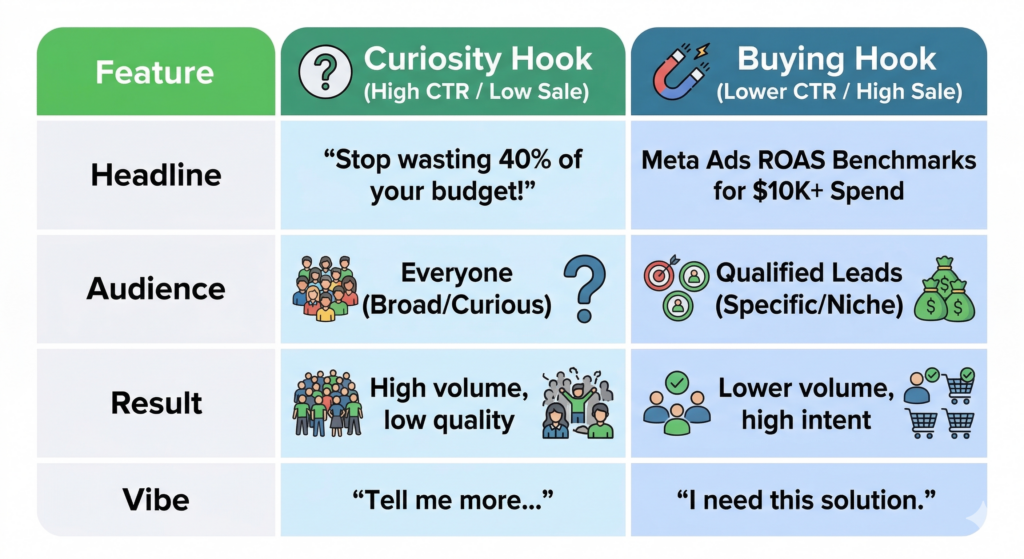
A common example is the curiosity hook.
A headline like “Stop wasting 40% of your ad budget” will attract a wide range of people. Some may be ideal buyers. Others may just be curious. You may also pull in students, beginners, or people who relate to the problem but were never likely to pay for your product.
That is the difference between a curiosity hook and a buying hook.
A curiosity hook pulls in anyone who finds the message interesting. A buying hook filters people in and out before they click. It gives enough context to attract the right audience and turn away the wrong one.
Compare these two headlines:
The first headline is broad. It can attract a lot of clicks from people at very different stages.
The second headline is narrower. It may get fewer clicks, but those clicks are often more qualified because the message already filters for budget, business model, and use case.
That is why CTR alone can be misleading. If your creative is too broad, too dramatic, or too curiosity-driven, it may attract browsers instead of buyers.
When you’re running the same creative to the same audience repeatedly, something predictable happens. CTR holds up for a while because you keep reaching new people in the audience who haven’t seen the ad yet. But as frequency climbs (typically past 3 to 4 impressions per person), the people who haven’t clicked yet are the people who decided not to. You’re paying to show the ad to an increasingly uninterested group.
CTR stays artificially healthy in aggregate. Purchases drop because the pool of likely buyers in that audience is already exhausted.
Check your frequency breakdown by ad set. If frequency is above 3.5 and purchase rate is falling, rotate creative or refresh the audience before touching anything else.
Understanding the anatomy of a Facebook ad, what each element does and who each one filters in or out, helps you build creative that pre-qualifies buyers before they ever click.
You’ve checked your tracking. Your objective is right. Your creative is attracting the right people. But purchases still aren’t coming.
At this point, the problem is what happens after someone lands on your page.
The most common post-click failure is a broken promise. Your ad says one thing, the page delivers something different, and the visitor leaves because they can’t find what they came for.
A few real examples: an ad promoting 50% off a specific product sends traffic to a homepage. An ad showing a blue running shoe sends traffic to a category page with 40 options. A B2B ad offering a free audit sends traffic to a page that immediately pushes a sales call instead.
Every extra step between the click and the thing you promised costs you purchases. Your landing page headline should match your ad headline almost word for word. The offer in the ad should be the first thing visible on the page without scrolling.
Most Meta traffic is on mobile. Most landing pages are designed on desktop. That mismatch shows up directly in purchase rate.
Google’s research found that each additional second of mobile page load time drops conversion rate by roughly 20%. Run your landing page URL through Google PageSpeed Insights. A mobile score below 60 is actively costing you purchases from Meta traffic.
Beyond speed, look at your checkout flow. Required account creation before purchase, too many form fields, and limited payment options (no Apple Pay, no Shop Pay) each add friction at the exact moment someone is ready to buy.
The last post-click issue is about funnel stage, not page design. Cold audiences who have never heard of your brand are being asked to buy on the first interaction.
For low-cost products this sometimes works. For anything above $50, cold traffic typically needs more than one touchpoint before it converts. If the majority of your budget is going to cold audiences with a direct “Buy Now” CTA, the CTR-purchase gap may simply reflect that these people aren’t ready yet, not that your page or offer is broken.
Retargeting campaigns for people who visited but didn’t purchase, combined with a warmer first touchpoint for cold audiences, will usually close this gap faster than optimizing the landing page itself.
If you’re still building out how Meta Ads fits into a full funnel strategy, the Meta Ads guide for beginners covers how to structure cold and warm campaigns together.
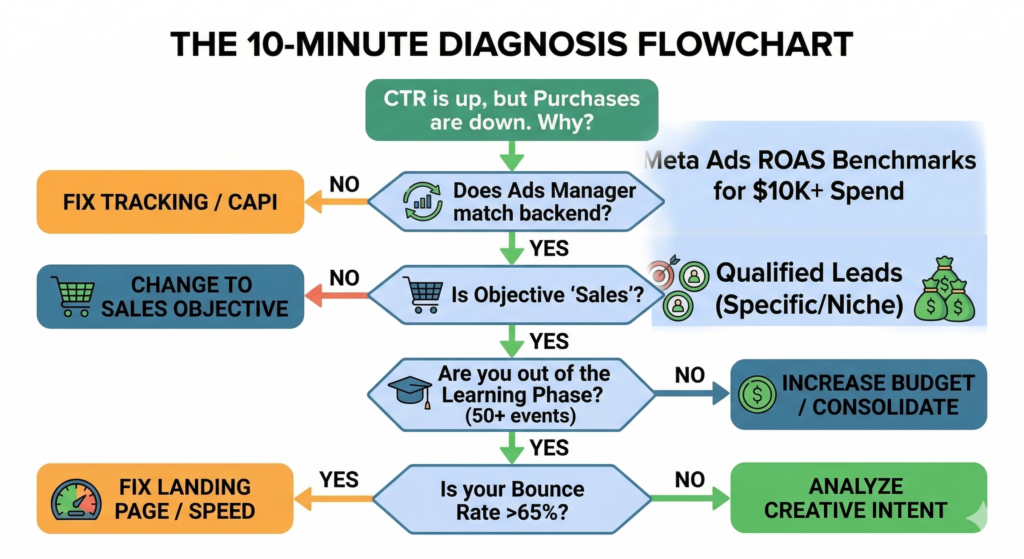
You now know the four places where CTR and purchases split. The faster question is: which one is yours?
Here’s a five-question sequence that narrows it down. Work through it in order.
If Ads Manager shows fewer purchases than your backend, tracking is broken. Start with the pixel and CAPI audit before anything else.
If it’s set to Traffic, Engagement, or any non-purchase event, change it. That alone often closes the gap.
If yes, your budget may not be hitting the 50-conversion weekly threshold Meta needs to optimize. Check your weekly budget against your cost per purchase. If the math doesn’t work, consolidate ad sets or increase budget before diagnosing anything else.
Pull this in GA4 by filtering sessions by source/medium = facebook/cpc (or instagram/cpc). If bounce rate is above 65%, visitors are landing and immediately leaving. That’s a message mismatch or a page speed problem, not an audience problem.
If it happened when you launched a new creative, look at creative type and audience filtering. If it happened when you expanded your audience, check your lookalike percentage and audience size. If it happened gradually with no campaign changes, check frequency and pixel health.
Most accounts have one primary culprit. The sequence above will find it in about 10 minutes.
Going through this manually in Ads Manager means pulling multiple reports, switching between tabs, and cross-referencing numbers that don’t live in the same view.
Vaizle AI connects directly to your Meta Ads account and surfaces this gap automatically. You can ask “why is my CTR up but purchases down?” and get an answer based on your actual campaign data, not a generic checklist.
CTR going up while purchases go down is not a random glitch. It’s a signal that one specific thing in your funnel broke.
Start with tracking. If Meta can’t see your purchases, nothing else you fix will matter. Then check your objective, your creative, and your landing page in that order.
If you want to skip the manual diagnosis, connect your Meta Ads account to Vaizle AI and ask it directly. It pulls the data from your actual campaigns and tells you where the gap is.
High CTR with low ROAS usually means you’re attracting clicks from people who don’t buy. The most common causes are a broad curiosity hook in your creative that attracts the wrong audience, a Traffic campaign objective that optimizes for clicks rather than purchases, or a landing page that loses visitors before checkout.
Not by itself. CTR tells you the ad stopped the scroll. It doesn’t tell you whether the people who clicked were ever going to buy. An ad can have a 5% CTR and a terrible purchase rate if the hook is engaging but the audience it attracts isn’t qualified.
CTR is clicks divided by impressions. It measures ad performance. Purchase conversion rate is purchases divided by clicks (or landing page visits). It measures funnel performance. CTR lives in the ad. Purchase CVR lives everywhere after the click: landing page, offer, checkout, and tracking.
Go to Meta Events Manager and check whether your Purchase event is firing. Then cross-check your Ads Manager purchase count against your actual order count in Shopify or your backend for the same date range. If Ads Manager is showing fewer purchases, your pixel is underreporting. An event match quality score below 6 in Events Manager is another clear signal.
Yes, directly. A Traffic campaign tells Meta to find people who click on ads, not people who buy things. Those are different behavioral profiles. Switching to a Sales campaign with the Purchase conversion event selected tells Meta to optimize for buyers instead. CTR often drops when you make this change. Purchase rate typically rises.
Apple’s iOS 14.5 update (released in 2021) required apps to ask users for permission before tracking their activity across other apps and websites. Most users declined. This cut off a significant portion of browser-based Meta Pixel signals, particularly on iPhone. When an iPhone user clicks your ad and purchases, your Pixel often doesn’t see it. Conversions API (CAPI) fixes this by sending purchase data server-side directly to Meta, bypassing the browser entirely.
Conversions API (CAPI) is a Meta tool that lets you send purchase events directly from your server to Meta, rather than through a browser-based pixel. You need it because iOS privacy changes made browser pixels unreliable for a large share of mobile traffic. Without CAPI, Meta is likely missing 15 to 20% of your actual purchases, which degrades its ability to optimize for buyers. Most major e-commerce platforms (Shopify, WooCommerce, BigCommerce) have native CAPI integrations that take under 30 minutes to set up.
Work through the problems in order. First verify your tracking (Pixel plus CAPI with deduplication). Then check your campaign objective (it should be Sales with the Purchase event). Then check whether you’re in the learning phase (you need roughly 50 purchase events per week per ad set to exit it). Then look at your creative for curiosity hooks that attract browsers rather than buyers. Finally check your landing page for message mismatch, mobile speed, and checkout friction. Most accounts have one primary issue. The tracking check alone resolves the gap for a meaningful number of advertisers.

Purva is part of the content team at Vaizle, where she focuses on delivering insightful and engaging content. When not chronically online, you will find her taking long walks, adding another book to her TBR list, or watching rom-coms.
Connect your marketing channels, ask questions, compare performance, and get reports without jumping between dashboards.
Copyright @VAIZLE 2026
