







Meta spending without conversions is one of the most frustrating problems in paid media because it looks simple from the outside, but usually isn’t.
You see money leaving the account. Traffic is coming in. Impressions are rising. Clicks may even look decent. But purchases, leads, or booked demos do not follow.
At that point, most advertisers jump to the wrong conclusion. They blame the creative, kill the campaign, change the offer, or launch fresh ads before they’ve actually found the leak.
The truth is, Meta can spend and still fail to convert for very different reasons. Sometimes the problem is targeting. Sometimes it is the landing page. Sometimes the algorithm is optimizing for the wrong signal. Sometimes tracking is broken, so conversions are happening but not being reported properly.
This is why the right question is not, “Why is Meta spending so much?” The right question is, “Where exactly is the conversion process breaking?”
In this guide, we’ll break that down step by step so you can diagnose the real issue before making expensive changes.
One quick note before we get into it: Conversion rates on Meta have been declining across most industries over the past two years, and ad costs have gone up. So the first question worth asking is whether you have a real performance problem or whether you’re running into a broader platform trend. We’ll help you figure out which one it is.
Before we get into the root causes for Meta spending but not converting, it helps to understand one thing clearly: Meta does not judge your campaigns the way you do.
Meta is not looking at your actual profit margins, your acceptable CPA, or the number at which your business starts losing money. Its job is simpler than that. Once you set a budget and choose an optimization goal, the system tries to spend that budget by finding people most likely to take the action you told it to prioritize.
That is an important distinction. Because the action Meta is optimizing for and the outcome your business actually cares about are not always perfectly aligned. In some cases, the wrong event is being optimized. In other cases, the event is correct, but the tracking behind it is weak, delayed, or incomplete. And sometimes the ad is doing its job, but the conversion process breaks after the click.
So when spend stays active while conversions stay weak, it does not automatically mean the algorithm is broken. It usually means there is a disconnect somewhere between optimization, measurement, and the actual user journey.
That is exactly where most advertisers go wrong. They assume the problem is the ad, start replacing creatives, and keep spending more money without checking whether the real issue is tracking, funnel friction, offer mismatch, or campaign setup.
To fix Meta ads that are spending without converting, you first need to find where the breakdown is actually happening.
This is one of the hardest problems to spot because broken tracking rarely looks broken.
There is usually no warning inside Ads Manager. No obvious error. No alert telling you that Meta is missing conversions. The numbers just look weaker than expected, and it is easy to assume the campaign itself is underperforming.
That is what makes this root cause so expensive. In many cases, the real issue is not that conversions stopped happening. It is that Meta stopped seeing them properly.
There are two separate problems to check here, and they should not be mixed together.
If you’re running Meta ads in 2026 with only the browser pixel and no Conversions API, you’re making budget decisions based on incomplete data.
After Apple’s iOS 14.5 update, browser-based pixels lost the ability to track a significant portion of iPhone users who opted out of tracking. Estimates vary, but the general consensus among practitioners is that pixel-only setups miss somewhere between 40% and 60% of conversion events on iOS devices.
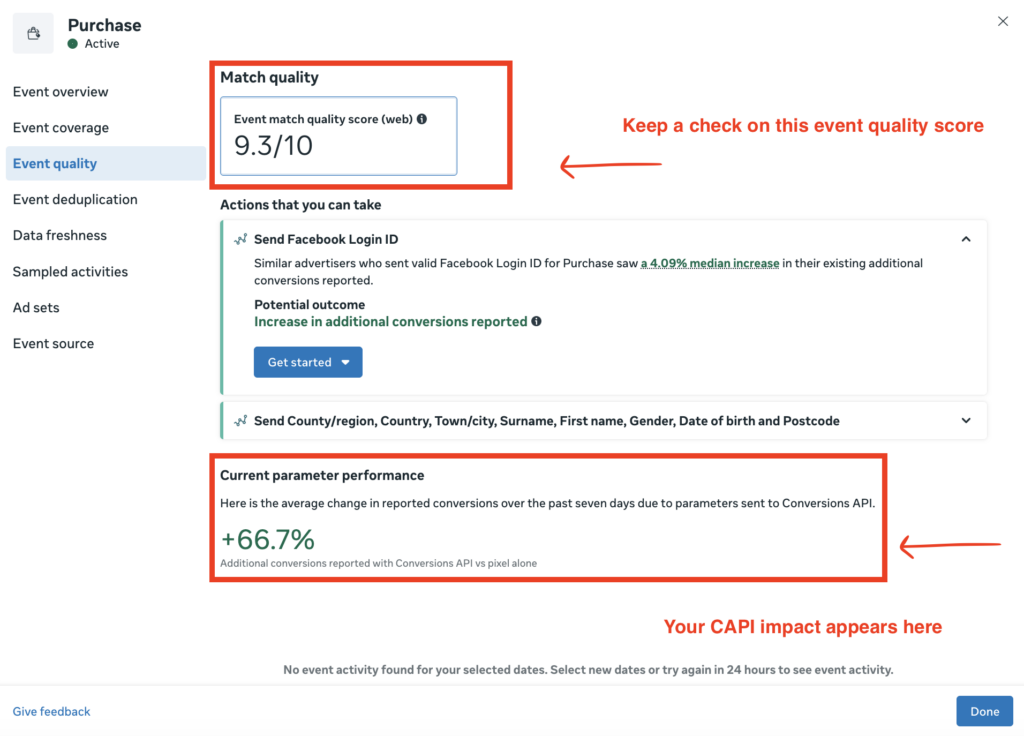
That is why the fix is not to replace the pixel. It is to pair the pixel with Conversions API. The pixel sends browser-side events. Conversions API sends the same events from your server. When both are implemented correctly, Meta gets a more complete view of what is actually happening after the click.
There is one thing that trips people up when they set this up: deduplication.
If the same purchase is sent through both the pixel and Conversions API, Meta has to understand that both signals belong to one event, not two. It does that by matching the eventID from the browser event with the event_id from the server event. If those values do not match exactly, reporting becomes unreliable.
That can create two different problems. Meta may count one purchase twice, or it may fail to process the event cleanly at all. Either way, your reporting gets distorted, and once reporting is distorted, optimization suffers too.
If your Shopify orders and Meta purchase numbers have never properly lined up, this is one of the first things worth checking. Our article on why Meta Ads and Shopify data don’t match goes deep on this specific problem.
Even if your pixel and Conversions API are set up correctly, your reported conversions may still have dropped for reasons unrelated to actual business performance.
In early 2026, Meta changed attribution reporting in Ads Manager. That mattered a lot for advertisers with longer decision cycles, especially B2B brands, higher-ticket ecommerce brands, and offers where people often convert days after seeing an ad rather than immediately after clicking it.
So for some accounts, reported conversions fell sharply even though backend sales did not.
This is why a drop inside Ads Manager should never be treated as proof on its own. Sometimes the business got weaker. Sometimes the reporting view changed.
If your reported conversions suddenly dropped around January or February 2026, but your Shopify orders, CRM revenue, or booked calls stayed relatively steady, your first move should be to review attribution settings before changing campaigns.
Before moving on to the next root cause, compare Meta’s reported conversions with your actual source of truth.
Pull the last 30 days from Shopify, your CRM, or whatever system you trust most, and line it up against Meta for the same period.
If the gap is small, tracking is probably not your main issue.
If the gap is large or persistent, stop there and fix tracking first. There is no point rewriting ads, changing audiences, or testing new offers when the measurement layer is already compromised.
Once you have ruled out tracking issues, the next thing to check is what Meta is actually optimizing for.
This sounds basic, but it is one of the most common reasons campaigns spend without producing real business outcomes. Meta’s system is built to find people who are likely to take a specific action. If you tell it to optimize for clicks, it will find clickers. If you tell it to optimize for purchases, it will try to find buyers.
That is where the disconnect happens.
Meta does not automatically know which action matters most to your business. It follows the signal you choose. So if your setup points the system toward an easier, higher-volume action, Meta may deliver plenty of that behavior without bringing in the result you actually care about.
This is why some campaigns look active but feel unproductive.
You may see impressions, traffic, and even decent click-through rates. But if the campaign is optimized for a weak or indirect action, Meta is not really being asked to find converters. It is being asked to find people who take easier actions on the way there, or sometimes actions that have little purchase intent at all.
That is why optimizing for Link Clicks or Engagement can become expensive very quickly when your real goal is sales. Those settings can produce activity, but not necessarily buying intent.
A common mistake happens when advertisers feel they do not have enough purchase data yet.
The thinking usually goes like this: if purchases are too limited, maybe Meta needs a broader signal, so let’s optimize for something easier like clicks, traffic, or engagement.
That sounds reasonable, but in practice it often makes things worse.
If purchase volume is too low for stable optimization, the safer move is usually to step down to the nearest meaningful lower-funnel action, such as Initiate Checkout or Add to Cart, not all the way up to clicks or engagement.
That distinction matters a lot.
Add to Cart and Initiate Checkout are still connected to purchase intent. Link Clicks and Engagement are not. Once you optimize for those vanity actions, Meta starts finding people who are simply more likely to click, browse, or interact, not people who are more likely to buy.
| Optimization Event | What Meta Finds | Use When |
|---|---|---|
| Link Clicks | People who click on ads | Traffic or awareness campaigns only |
| Landing Page Views | People who load your landing page | Top-of-funnel, brand awareness |
| Add to Cart | Mid-intent shoppers | Fewer than 50 purchases per week |
| Initiate Checkout | High-intent shoppers | Building toward purchase volume |
| Purchase | People who buy things | Default choice for e-commerce |
| Lead | People who fill out forms | Lead generation campaigns |
If your goal is conversions, do not solve weak purchase volume by moving to a cheap action that has weak buying intent. Move one step closer to purchase if you need more signal. Do not move sideways into vanity metrics.
That is one of the fastest ways to create the exact problem this article is about: Meta keeps spending, the dashboard looks busy, and the business gets very little back. Campaign objective still matters too, because it shapes how Meta interprets the campaign at a higher level. But the more immediate question is this: what exact action have you trained Meta to chase?
If the answer is not closely tied to revenue, the problem may not be your ads at all. It may be your optimization logic.
👉 RELATED: If you’re unsure how Meta’s campaign objectives map to your actual business goals, our guide on how to choose the right Facebook Ads objective walks through each one in plain language.
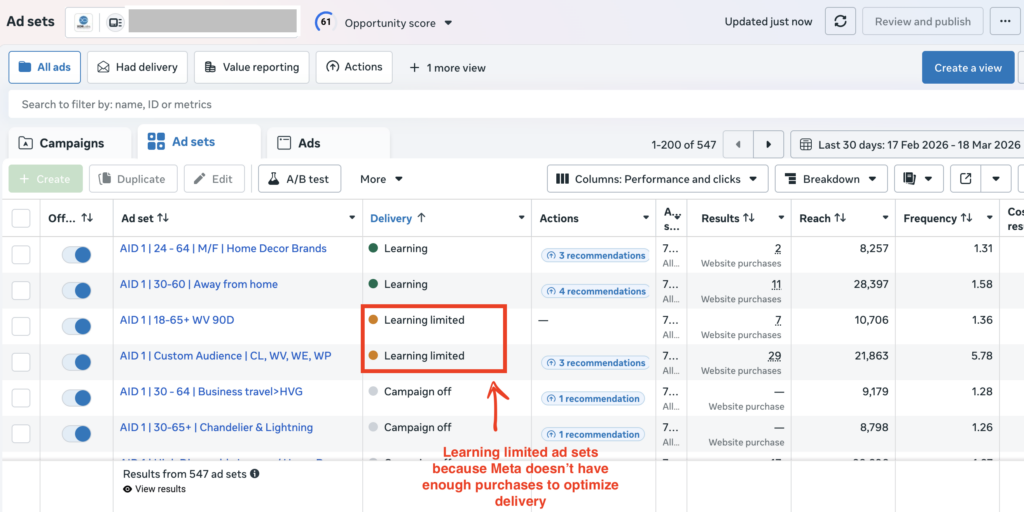
Here’s something that doesn’t get talked about enough: your campaign can look completely normal in Ads Manager, spend its full daily budget, and still be in a state where Meta’s algorithm has effectively given up trying to optimize it. This is what the learning phase is, and more specifically, what it looks like when a campaign can’t get out of it.
When you launch a new ad set, Meta enters a learning period where it’s still figuring out who responds best to your ad and at what times and placements. This is normal and expected. The issue arises when the ad set never generates enough conversion events to graduate out of learning mode and into stable, optimized delivery.
Meta’s guidance is that an ad set needs roughly 50 conversion events in a 7-day period to exit the learning phase properly. Below that threshold, the algorithm doesn’t have enough data to make reliable predictions, so it keeps experimenting, which means erratic performance, unstable CPAs, and spend that doesn’t compound into learning.
Let’s put that into real numbers. Say your average cost per purchase is $40 and you’re running an ad set on a $20 daily budget. In a week, that ad set might generate 3 or 4 purchases if things go reasonably well. You’d need to run it for more than 3 months at that budget to accumulate the signal that Meta needs in a single week. The algorithm never stabilizes. Every week looks different from the last.
The other version of this problem, and it affects a lot of accounts that have been running for a while, is what happens when budgets get spread too thin across too many ad sets.
Imagine you have 10 ad sets each running at $20 per day. That’s $200 per day in total spend. Now imagine you consolidated those into 2 ad sets at $100 per day each. The total spend is identical. But each ad set is now generating 5 times more conversion events, which means both can exit the learning phase and actually optimize. The structure of your account matters as much as the budget.
Every significant edit you make to an ad set also resets the learning phase clock. Audience changes, creative swaps, budget increases above roughly 20% in a single day — all of these count as significant edits and push the ad set back to square one. So even if an ad set had accumulated decent learning, a round of well-intentioned optimizations can erase it.
Meta’s broader platform direction in 2025 and 2026 has been pushing toward fewer, simpler campaign structures where the algorithm handles more of the optimization work. That’s not just a best practice anymore. It reflects how the system is actually designed to function.
The fix here is consolidation: fewer ad sets, higher per-set budgets, and a strong bias toward leaving things alone once they’re running. It’s a counterintuitive discipline for most advertisers who feel like they should always be doing something.
If you’ve checked your tracking, confirmed your optimization event, and audited your campaign structure, and your conversion numbers are still low, the problem is probably not in Meta at all. It’s on your website.
This is actually good news, because fixing a landing page is faster and cheaper than reworking a campaign structure. But it requires being honest about something: Meta’s job ends when someone clicks your ad. What happens after that is entirely your responsibility.
The pattern that signals a post-click problem is specific: your CTR is normal or healthy, your cost per click is in a reasonable range, but your purchase rate is near zero. The ad is doing its job. The website isn’t.
Google’s mobile performance research found that mobile pages loading one second faster are associated with up to 27% better conversion rates. Akamai’s research on retail performance showed that even 100-millisecond delays can reduce conversions on mobile devices. Those numbers sound extreme, but when you consider that most Meta traffic is mobile, and most mobile users abandon pages that take more than 3 seconds to load, the math adds up quickly.
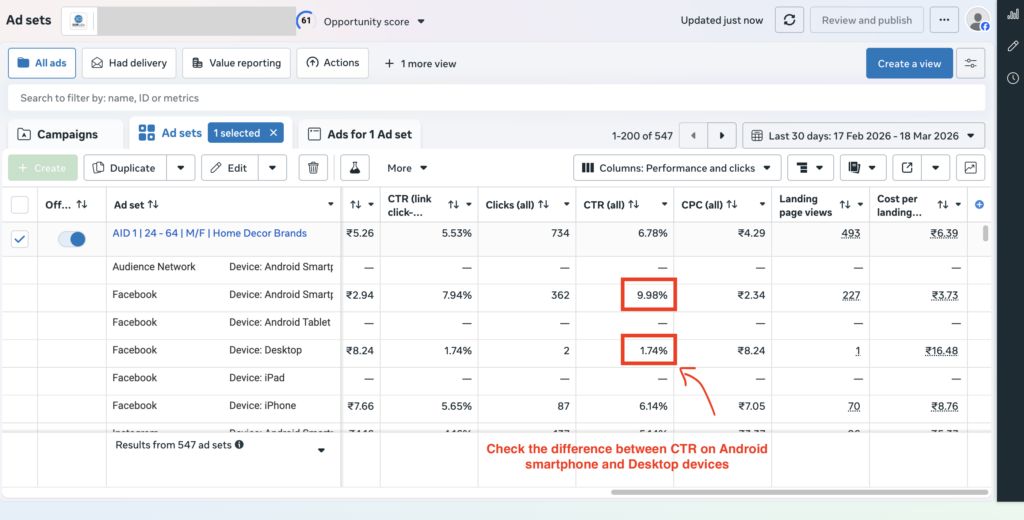
Open your Meta Ads Manager and break down your results by device. If mobile CTR matches or exceeds desktop CTR but mobile purchase rate is a fraction of desktop, the mobile experience on your landing page is broken. Load the page yourself on a 4G connection, not your office WiFi. Count the seconds. Notice what loads first. Notice what doesn’t load at all.
The other major post-click problem lives at the end of the funnel rather than the top. Baymard Institute’s meta-analysis of cart abandonment research puts the average abandonment rate at roughly 70%. The reasons people give are remarkably consistent: unexpected costs appearing at checkout (shipping, taxes, fees), being forced to create an account before purchasing, and checkout flows that are confusing or require too many steps.
If your Add to Cart numbers are reasonable but your completed purchases are low, and your landing page loads fine, walk through your own checkout process on a mobile device as if you were a first-time customer. Is the total cost including shipping visible before you get to the payment screen? Can you check out as a guest? How many screens does it take to complete a purchase? Are there trust signals (reviews, security badges, return policy) visible near the checkout button?
Fixing these things doesn’t require touching your Meta campaigns at all. But they can have a larger impact on your effective ROAS than any creative or bidding change you could make.
I’ve listed this last on purpose. Most conversations about Meta ad performance start here. Most diagnostic processes should end here, after you’ve cleared the four causes above.
That said, creative-audience mismatch is a real problem, and in 2026 it’s gotten more nuanced thanks to changes in how Meta’s algorithm handles creative.
Meta’s Andromeda retrieval system, which is the algorithm now responsible for matching people to ads, rewards creative diversity in a specific way. It doesn’t reward running more ads. If you’re running six variations of the same hook with slightly different copy, the system will pick the one it likes and ignore the rest. True creative variation means genuinely different angles: a problem-focused ad, a social proof ad, a demo or walkthrough, a founder story. Not six versions of the same benefit headline with different fonts.
The three signals that tell you creative-audience fit has broken down are these: your frequency has climbed above 3.0 and your CTR is declining week over week; your CTR looks fine but your landing page view rate is low (people are clicking but not actually loading the page, which suggests curiosity without intent); or your performance was strong for the first week or so and has been declining steadily since.
Rising frequency paired with declining CTR is the clearest signal. It means you’ve shown your ad to the same people often enough that they’ve stopped responding. The fix is new creative, not a new audience, in most cases. The audience is fine. They’re just tired of the ad.
Vaizle AI instantly lets you compare your ad creatives with what your competitors are running. You can spot missing hook angles and creative direction.
Try Vaizle AI’s creative research feature now ->
Most wasted Meta spend lives in root causes one through three. Most advertisers start looking at root cause five. That ordering is backwards, and it’s the main reason ad budgets disappear without a clear explanation.
Here’s the sequence that actually makes sense, based on both what causes the most problems and what’s fastest to rule out.
Step 1: Verify your tracking. Pull your last 30 days of orders from your backend source of truth and compare it to Meta’s reported purchases for the same period. If there’s a persistent gap, you have a tracking problem. Stop here and fix it before changing anything in your campaigns.
Step 2: Check your optimization event. Open each active ad set and confirm what you’re optimizing for. If you’re running a sales campaign but optimizing for link clicks, traffic, or engagement, fix this first.
Step 3: Audit your learning phase status. Look at the Delivery column in Ads Manager. Any ad set showing “Learning Limited” is a structural problem. Check how many conversions each ad set is generating per week. If it’s below 50, consider consolidating.
Step 4: Diagnose the post-click funnel. Load your landing page on mobile, on 4G. Run all the way through checkout as a first-time buyer. Find the friction points before your customers do.
Step 5: Evaluate creative and audience. Only after steps one through four are clear. Check frequency, CTR trends over time, and landing page view rate relative to CTR.
Once your tracking is clean, your structure is solid, and your funnel works, you’re in a position to actually scale. Our article on how to scale Meta Ads without dropping ROAS picks up from exactly that point.
If you’d rather skip the manual diagnosis, Vaizle AI connects directly to your Meta Ads account and surfaces which stage in this sequence is breaking down. Try it free.
When Meta is spending but not converting, most advertisers jump straight to creative or audience targeting.
That is usually the wrong place to start.
In most cases, the real issue shows up earlier in the chain: tracking, optimization setup, or campaign structure. If you skip those and start changing ads first, you can waste a lot of budget without ever fixing the actual problem.
This is the order that makes the most sense.
Start by comparing Meta’s reported purchases with your actual backend data from Shopify, your CRM, or whatever system you trust most.
Use the same date range on both sides. If there is a consistent gap, fix tracking before touching anything inside the campaign. There is no point optimizing ads when the measurement layer is already unreliable.
Next, look at what each active ad set is optimized for.
If the campaign is meant to drive sales but the optimization event is something like Link Clicks, Traffic, or Engagement, that needs to be corrected first. Meta will keep finding more of the behavior you asked for, even if that behavior does not lead to revenue.
Open Ads Manager and review the Delivery column.
If ad sets are showing Learning Limited, that is a structural issue. Then check how many optimization events each ad set is actually generating per week. If the number is too low, the campaign may never stabilize properly. In that case, consolidation is usually worth considering.
Once the campaign setup looks clean, test the path after the click.
Open the landing page on mobile. Use normal mobile internet, not perfect office Wi-Fi. Go through the page like a real first-time visitor and try to complete the conversion flow yourself. Slow load time, weak message match, broken form fields, checkout friction, or trust issues can all kill performance after Meta has already done its job.
Only after the first four checks are clear should you move to creative and audience diagnosis.
At that point, look at things like frequency, CTR trends, landing page view rate, and whether the message is attracting the right kind of intent. Creative matters a lot, but it should not be the first suspect every time performance drops.
Once tracking is accurate, optimization is aligned, the campaign structure is stable, and the funnel works, you are in a much better position to improve performance or scale spend with confidence.
If you want to skip this manual process, Vaizle AI connects directly to your Meta Ads account and helps identify where the breakdown is happening. Try it now>>
Here’s the thing about Meta ad spend that doesn’t convert: the problem is almost never where you first look. Advertisers lose weeks cycling through creative while their pixel sends incomplete data to an algorithm that’s stuck in the learning phase, optimizing for the wrong event, delivering to a landing page that times out on mobile. Every individual issue looks like a creative problem from the outside.
The diagnostic order in this article exists because it matches the actual frequency of these problems, not just their theoretical importance. Start with tracking. It’s invisible, it’s common, and fixing it costs nothing except the hour it takes to check.
Once the foundation is solid, scaling becomes a very different conversation. Our guide on how to scale Meta Ads without dropping ROAS covers exactly what to do from that point forward.
Ready to skip the manual diagnosis? Connect your Meta Ads account to Vaizle AI and get a clear picture of where your funnel is breaking down. Try Vaizle now.
Meta’s auction is designed to spend your budget finding people likely to take whatever action you told it to optimize for. It doesn’t pause when your ROAS drops or when your conversion numbers don’t make business sense. High spend with low conversions usually comes from one of five places: broken tracking, the wrong optimization event, a campaign structure that’s stuck in the learning phase, post-click funnel issues, or a creative-audience mismatch. Check them in that order.
The fastest check is comparing your backend orders (from Shopify, your CRM, or your order management system) to Meta’s reported purchases for the last 30 days. If there’s a consistent gap, your tracking has a problem. You can also open Events Manager in Meta and check the match quality score for your Purchase event. Anything below “Good” means Meta is having trouble connecting your conversion events back to the right people, which weakens optimization.
Good CTR with low purchases almost always points to a post-click problem rather than an ad problem. The most common causes are slow mobile page load times, a disconnect between what your ad promises and what the landing page delivers, unexpected costs appearing during checkout, and checkout flows that are too complicated or require account creation. Break your results down by device in Ads Manager. If mobile CTR is healthy but mobile purchase rate is low, start with the mobile landing page experience.
Meta’s guidance is approximately 50 conversion events per ad set per week. Below that number, the algorithm doesn’t have enough signal to optimize delivery reliably, and costs tend to be higher and less consistent. If your CPA makes it mathematically impossible to hit 50 purchases a week at your current ad set budget, either increase the budget, consolidate ad sets to concentrate your spend, or temporarily optimize for a higher-volume event like Add to Cart or Initiate Checkout.
On January 12, 2026, Meta permanently removed the 7-day view and 28-day view attribution windows from Ads Manager. For businesses with longer buying cycles, a meaningful portion of conversions had been attributed through those windows. When they were removed, reported conversion counts dropped for many advertisers without any change in actual sales performance. If you saw an unexplained drop in Meta-reported conversions in early 2026, check whether your backend order numbers tell a different story. The current standard setup is 7-day click plus 1-day view attribution.
Both, not one or the other. The pixel handles browser-side tracking for users who haven’t opted out of tracking. The Conversions API handles server-side tracking, which bypasses browser restrictions and iOS privacy changes. Running them together gives you the most complete picture of your conversions. The important thing when running both is to make sure deduplication is set up correctly, meaning the pixel’s eventID and the CAPI’s event_id match for the same conversion event, so Meta doesn’t count one purchase twice.
It depends heavily on your industry, your margins, and your funnel structure, which makes blanket benchmarks tricky. Triple Whale’s analysis of roughly 35,000 brands found median ROAS on Meta sitting around 1.5 to 2.0 for most e-commerce categories in 2025, with significant variation by vertical. The more useful question is what ROAS you need to be profitable given your margins, and whether your current numbers are above or below that threshold. If you’re above it, your job is to scale. If you’re below it, work through the diagnostic checklist in this article before adjusting bids or budgets.

Purva is part of the content team at Vaizle, where she focuses on delivering insightful and engaging content. When not chronically online, you will find her taking long walks, adding another book to her TBR list, or watching rom-coms.
Connect your marketing channels, ask questions, compare performance, and get reports without jumping between dashboards.
Copyright @VAIZLE 2026
