| |
|
Hey there
You know how some people create a fresh ChatGPT chat for literally every question, while others just keep scrolling through one massive thread that started three months ago?
And I get it. Both extremes feel a bit... off.
Here's what we've learned works best with Vaizle AI: think of each chat like a project folder.
|
| |
| |
Think of chats as projects, not conversations
You wouldn't throw all your files into one folder, right? Same logic here.
Starting a new chat makes total sense when you're:
• Switching tasks - Like going from reporting to campaign planning. Or from performance analysis to brainstorming.
• Analyzing a different ad account - If you're managing more than one ad account, connect the second one in a new chat and start working on it.
✨ It also helps when your current chat's getting long and cluttered (we've all been there).
|
| |
| |
How to create a new chat?
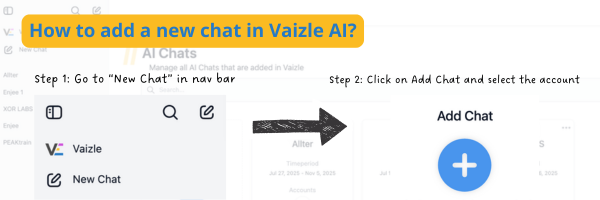
To create a new chat, simply head to your Vaizle AI screen. From the sidebar on left side, tap on New Chat. Now, click on the Add Chat button.
That's it. Just select the account you want to analyze. If it is not yet linked with Vaizle AI, click on Add Account button.
For more info, navigate to Help Center and read about how to create a new chat.
|
| |
| |
Real question: Is Vaizle AI working for you?
Vaizle AI was built to make Meta Ads analytics smart and easy.
But if you're not sure how to get value out of it, just tell us. Write to [email protected] or book 15 minutes and let's figure it out together.
It's always great to connect with the community and have a productive discussion :)
----
Happy analyzing
Nitan Jain
CEO, Vaizle
PS: Vaizle AI is right now active for Meta Ads analysis only. Soon, we will be integrating other ad and social platforms as well.
|
| |
|